From Vibe Coding to Spec Coding: Building a Project-Level AI Workbench with Trellis
A lot of AI coding today is "one-shot": hand the model a request and let it run with the rest. Models keep getting stronger — sometimes you don't even need a skill or workflow plugin to get reasonably clean output. This is vibe coding, and it's everywhere now, because it works as long as the result satisfies the ask.
The problem shows up over time. Keep stacking code this way on a real project and it tends to turn into a mess that gets harder to maintain with every change. Even handing it back to the AI doesn't help much — the model doesn't remember why something was written a certain way, so it just piles new mess on top of old mess. Doesn't matter if you're on Claude Code, Cursor, or Codex, or which model generation — pure vibe output converges to roughly the same quality. One person can get away with it; a team using it is a slow-motion disaster.
That's the case for why AI coding can't stay a purely conversational, ad-hoc activity forever. Trellis is a scaffold I've actually used, in both solo and team settings, that helps make the shift from vibe coding toward spec coding. This isn't an installation tutorial — it's about why that shift matters, and specifically how Trellis makes it happen.
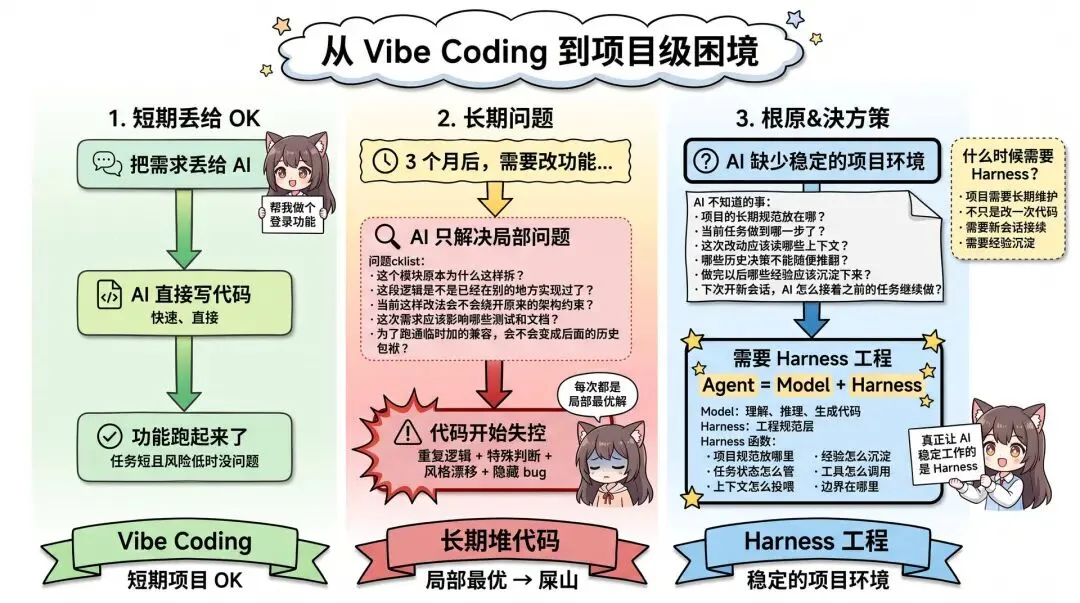
Why AI Coding Needs Engineering Structure
Handing a requirement straight to the AI and letting it run end to end works fine in plenty of cases — as long as the task is small and low-risk. Writing a userscript, building a personal project — if it runs, that's good enough, and vibe coding is genuinely the most comfortable way to work there. Even when bugs show up or you need a new feature later, you can keep letting the AI patch things as they come up.
The real trouble is that every fix the AI makes tends to solve the immediate, local problem in front of it. It can see the current error, understand the current request, and bolt on logic that fits the existing code — but it doesn't necessarily know why a module was split up a certain way, whether this logic already exists somewhere else, whether the current fix quietly breaks an existing architectural constraint, which tests and docs a change should actually touch, or whether a quick compatibility hack today becomes technical debt tomorrow.
So the underlying issue isn't that vibe coding can't iterate — it's that relying on it exclusively over a long stretch means every change is, at best, a local optimum. Fine in isolation; after a dozen rounds, you accumulate duplicated logic, special-cased branches, style drift, and a growing pile of hidden bugs. Pairing AI with a strong model is genuinely convenient, but what's missing is a stable project engineering environment. Many problems aren't solved by "describing the requirement clearly enough" — the AI simply doesn't know how the project has been planned over time: where the standards live, what stage the current task is at, which context this change should read, which past decisions shouldn't be casually overturned, and which lessons from this task are worth keeping around afterward.
Every new session feels like onboarding a new hire who happens to be extremely capable and fast — but still needs to be walked through the project's conventions, historical baggage, architectural boundaries, and testing habits all over again. One useful way to frame today's AI coding tools:
Agent = Model + Harness
The model handles understanding, reasoning, and code generation. The harness is everything else that lets the AI actually operate within a real engineering process — where project conventions live, how task state is tracked, how context gets fed in, how lessons get captured, how tools get invoked, where the boundaries are. What actually makes an agent reliable on a real project is that harness layer, not just the model. And no matter how strong the model gets, you still run into session amnesia, rule files that spiral out of control, and configuration that doesn't carry over between tools.
What Prompts, Rules, and Skills Solve — and Where They Fall Short
The limits of prompts: prompts aren't persistent. Open a new session and everything you said before is gone — you either re-explain the situation or make the AI diff against the previous session's changes, which burns tokens and still doesn't guarantee it actually understood the earlier requirements and conventions. Prompts are only good for one-off, throwaway asks.
The value and limits of AGENTS.md / CLAUDE.md / rules files: these files persist project standards, build commands, test commands, and style conventions, and the AI reads them before writing code. But the real problem isn't the file format — it's switching tools. .cursorrules, CLAUDE.md, and the like are largely platform-specific; if one teammate uses Claude Code, another uses Cursor, and a third uses something else, everyone has to configure their own copy, and it's awkward to manage centrally in the repo. Rules files also tend to grow indefinitely as a project evolves — new rules get added, old ones don't get removed out of caution, and the file becomes bloated. Past a certain length, the AI starts missing important details due to context overload. And rules are inherently static; they don't know the current task's state, and ad-hoc judgment calls and lessons learned don't naturally flow back into them.
The value and limits of skills: a skill codifies a specific way of doing something — requirement clarification, debugging, review, test writing, pre-release checks — and it's more flexible than a rules file; it can shape the AI's behavior pattern, not just list constraints. But as models get stronger, generic skills deliver diminishing returns — a strong model already knows generic workflows on its own. What actually holds value is project-specific, domain-specific, team-specific skills: they encode project conventions, team process, and domain knowledge, which is a context-and-consistency problem, not a model-capability problem. The fatal flaw is the same as with rules: format doesn't travel across platforms — switch tools, and project-level skills need to be re-adapted from scratch.
Prompts, rules, and skills each solve part of the problem, and combining them genuinely helps produce more disciplined, engineering-grade AI output. But three shared weaknesses remain:
- Session amnesia — every new session, the AI forgets prior progress and context.
- Tool lock-in — switch agents and every project-level configuration has to be redone; teams using different tools can't share a common setup.
- No project-level feedback loop — no task assets, no cross-session memory, no mechanism for standards to evolve. These tools mostly solve "how does the AI write code in this one conversation," not "how does the project use AI to keep improving over time."
Why Trellis Fits as a Spec Coding Implementation
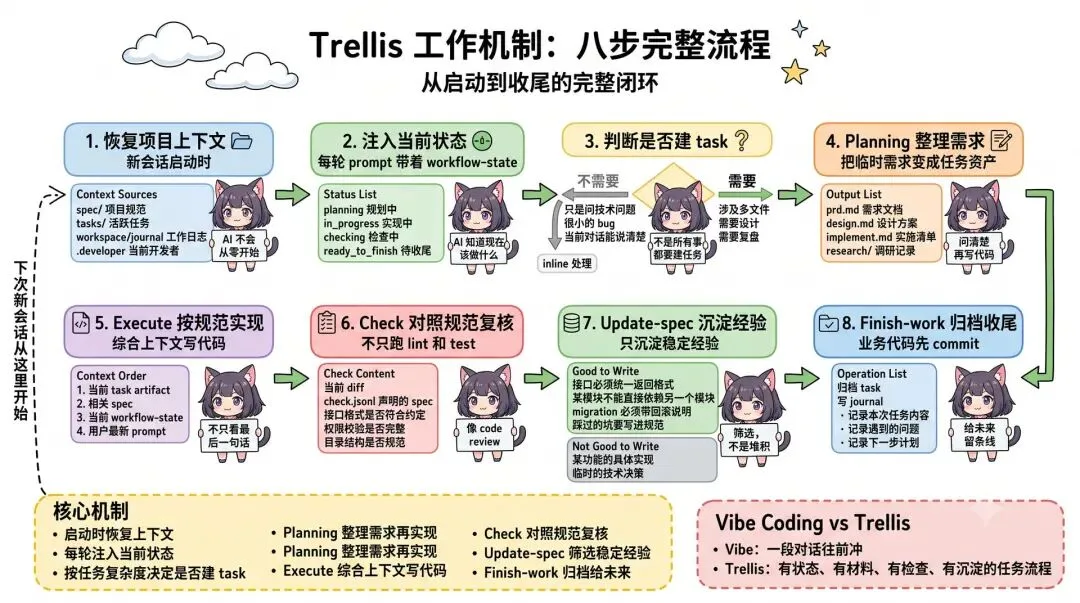
Trellis isn't just a prompt pack, and it isn't just a skill collection — it's a project-level AI workbench. Its core idea isn't to make you re-explain the project every time; it's to persist project standards, task records, and working memory into a .trellis/ directory. From then on, regardless of a new session, a different tool, or a different task, the AI can read the context it needs straight from the project structure. As the project evolves, new, stable lessons get written back into spec through a process like update-spec, so the project's knowledge base keeps compounding.
Trellis addresses each of the three weaknesses above directly:
Mitigating session amnesia — task, workspace, journal, and startup context work together to restore project knowledge. What was done last, what problems came up, what's next — all of it lives in the journal. When a new session starts, the AI reloads it straight from .trellis/. This isn't true long-term memory in the model itself, but the project's knowledge is persisted to the filesystem and re-readable every time.
Sharing a common core across platforms — the .trellis/ core is cross-platform: spec / task / workflow act as a team-shared source of truth, while workspace / journal are working memory isolated per developer. Each tool needs its own thin adapter layer (trellis init --claude or --cursor), but the underlying standards and tasks are the same set. If someone on the team hits a pitfall and writes the lesson into .trellis/spec/ and commits it, anyone who pulls the repo — regardless of which tool they use — gets that new rule surfaced to their AI.
Forming a complete project-level loop — Trellis organizes spec (long-term standards), task (current work), workflow (current stage), and journal (working memory) into a closed loop, and prompts you at task wrap-up to decide which lessons are worth keeping and folding back into spec. It doesn't dump every rule on the AI at once — a spec index plus a per-task context manifest means a task only loads the spec/research relevant to it, cutting down on context overload — provided the spec itself stays short, accurate, and searchable.
Trellis isn't a magic bullet, of course — it takes upfront investment, maintenance discipline, and a learning curve. But if a project has already outgrown what vibe coding can sustain and needs a more stable way to collaborate with AI, it's currently one of the more complete attempts at solving that.
How Trellis Works: Eight Steps Per Task
Trellis runs on several mechanisms working together: standards, tasks, workflow, context, memory, and finally feeding lessons back in.
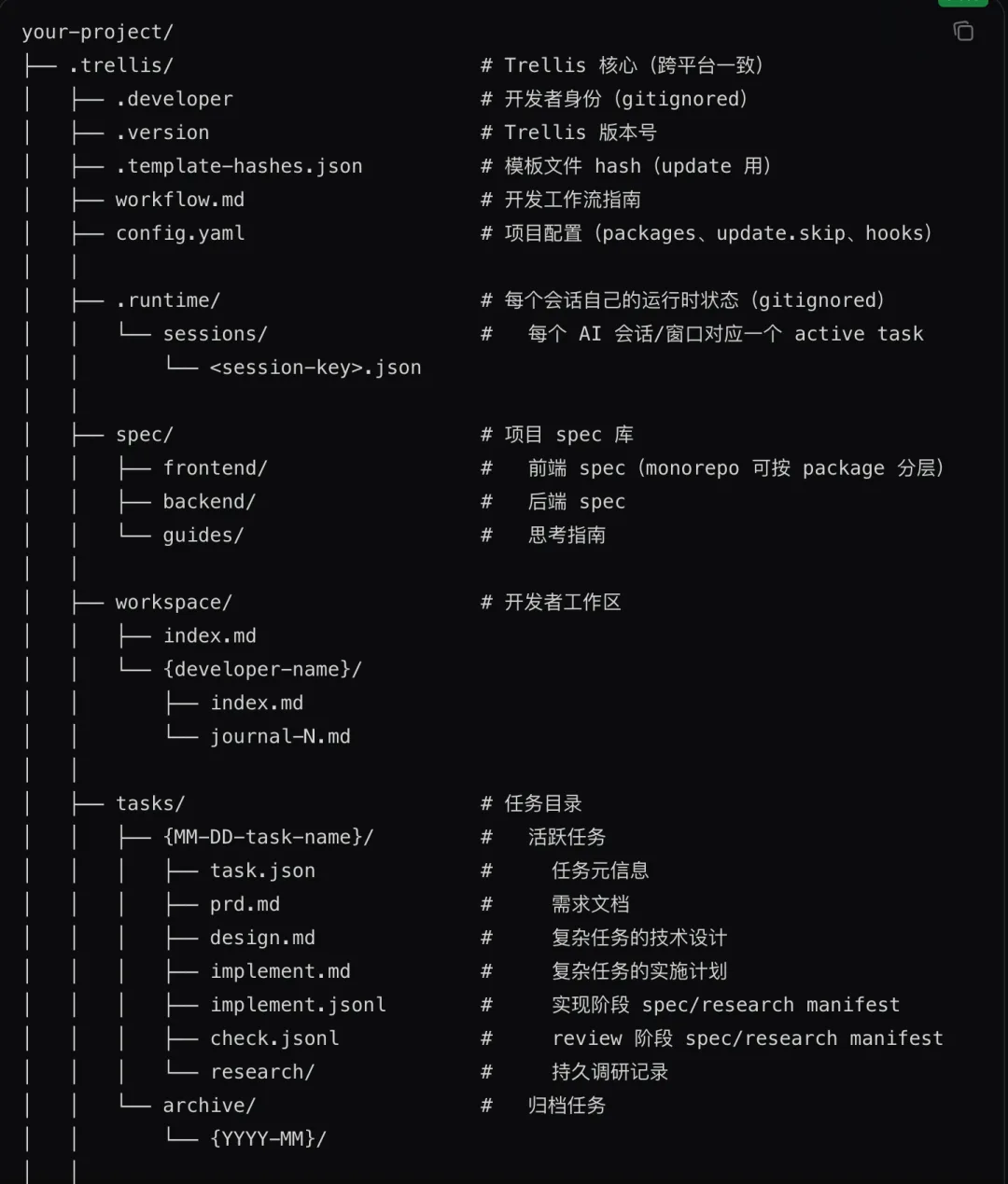
Step 1 · Restore project context: at the start of a new session, Trellis hands the AI a compact project context so it isn't facing a completely unfamiliar repo — what was done last, whether there's an active task, who the current developer is, and roughly where things should go next. Entry points differ by platform: platforms with a SessionStart hook or plugin usually inject this automatically; if you suspect it didn't load, have the AI read the trellis-start skill once. On Codex, it mainly relies on the repo's root AGENTS.md as a prelude, with a UserPromptSubmit hook injecting workflow-state — confirm features.hooks = true in ~/.codex/config.toml and approve it via /hooks.
Step 2 · Inject current state on every prompt: restoring context once at session start isn't enough, since AI coding is mostly multi-turn. Trellis solves this with workflow-state — on platforms that support hooks, every incoming prompt carries the task's current stage (clarifying requirements, in progress, checking, wrapping up), so the AI doesn't skip steps.
Step 3 · Decide whether this turn needs a task: a quick technical question, or a small bug fix the current conversation can already describe fully, goes inline — no task needed. Trellis only suggests creating a task when the work spans multiple files or modules, needs design, or is worth a retrospective. This is lighter than some process-heavy alternatives — it doesn't force every interaction through a formal process.
Step 4 · Planning turns an ad-hoc request into a task asset: once in the planning stage, Trellis takes a one-line request like "build me a login feature" and turns it into a task asset you can keep working on. It surfaces the key questions up front — how to handle failed logins, how tokens expire, whether to support third-party login, how to migrate existing user data — and writes the answers into the task directory (typically prd.md, design.md, implement.md). That way, if you pick the task back up tomorrow in a fresh session, the AI doesn't have to guess from chat history.
Step 5 · Execute according to task artifacts and spec: once planning is done, the task moves to in_progress and the AI starts implementing — not based solely on your last message, but by working through the task's full context order. This is where Trellis differs from a plain rules file: rules only tell the AI what long-term rules exist; Trellis also tells it what the current task is trying to accomplish, why, which context is mandatory reading, and where execution currently stands. spec/ itself isn't dumped in all at once either — the default template splits it into backend/, frontend/, guides/, and the AI pulls in whatever's relevant to the task.
Step 6 · Check against the spec: a lot of AI coding checks boil down to "run lint and tests," which is useful but not sufficient — some problems (an API error format that violates convention, a missing permission check, a directory structure that breaks team habits, a dependency pointing the wrong way) don't show up in tests. Trellis's check stage is closer to a lightweight code review: it looks at the current diff, reads the spec/research declared in check.jsonl, and checks the code against it — turning review criteria from a gut feeling into something explicitly written down in the task and spec.
Step 7 · update-spec captures only stable lessons: once a task is done, Trellis prompts you to decide which lessons are worth keeping long-term — a class of API that must return errors in a consistent format, a module that shouldn't directly depend on another, a type of database migration that always needs a rollback note, a pitfall worth writing into the standards so no one hits it again. Something as specific as a particular endpoint path is better left in the task than promoted into spec. The point of this step is filtering — without it, spec becomes a dumping ground.
Step 8 · finish-work archives and journals: /trellis:finish-work doesn't commit your feature code — per the intended workflow, feature commits happen first, and this command only runs once that work commit already exists; if there are still uncommitted changes to actual code, it refuses and asks you to handle that first. The journal records what the task did, what got committed, what problems came up, and what's next. It lives under workspace/, isolated per developer, so people don't overwrite each other's context — but once it's in git, the team can look back at it, and new hires can use it to understand how the project actually got built.
Put these eight steps together and Trellis's focus has shifted from "can the AI write code" to "does the AI have stable project context, task state, review criteria, and a wrap-up mechanism while writing code." Vibe coding is a conversation charging forward; Trellis turns that conversation into a task process with state, artifacts, checks, and captured lessons.
How It Compares to Other Harness Approaches
No approach is strictly better than another — they just optimize for different things:
- Process-reinforcement tools (heavier, process-oriented skills/rules setups): emphasize discipline — clarify requirements first, write a plan first, do TDD, then review. Good at turning a rough idea into an executable plan and keeping the AI from writing whatever it wants. The downside is weight: constantly re-clarifying and reviewing small tasks gets tedious, and without project-level task/spec/journal assets, lessons still end up scattered across chat history once the process finishes.
- Spec-first management tools: emphasize alignment before implementation — every change moves through structured artifacts like a proposal, spec, design, and tasks. Great for complex requirements and long-lived systems, and good at making implicit team conventions explicit. The catch: once the spec is written, whether the AI reads it every time, reads it correctly, and actually follows it still needs an external mechanism to enforce — task tracking, working memory, and cross-platform support aren't necessarily its focus.
- Multi-agent orchestration: splits planner, executor, reviewer, and debugger into separate roles for complex work. Good for tasks that genuinely benefit from separating planning, execution, review, and debugging. The obvious downside: the orchestration layer gets heavy fast, and once agents, skills, and hooks pile up, debugging the system itself becomes its own cost. Simple tasks tend to get over-engineered here.
- Project-loop tools (Trellis falls here): stitches spec, task, workflow-state, journal, and finish/update-spec into a single project-level loop. The focus isn't whether one specific command is convenient — it's whether the project as a whole builds a source of truth the AI can read, trace, and keep evolving: how standards accumulate, how tasks get tracked, how sessions pick up where they left off, how lessons flow back in, and how different tools share the same project context.
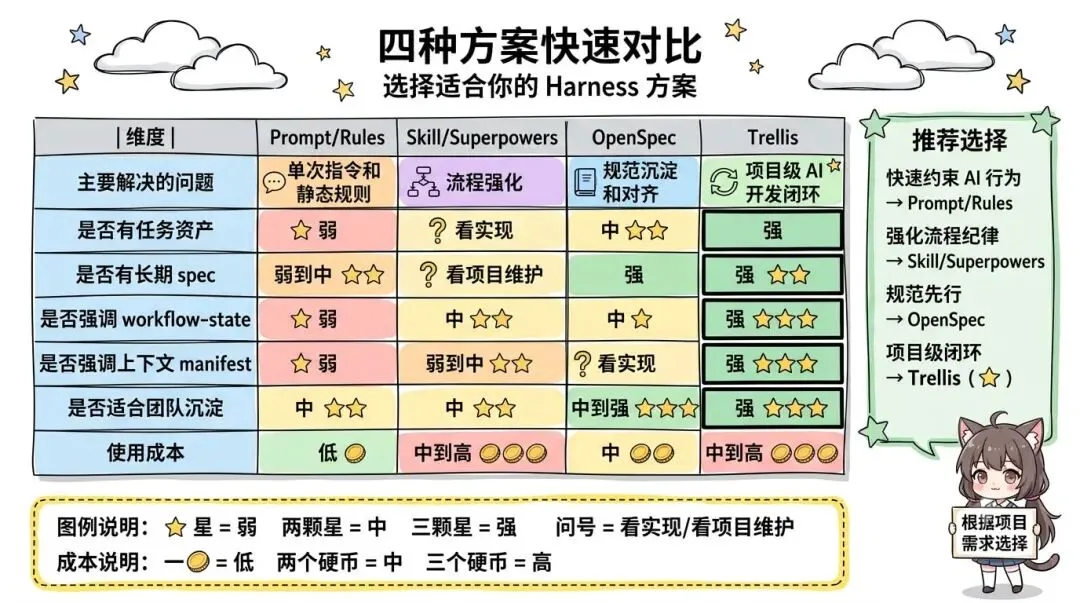
If you just want to quickly constrain AI behavior, skills/rules are lighter-weight. If standards-first is your priority, a spec-first approach fits better. If you want to level up the experience on one specific platform, multi-agent orchestration is more direct. If you want a project-level loop where standards, tasks, memory, and lessons all accumulate inside the project itself, Trellis is currently one of the more complete attempts at that.
The Value for Solo Developers
A common assumption is that spec coding only matters for team collaboration — that solo projects don't need this much structure. In practice, solo projects run into similar problems too:
- Session amnesia: come back to a personal vibe-coded project after a few months and you've forgotten what you did last and why you designed it that way — you end up re-reading code, re-reading chat history, or just starting over.
- Tool switching: every time you switch agent tools, you rewrite the standards you configured for the last one.
AGENTS.mdhelps some, but project-level rules and skills still don't transfer. - Cross-project confusion: if you maintain several projects with different tech stacks and their conventions all live scattered across chat sessions, the AI easily gets dragged off by leftover context or generic habits.
- Digging your own hole: you let the AI write quickly based on the thinking at the time, come back months later, and have no idea why it's built that way — the trade-offs only existed in chat history, and once that gets compressed, it's nearly impossible to trace back.
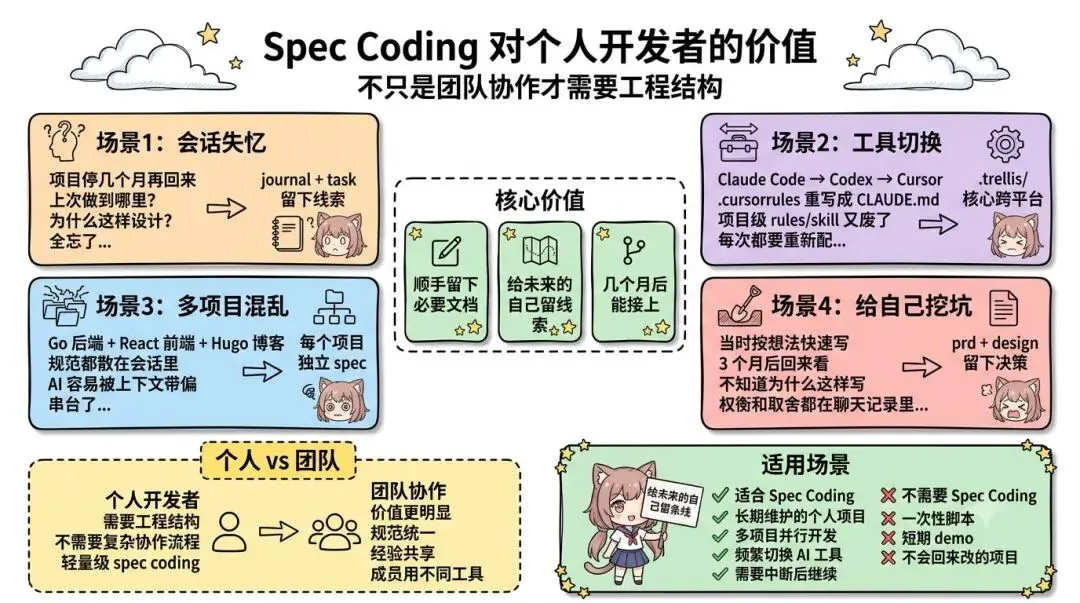
The value of spec coding for solo developers isn't "one more process to follow" — it's solving these actual, recurring problems by leaving a bit of documentation as a byproduct of doing the work, giving your future self a thread to pick back up. Solo developers typically don't need a heavy collaboration process, but they still benefit from basic engineering structure.
The Value for Teams
The value of spec coding becomes even more obvious in team settings:
Team members can use different tools — you no longer have to force everyone onto the same agent tool. Trellis's core is cross-platform with independent adapter layers per tool, so teammate A can use Cursor, teammate B can use Claude Code, and a new hire C can use Codex, all sharing the same .trellis/.
What goes into git, and what doesn't: worth committing are .trellis/spec/ (team standards, reviewed through PRs like any other code), .trellis/tasks/ (task directories — PRD, design, research — as project assets), and .trellis/workspace/{name}/ (each developer's journal). Not worth sharing: .trellis/.developer (records the current developer's name) and .trellis/.runtime/ (session runtime state) — both of these should be gitignored. Having spec and task in git means standards changes get reviewed like code — important API design, testing conventions, and architectural constraints should be visible and discussable by the whole team. Task directories can conflict too, so it's worth assigning clear ownership so two people don't edit the same task at once. New hires also ramp up faster by reading through this history to see how the project actually evolved.
Standards aren't fixed forever — a major refactor or a new testing framework means spec needs updating, but meaningful spec changes should go through PR review and get maintained like code, so the evolution of the standards stays controlled and traceable.
Boundaries and Cost
Trellis isn't something everyone or every project needs:
- One-off scripts: something like a userscript doesn't need Trellis — vibe coding it directly is fine, no need to over-engineer.
- Projects with no long-term maintenance value: speed matters more here; creating tasks, writing PRDs, and capturing lessons is overhead, not value.
- Teams unwilling to maintain spec: Trellis provides structure, not maintenance-free automation — spec has to be written, updated, and cleaned up by people. A small team (two or three people) that isn't willing to do that will just end up with a pile of empty templates or stale standards, which is worse than not adopting it.
The cost is real too: upfront, you need to understand what spec/, tasks/, workspace/, workflow.md, and .runtime/ under .trellis/ each handle. You need to get used to a plan/execute/finish rhythm that emphasizes clarifying first, then implementing, then checking, then wrapping up — more stable, but slower than just diving in. Spec needs ongoing maintenance as the stack, architecture, and team conventions change; a stale spec actively misleads the AI. Task granularity needs tuning — too big and the AI loses the thread, too small and it becomes process overhead. And support varies by platform — hooks, commands, and sub-agent capabilities differ, so being "supported" and having a complete experience are two different things; it's worth checking how your usual tool integrates before committing.
The rule of thumb: short tasks, small scripts, personal side projects — just vibe it. Long-lived projects with real business logic, multi-person teams, frequent tool switching, and a desire for lessons to actually land in the repo — that's where Trellis earns its keep. The point of spec coding is capturing project facts that have long-term reuse value, not turning every single task into a formal process.
Practical Notes: Common Commands
First-time setup:
npm install -g @mindfoldhq/trellis@latest
cd your-project
trellis init -u your-name
For an already-initialized project, a new team member typically also runs trellis init -u your-name to set up their own developer identity on that machine. After initializing, don't jump straight into feature work — run the bootstrap task first so the AI extracts a first draft of spec from the actual codebase. Otherwise .trellis/spec/ is mostly empty templates, which aren't worth reading later.
Codex needs an extra hook enabled. In ~/.codex/config.toml:
[features]
hooks = true
Then run /hooks once in the TUI to approve the UserPromptSubmit hook Trellis installs. Without this, Trellis commands may not show up in the / menu, and workflow-state won't get injected automatically — there's a fallback, but the experience is noticeably worse.
Day to day: you don't need to decide up front whether something needs a task — just describe what you want, and let Trellis and the AI decide whether to propose one; you just confirm when asked. There are really only three commands worth knowing: /trellis:start (only needed on platforms without automatic startup context — most platforms with a SessionStart hook orient automatically), /trellis:continue (the one you'll use most — planning done, implementation done, checks done, all move forward with this), and /trellis:finish-work (for wrapping up a task — feature code has to be committed first; this command only handles archiving the task and writing the journal).
Summary
Vibe coding is genuinely fast for scripts and personal projects. But once a project needs to be maintained long-term, questions like how standards get preserved, how tasks carry across sessions, how lessons get captured, and how a new session avoids starting from zero become both complicated and unavoidable. Whether to adopt Trellis on a given project comes down to your own habits and judgment — but if vibe coding has already started to buckle under a project's weight, it's currently one of the more complete answers available.