Superpowers + gstack in Practice: 2 Plugins, 37 Skills, 5 Handoff Points, and a Complete Dev Loop
If you use Claude Code for real projects, you've almost certainly hit this wall: you install a pile of plugins, and the skills start fighting over every match. You say "make a plan" and three skills respond at once. You say "test this" and Claude Code has no idea which workflow to run.
The lesson you eventually learn: more plugins doesn't mean more capability — it makes behavior unpredictable.
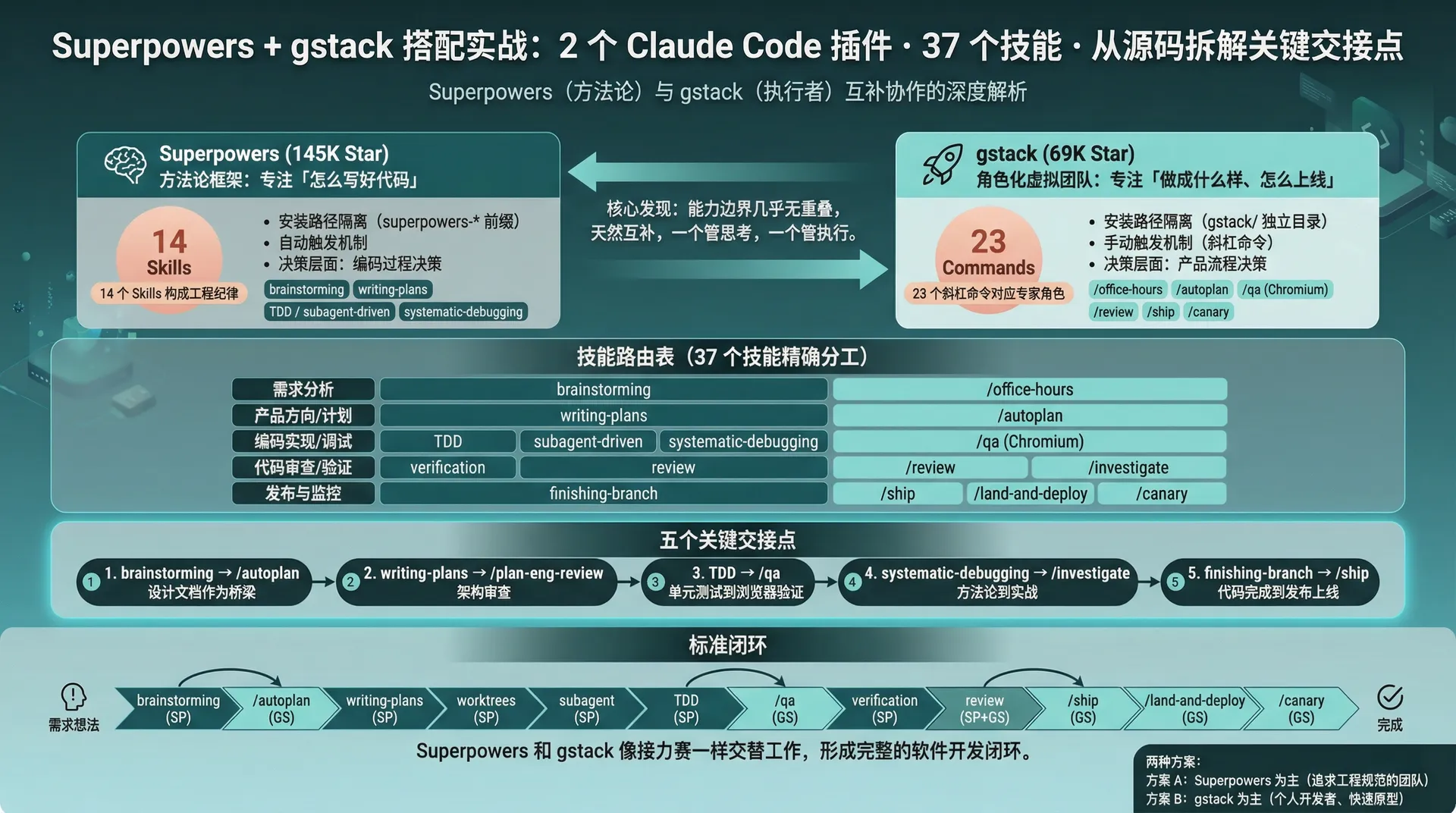
After digging through two of the most-starred Claude Code plugin projects on GitHub — Superpowers (145K stars) and gstack (69K stars) — I found something interesting: their capability boundaries barely overlap. Superpowers focuses on "how to write good code," gstack focuses on "what to build, what it should become, and how to ship it."
One handles thinking, one handles execution. This pairing isn't a gut feeling — the two projects' design philosophies, skill architectures, and trigger mechanisms are complementary at the source-code level.
1. Why These Two Plugins
Most people pick plugins by their feature lists — this one has code review, that one does too; this one can write plans, that one can too. The feature lists look overlapping, but in practice they're worlds apart.
After reading through both projects' source code and design docs, I found one key distinction:
Superpowers is a methodology framework — its core is an open-source project with a 94% PR rejection rate (source: Superpowers CLAUDE.md), and it takes code quality extremely seriously. Its 14 skills are not a feature list but a set of engineering disciplines: brainstorming forces "think before you build," test-driven-development forces the TDD red-green loop, systematic-debugging forces "no fixes without root cause," and subagent-driven-development forces "the implementer and reviewer are never in the same context."
gstack is a role-based virtual team — its core is the daily toolset of Garry Tan (YC CEO). Each of its 23 slash commands maps to an expert role: /office-hours is a YC partner doing product diagnosis, /plan-ceo-review is a CEO challenging product direction, /qa is a QA lead running real browser tests, and /ship is a release engineer running the full shipping pipeline.
The difference is visible in the authors' backgrounds: Jesse Vincent is an open-source veteran focused on engineering discipline and code quality; Garry Tan is the YC president who invested in Coinbase and Instacart, focused on product decisions and full-lifecycle delivery.
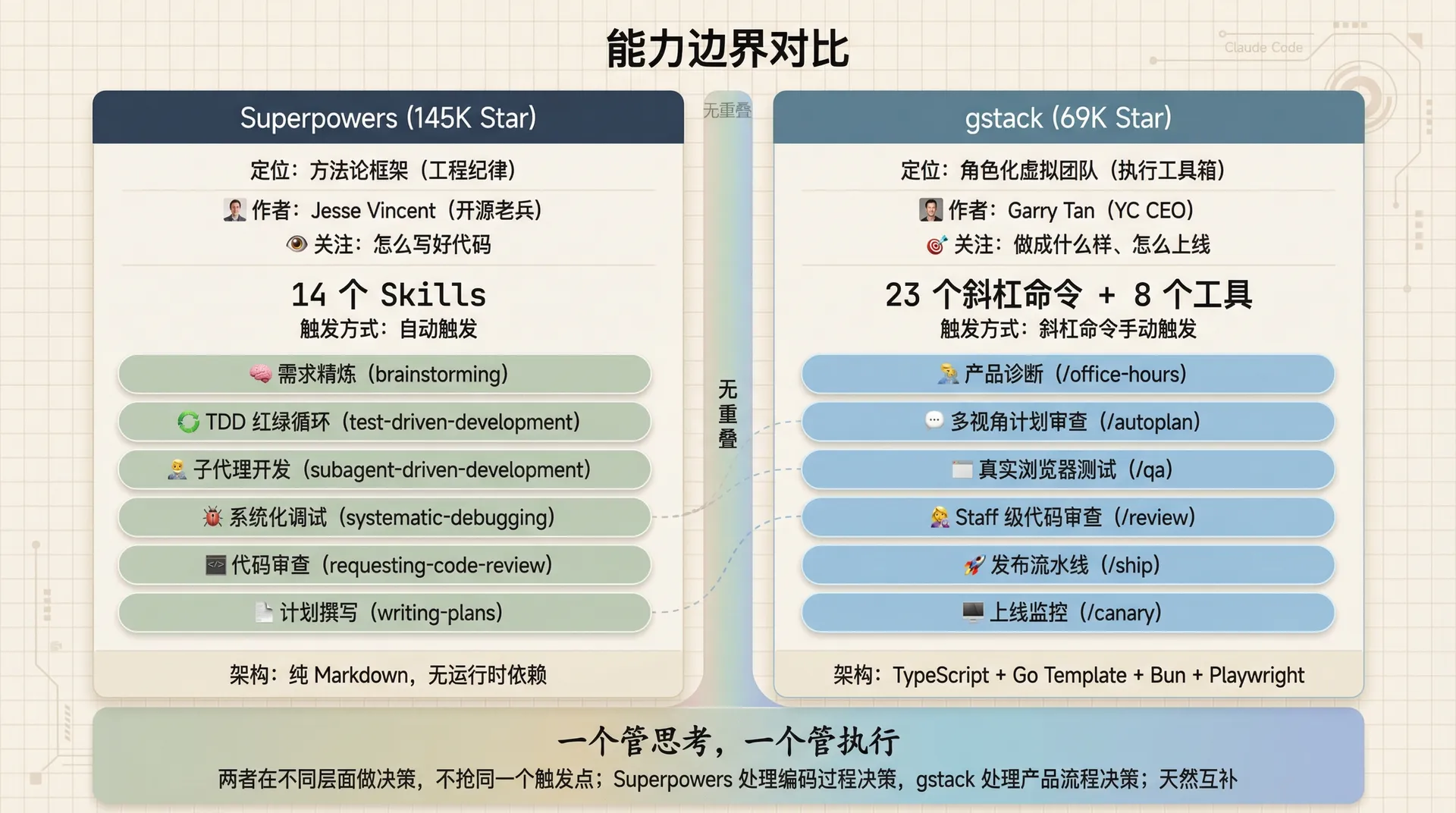
The source structure makes the difference even clearer:
| Dimension | Superpowers | gstack |
|---|---|---|
| Skill count | 14 Skills | 23 slash commands + 8 tools |
| Source structure | One SKILL.md per skill (pure Markdown) | TypeScript + Go Template generating SKILL.md |
| Trigger | Automatic (agent starts when a relevant scenario is detected) | Manual (user types a slash command) |
| Core focus | Code engineering methodology (TDD, debugging, review) | Full product lifecycle (strategy, design, QA, release, monitoring) |
| Philosophy doc | None (embedded in skill prompts) | ETHOS.md (Boil the Lake, Search Before Building, User Sovereignty) |
| Architecture doc | None (pure skill files, no runtime deps) | ARCHITECTURE.md (Bun + Playwright daemon model) |
| Install path | ~/.claude/skills/superpowers-* | ~/.claude/skills/gstack/ + symlinks |
In one sentence: Superpowers is a discipline framework for "how to write good code," and gstack is an execution toolbox for "what it should become and how to ship it."
2. Compatibility at the Source Level: Why They Don't Conflict
The question "can the two plugins coexist?" is answered by their install structure and command namespaces.
2.1 Install path isolation
Superpowers installs through the official plugin marketplace, landing its skill files in ~/.claude/skills/ under directories prefixed with superpowers-.
gstack installs via git clone into ~/.claude/skills/gstack/, then runs ./setup to create symlinks — one directory per skill (e.g. qa/, review/, ship/), each holding a SKILL.md symlink pointing into gstack/.
~/.claude/skills/
├── superpowers-brainstorming/     ← Superpowers skill dirs
├── superpowers-writing-plans/
├── superpowers-systematic-debugging/
├── ...(14 superpowers skills)
├── gstack/                        ← gstack main repo
├── qa/                            ← gstack symlink
│   └── SKILL.md → ../gstack/qa/SKILL.md
├── review/
│   └── SKILL.md → ../gstack/review/SKILL.md
└── ...(23+ gstack skill symlinks)
The two projects' files are fully isolated — no conflict at the disk level.
2.2 Namespace isolation
Superpowers skills activate through an automatic trigger — the agent checks for a relevant skill before each task, with no explicit slash command. The README says: "The agent checks for relevant skills before any task. Mandatory workflows, not suggestions."
gstack skills activate through manual slash commands — the user types /qa, /ship, /review. The README's design is: "all slash commands, all Markdown."
One is automatic, one is manual. No conflict at the activation level.
One thing to note: gstack supports unprefixed mode (/qa) and prefixed mode (/gstack-qa). If you have other plugins with a /review command, use prefixed mode:
cd ~/.claude/skills/gstack && ./setup --prefixAll gstack commands become /gstack-qa, /gstack-review, /gstack-ship — eliminating naming conflicts entirely.
2.3 Complementary trigger mechanisms
This is the elegant part of the compatibility design.
Superpowers' automatic trigger handles decision points in the coding process: "about to write code → should I brainstorm first?", "finished → should I run a code review?", "hit a bug → should I start systematic-debugging?"
gstack's manual trigger handles decision points in the product process: "requirements are clear → run /plan-ceo-review to challenge the direction", "code is done → run /qa to verify in a real browser", "ready to ship → run /ship to release."
They make decisions at different layers and don't compete for the same trigger point.
2.4 Conflict points to watch
| Conflict type | Description | Solution |
|---|---|---|
| CLAUDE.md config | Both need declarations in CLAUDE.md | Partition with ## Superpowers and ## gstack sections |
| Command names | Overlap possible in unprefixed mode | Use ./setup --prefix |
| Token usage | Both skill sets occupy context simultaneously | Enable on demand; move unused skills out of CLAUDE.md |
| Context window | Combined skill files can reach hundreds of KB | Use gstack's /freeze to limit edit scope |
Token usage is the biggest thing to watch in practice. Both skill sets in context means every conversation pays extra tokens to load those descriptions. If a task only needs one plugin, temporarily disable the other.
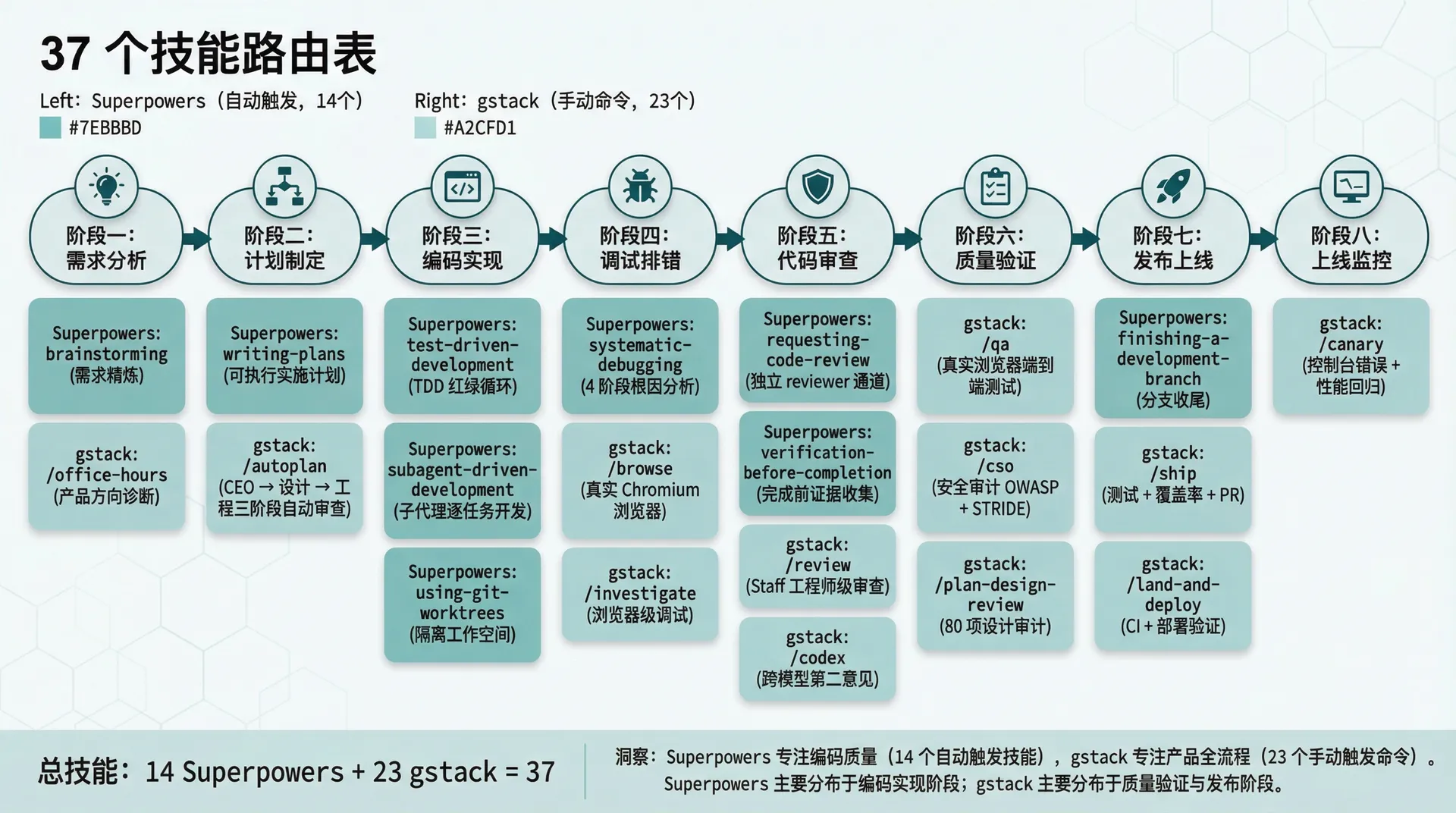
3. The Skill Routing Table: Precise Division of 37 Skills
Together the two plugins have 37 skills (14 + 23), but the division matters far more than the count. Here's the full routing table extracted from the official sources — check it before any task.
| Stage | Task | Superpowers | gstack | Notes |
|---|---|---|---|---|
| Requirements | Clarify what to build | ✅ brainstorming | — | Forces design approval before code |
| Product direction | Challenge direction & priorities | — | ✅ /office-hours | YC partner lens |
| Plan writing | Write implementation plan | ✅ writing-plans | — | Superpowers specialty |
| Plan review | Multi-perspective review | — | ✅ /autoplan | CEO → design → eng pipeline |
| Implementation | Write code | ✅ test-driven-development | — | Forces TDD red-green loop |
| Implementation | Subagent development | ✅ subagent-driven-development | — | Independent subagent per task + two-phase review |
| Debugging | Systematic bug hunting | ✅ systematic-debugging | — | 4-phase root cause, no guessing |
| Debugging | See the real page | — | ✅ /browse | Real Chromium, ~100ms |
| Code review | Internal review | ✅ requesting-code-review | — | Separate author/reviewer channels |
| Code review | Staff-engineer review | — | ✅ /review | Finds bugs that pass CI but break prod |
| Code review | Cross-model second opinion | — | ✅ /codex | OpenAI Codex independent review |
| Verification | Pre-completion self-check | ✅ verification-before-completion | — | Evidence before declaring done |
| Verification | End-to-end QA | — | ✅ /qa | Real browser + auto-fix |
| Security | Security audit | — | ✅ /cso | OWASP Top 10 + STRIDE |
| Design review | 80-point design audit | — | ✅ /plan-design-review | AI Slop detection + interaction states |
| Release | Release pipeline | — | ✅ /ship | Tests + coverage + PR |
| Release | Merge + deploy | — | ✅ /land-and-deploy | CI + deploy verification |
| Monitoring | Post-launch observation | — | ✅ /canary | Console errors + perf regression |
| Branch mgmt | Git worktree isolation | ✅ using-git-worktrees | — | Parallel dev without polluting main |
| Branch mgmt | Branch finishing | ✅ finishing-a-development-branch | — | Verify tests + merge/PR/cleanup |
One detail worth noting: gstack's /office-hours and Superpowers' brainstorming both look like "requirements analysis," but their lenses are completely different.
From the source, Superpowers' brainstorming is a structured requirement-refinement flow — explore project context → ask one question at a time → propose 2-3 approaches → present the design in segments for approval → write the design doc → hand off to writing-plans. It's about "how to implement this feature."
gstack's /office-hours is a product-direction diagnosis — six forced questions that reframe the product, challenge your assumptions, and generate implementation alternatives. It's about "whether this product is worth building."
One is the engineering lens of "how," the other is the business lens of "whether." Different lenses, no conflict — they complement each other.
4. The Five Key Handoff Points
"Can they be installed together" is only step one. The real question is how the skills connect. Five key handoff points emerge from the source.
4.1 Handoff 1: brainstorming → /autoplan (from "how" to "is it right")
After Superpowers' brainstorming finishes refining requirements and producing a design doc, gstack's /autoplan can take over for multi-perspective plan review.
Why this handoff is natural, from the source: Superpowers' brainstorming terminal state (SKILL.md line 66) says explicitly: "The terminal state is invoking writing-plans. Do NOT invoke frontend-design, mcp-builder, or any other implementation skill." So its output is a design doc (docs/superpowers/specs/YYYY-MM-DD-<topic>-design.md).
gstack's /autoplan reads the design context and runs CEO → design → engineering reviews automatically: "Runs CEO → design → eng review automatically with encoded decision principles. Surfaces only taste decisions for your approval."
Handoff mechanism: the design doc is the bridge — brainstorming's output is exactly /autoplan's input.
4.2 Handoff 2: writing-plans → /plan-eng-review (from "detailed enough" to "is the architecture sound")
Superpowers' writing-plans breaks work into 2-5 minute micro-tasks, each with precise file paths, complete code, and verification steps. It's an engineering-executable plan.
But Superpowers' only plan review is its own requesting-code-review, which focuses on code standards and quality. It does not review architecture — data flow, state transitions, failure modes, trust boundaries.
That's exactly the domain of gstack's /plan-eng-review: "Lock in architecture, data flow, diagrams, edge cases, and tests. Forces hidden assumptions into the open." It also generates ASCII architecture diagrams, test matrices, and data-flow diagrams.
Handoff mechanism: Superpowers' implementation plan file → gstack's /plan-eng-review reads it and does the architecture-level review.
4.3 Handoff 3: test-driven-development → /qa (from "unit tests pass" to "verified in a real browser")
This is the most important handoff, and where the complementary value shines.
Superpowers' test-driven-development enforces the RED-GREEN-REFACTOR loop: write a failing test → watch it fail → write minimal code → watch it pass → commit. Its source comment even says "Deletes code written before tests" — if you wrote production code before the test, it deletes it and starts over.
But TDD verifies unit and integration correctness. It does not verify:
- Whether the page renders correctly in a real browser
- Whether the user interaction flow is smooth
- Whether frontend-backend integration works
- Whether the layout holds across viewports
That's exactly what gstack's /qa does. It launches a real Chromium browser, runs full user flows, auto-fixes bugs it finds, and generates regression tests after each fix.
Handoff mechanism: TDD passes → gstack /qa takes over for end-to-end verification.
4.4 Handoff 4: systematic-debugging → /investigate (from "methodology" to "hands-on debugging")
Superpowers' systematic-debugging is a 4-phase root-cause methodology:
- Phase 1: Root Cause Investigation — read errors, reproduce, check changes, collect evidence
- Phase 2: Pattern Analysis — compare against working code, identify differences
- Phase 3: Hypothesis and Testing — form a single hypothesis, test minimally
- Phase 4: Implementation — write a failing test, fix the root cause, verify
The source has one iron rule (line 19): "NO FIXES WITHOUT ROOT CAUSE INVESTIGATION FIRST." If three fixes fail, it doesn't try a fourth — it makes you question the architecture itself.
gstack's /investigate follows the same "no investigation, no fix" principle, but adds browser-level debugging. Superpowers debugs at the code and test level; gstack can launch a browser to inspect real DOM, network requests, and console errors.
Handoff mechanism: Superpowers narrows it down to a likely frontend issue → switch to gstack's /investigate for browser-level investigation.
4.5 Handoff 5: finishing-a-development-branch → /ship (from "code done" to "shipped")
Superpowers' finishing-a-development-branch is a branch-finishing checklist: verify tests pass → offer options (merge/PR/keep/discard) → clean up the worktree.
gstack's /ship is a full release pipeline: sync main → run tests → review coverage → push → create PR. If the project has no test framework, it even scaffolds one automatically.
Handoff mechanism: after Superpowers finishes the branch → gstack's /ship takes over release. A natural linear handoff — one says "the code is ready," the other "sends it out."
5. The Complete Dev Loop
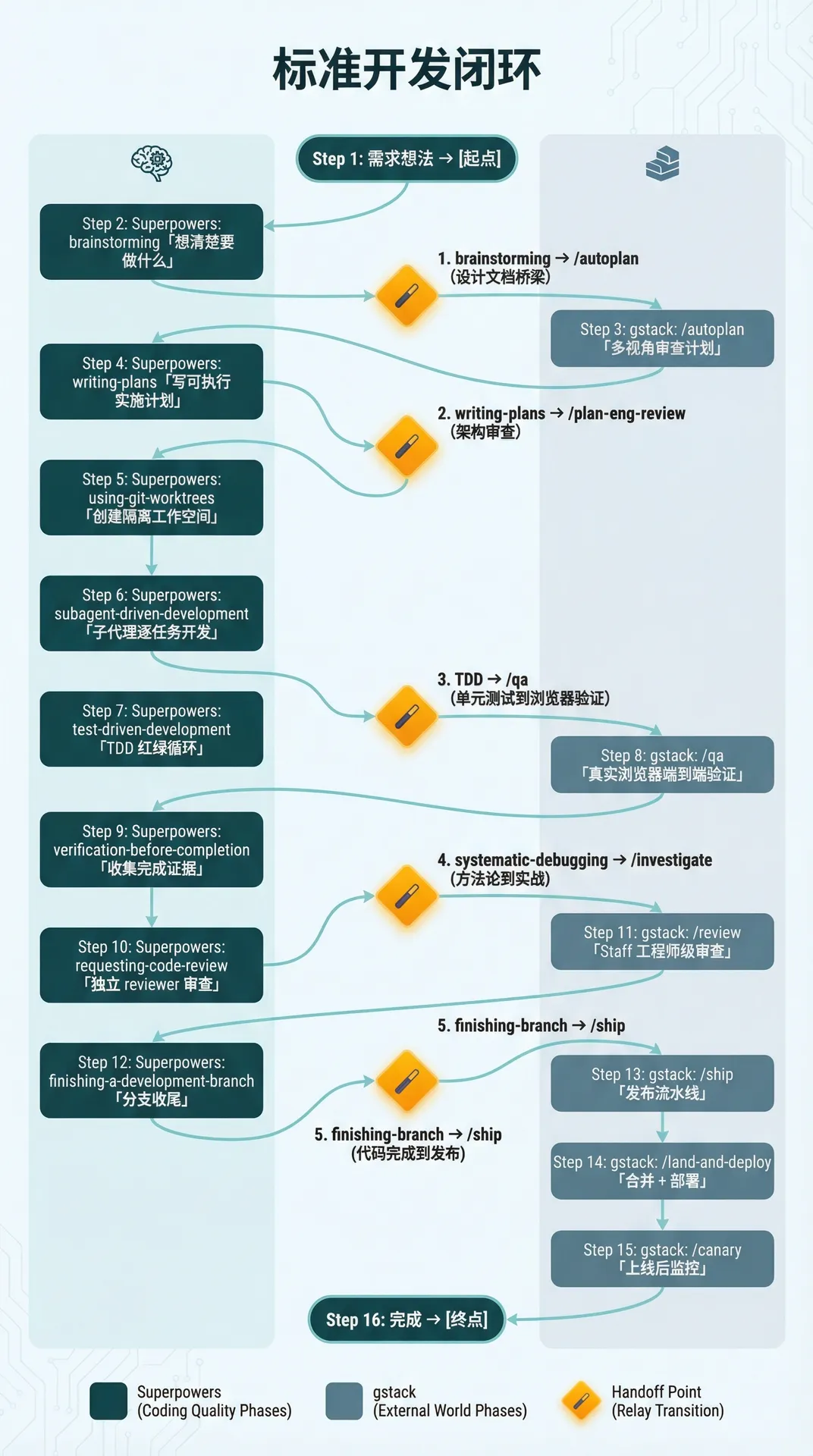
String the five handoff points together and you get a full path from idea to production:
[Idea]
    ↓
Superpowers: brainstorming              ← clarify what to build
    ↓
gstack: /autoplan                       ← multi-perspective plan review
    ↓
Superpowers: writing-plans              ← executable implementation plan
    ↓
Superpowers: using-git-worktrees        ← isolated workspace
    ↓
Superpowers: subagent-driven-development ← task-by-task subagent dev
    ↓
Superpowers: test-driven-development    ← TDD red-green loop
    ↓
gstack: /qa                             ← real-browser E2E verification
    ↓
Superpowers: verification-before-completion ← collect completion evidence
    ↓
Superpowers: requesting-code-review     ← independent reviewer
    ↓
gstack: /review                         ← staff-engineer review
    ↓
Superpowers: finishing-a-development-branch ← finish the branch
    ↓
gstack: /ship                           ← release pipeline
    ↓
gstack: /land-and-deploy                ← merge + deploy
    ↓
gstack: /canary                         ← post-launch monitoring
    ↓
[Done]
Notice the rhythm of the loop: Superpowers and gstack alternate like a relay race. Superpowers handles code-quality stages (design, implementation, test, review), gstack handles external-world stages (browser verification, release, deploy, monitoring).
Not every project needs the full loop. Day-to-day, on-demand combinations are more common:
| Scenario | Recommended combination |
|---|---|
| Pure backend feature | Full Superpowers (brainstorming → TDD → review → branch) |
| Frontend feature | Superpowers coding + gstack /qa + /browse |
| Bug fix | Superpowers systematic-debugging + gstack /browse (if page inspection needed) |
| Requirements exploration | gstack /office-hours + /plan-ceo-review → Superpowers brainstorming |
| Security audit | gstack /cso (standalone) |
| Rapid prototype | gstack /autoplan → code → /ship (skip Superpowers' heavyweight flow) |
6. CLAUDE.md Config Template
Installing the plugins isn't enough — you need to write the division of labor into CLAUDE.md. When Claude Code hits an ambiguous instruction, it decides which skill to route to based on this config.
# Superpowers + gstack integration config

## Superpowers (thinking & process layer)
Handles all plan, brainstorm, debug, TDD, verify, code review.
Trigger: automatic.

## gstack (execution & external-world layer)
Handles browser operations, QA, ship, deploy, canary, security audit.
Trigger: manual slash commands.

## Browser rules
Use /browse as the only browser entry point.
Never use mcp__claude-in-chrome__* to operate the browser.

## Division of labor
- Plan writing → Superpowers: writing-plans
- Multi-perspective plan review → gstack: /autoplan
- Coding → Superpowers: test-driven-development
- Debugging → Superpowers: systematic-debugging
- Real-environment verification → gstack: /qa
- Code review → Superpowers: requesting-code-review
- Release → gstack: /ship
- Security audit → gstack: /cso

Available skills: /office-hours, /plan-ceo-review, /plan-eng-review,
/plan-design-review, /design-consultation, /design-shotgun, /design-html,
/review, /ship, /land-and-deploy, /canary, /benchmark, /browse, /qa,
/qa-only, /design-review, /setup-browser-cookies, /setup-deploy, /retro,
/investigate, /document-release, /codex, /cso, /autoplan, /pair-agent,
/careful, /freeze, /guard, /unfreeze, /gstack-upgrade, /learn
The core purpose of this config is mapping vague instructions to specific skills. Without it, Claude Code randomly matches when you say something generic like "make a plan." With it, behavior becomes predictable and reproducible.
7. Installation
Two steps, no extra dependencies.
Step 1: Install Superpowers
/plugin install superpowers@claude-plugins-officialFor Superpowers' full extensions (experimental tools, low-level Chrome control):
/plugin install superpowers-chrome@superpowers-marketplace
/plugin install superpowers-lab@superpowers-marketplace
Step 2: Install gstack
git clone --single-branch --depth 1 https://github.com/garrytan/gstack.git \
  ~/.claude/skills/gstack && cd ~/.claude/skills/gstack && ./setup
If you're worried about command conflicts, install with prefix mode:
cd ~/.claude/skills/gstack && ./setup --prefixVerify the install: open a new Claude Code session and say "help me plan this feature." If Superpowers' brainstorming auto-starts, the first one is working. Then type /qa — if gstack's QA skill responds, the second one is working too.
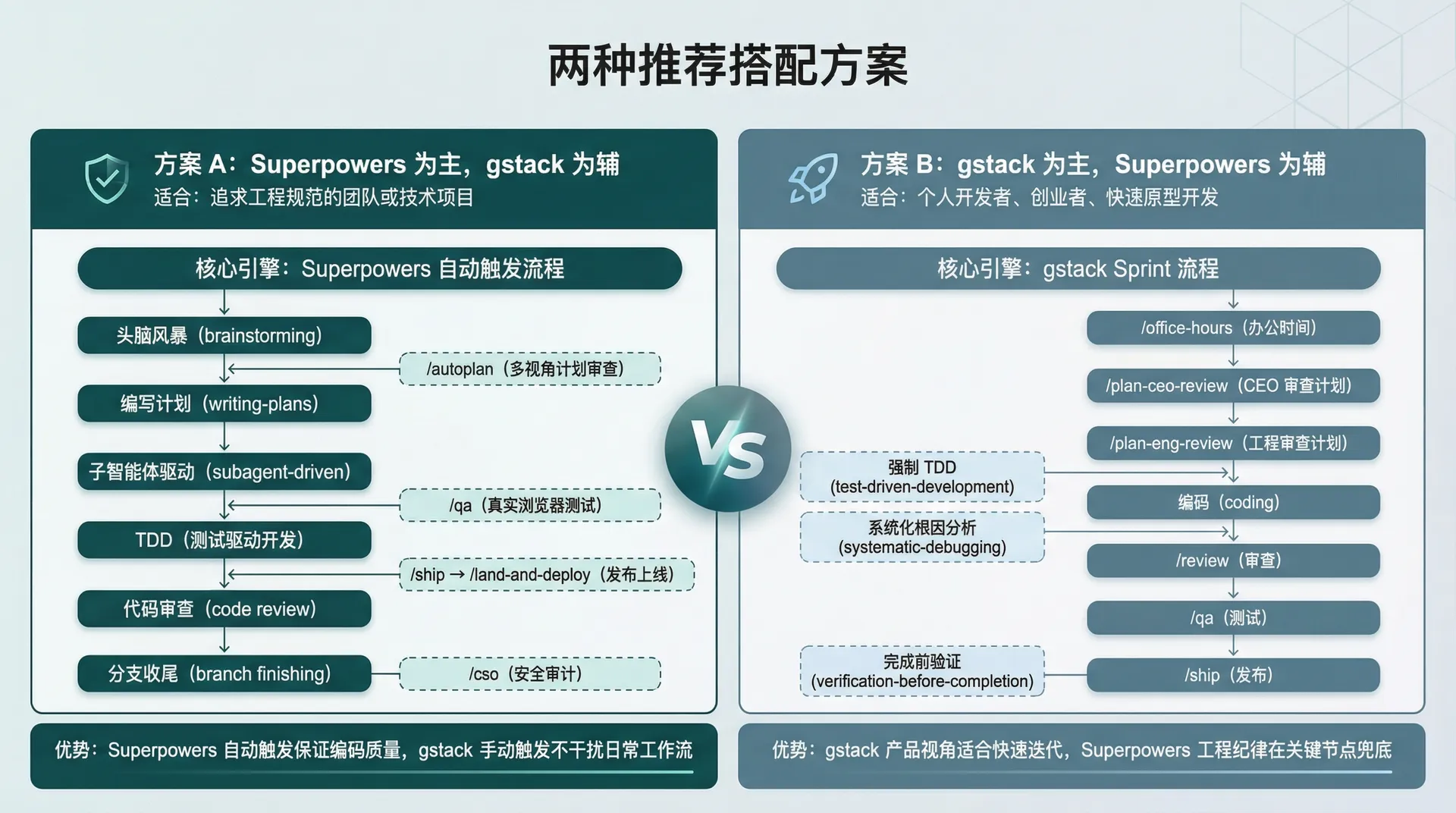
8. Two Recommended Integration Patterns
Pattern A: Superpowers primary, gstack secondary
Best for teams or technical projects that prioritize engineering discipline.
The core engine is Superpowers' auto-trigger flow (brainstorming → writing-plans → subagent-driven-development → TDD → code review → branch finishing). Daily coding is entirely Superpowers-driven. Bring in gstack only at key points:
- Plan review:
/autoplan(multi-perspective) - Frontend verification:
/qa(real browser tests) - Release:
/ship→/land-and-deploy - Security:
/cso(OWASP + STRIDE)
The benefit: Superpowers' auto-trigger guarantees code quality, and gstack's manual trigger never interferes with the daily workflow.
Pattern B: gstack primary, Superpowers secondary
Best for individual developers, founders, and rapid prototyping.
The core engine is gstack's Sprint flow (/office-hours → /plan-ceo-review → /plan-eng-review → code → /review → /qa → /ship), driving development from a product lens. Bring in Superpowers only at code-quality critical points:
- Coding:
test-driven-development(enforces TDD) - Debugging:
systematic-debugging(systematic root-cause analysis) - Completion:
verification-before-completion(verify before done)
The benefit: gstack's product lens suits rapid iteration, and Superpowers' engineering discipline provides a safety net at key points.
9. A Real Walkthrough: From Requirement to Production
Let's walk the full integration with a concrete scenario. The requirement: add a user-behavior analytics dashboard to a SaaS admin system.
Phase 1: Think it through (Superpowers + gstack together)
Superpowers' brainstorming auto-starts. It asks the key questions: which metrics should the dashboard show? Where does the data come from? Update frequency? Is the target user operations or product managers?
After the design doc is written, don't rush to code. Call gstack's /autoplan to review it from CEO, design, and engineering perspectives. It will probably challenge you: do you really need real-time updates? Would a 30-second delay work? Is this an MVP achievable in 3 pages, or a full analytics platform?
Phase 2: Write code (Superpowers leads)
Once the plan is confirmed, Superpowers takes over: writing-plans breaks it into micro-tasks → using-git-worktrees creates an isolated branch → subagent-driven-development dispatches subagents task by task → test-driven-development forces tests first.
Backend API, data aggregation logic, frontend components — every step happens inside the TDD red-green loop.
Phase 3: Verify (gstack takes over)
After all unit tests pass, we enter gstack's domain. /qa launches a real Chromium browser, opens the local dev server, clicks through every page, checks chart rendering, data loading, error handling, and mobile layout. Bugs found are auto-fixed, and regression tests are generated after each fix.
If there are design doubts, run /plan-design-review to score 80 design dimensions: is the empty state handled? How is the loading state shown? What appears when data is zero? Is the chart color contrast sufficient?
Phase 4: Review and release (the two plugins alternate)
Superpowers' verification-before-completion collects all evidence: test reports, QA reports, screenshots. Then requesting-code-review opens an independent reviewer channel for code review.
After review passes, gstack's /ship takes over release: sync main → run tests → review coverage → push → create PR. If the project has no test framework, /ship scaffolds one.
After the PR merges, /land-and-deploy waits for CI, waits for deployment, verifies production. Finally /canary monitors console errors and performance metrics post-launch.
Throughout, the two plugins alternate in a relay, each step producing a clear artifact and handoff.
Conclusion
At the end of the day, the reason Superpowers and gstack work together isn't that one made itself compatible with the other — it's that they were designed with no overlap. One solves "how to write good code," the other solves "what it should become and how to ship it."
Splitting thinking and execution across two focused tools is far more effective than installing ten plugins with overlapping features. Fewer components, clearer boundaries, cleaner handoffs — this isn't just a Claude Code plugin pairing philosophy, it's the optimal configuration strategy for any complex system.
Resources