One person, one team: a minimal dev workflow with OpenSpec + Superpowers
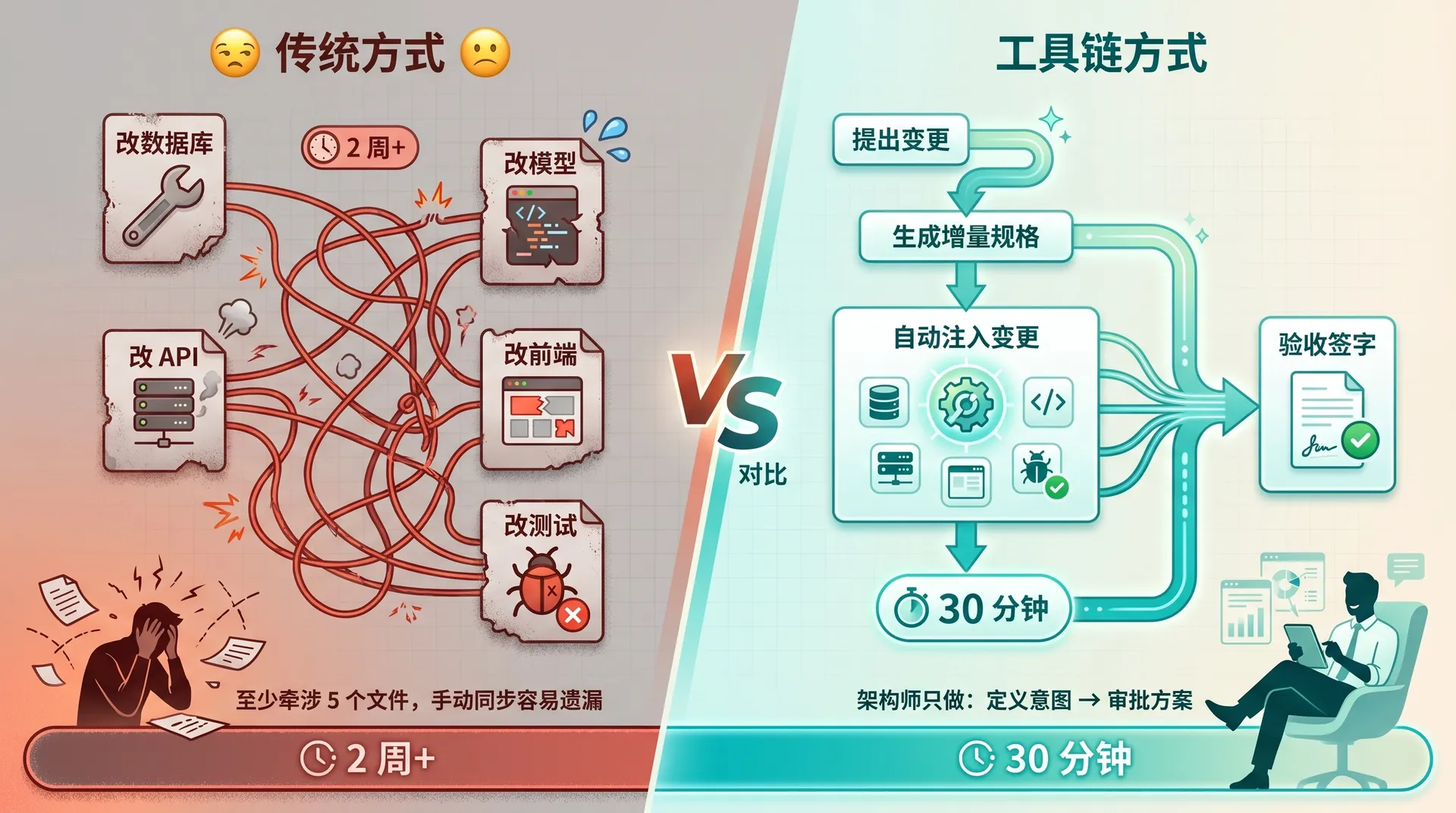
You finish the architecture diagram, hand it off to the dev team, then wait for sprint planning, design review, integration. A kanban board feature goes from your head to running code in at least two weeks.
But what if one architect, paired with two open-source tools called OpenSpec and Superpowers, could ship a tested kanban system from scratch in 30 minutes — not a demo, but a real CRUD app with a database and unit tests.
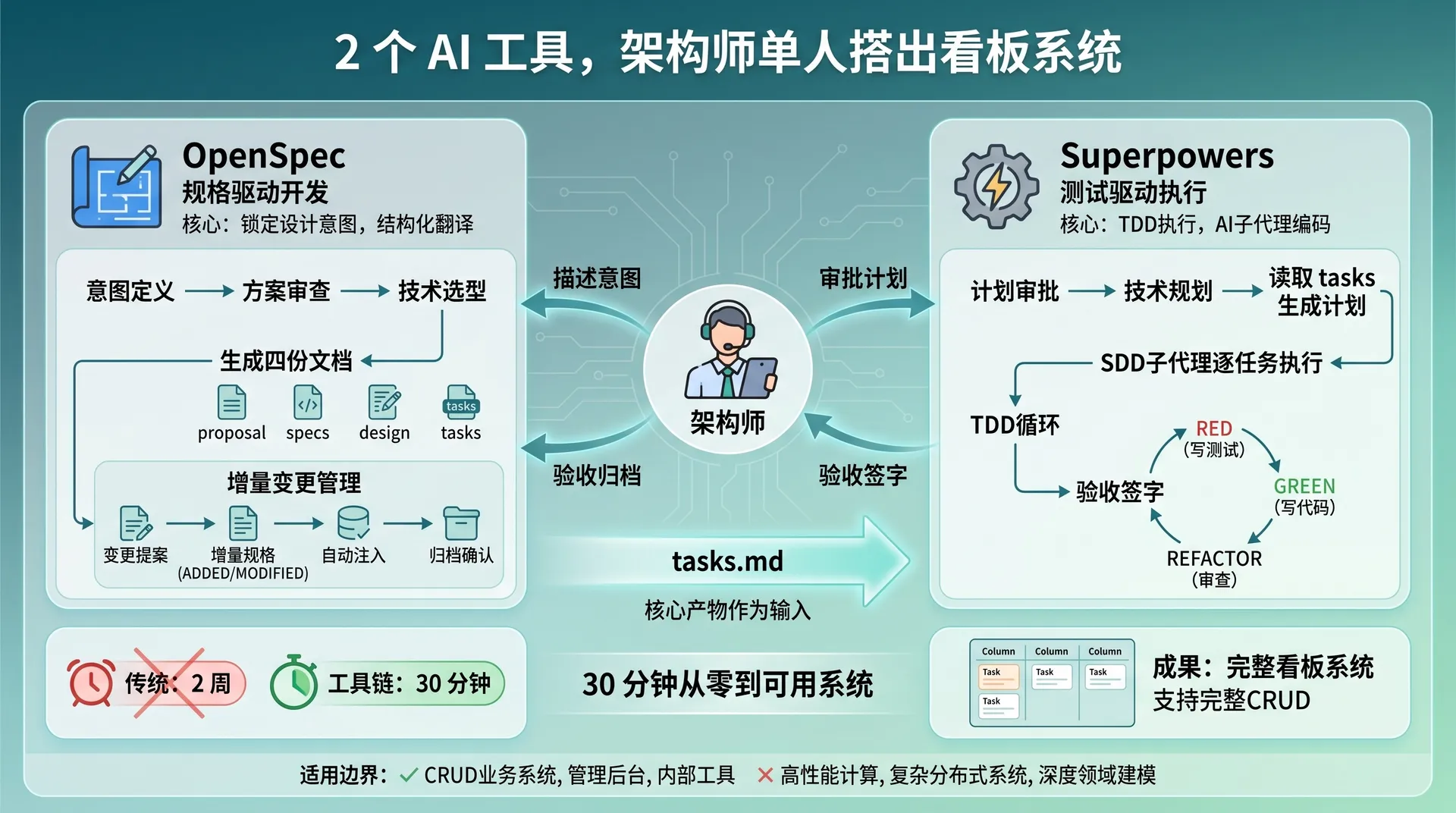
OpenSpec locks down your design intent by turning fuzzy ideas into structured spec documents. Superpowers runs TDD execution by having AI sub-agents write code and tests against those specs. The architect only does two things: define intent, approve plans.
This article walks through the whole flow. From the first command to the final sign-off, every step has real commands and code.
1. Two weapons, separate jobs
1.1 OpenSpec: lock down intent, manage change
OpenSpec (npm package @fission-ai/openspec, currently v1.2.0) does spec-driven development. The core idea is simple: before any code, let AI translate the requirement into structured spec docs.
The workflow is three steps:
propose → apply → archive
  |          |         |
  v          v         v
create artifacts  implement tasks  merge specs
Each time you kick off a requirement (called propose), OpenSpec auto-generates four docs:
- proposal.md — why we're doing this, what we're doing
- specs/ — concrete requirements in Given/When/Then scenarios
- design.md — technical approach, architecture decisions, risks
- tasks.md — task list, broken down to executable units
These four docs have a DAG dependency: specs depend on proposal, tasks depend on specs + design. OpenSpec forces you to think it through before you write code.
1.2 Superpowers: TDD execution, sub-agent driven
Superpowers (v5.0.7) does test-driven execution. It doesn't let AI write code directly. Instead it forces a structured flow: brainstorm → write plan → TDD execute → code review.
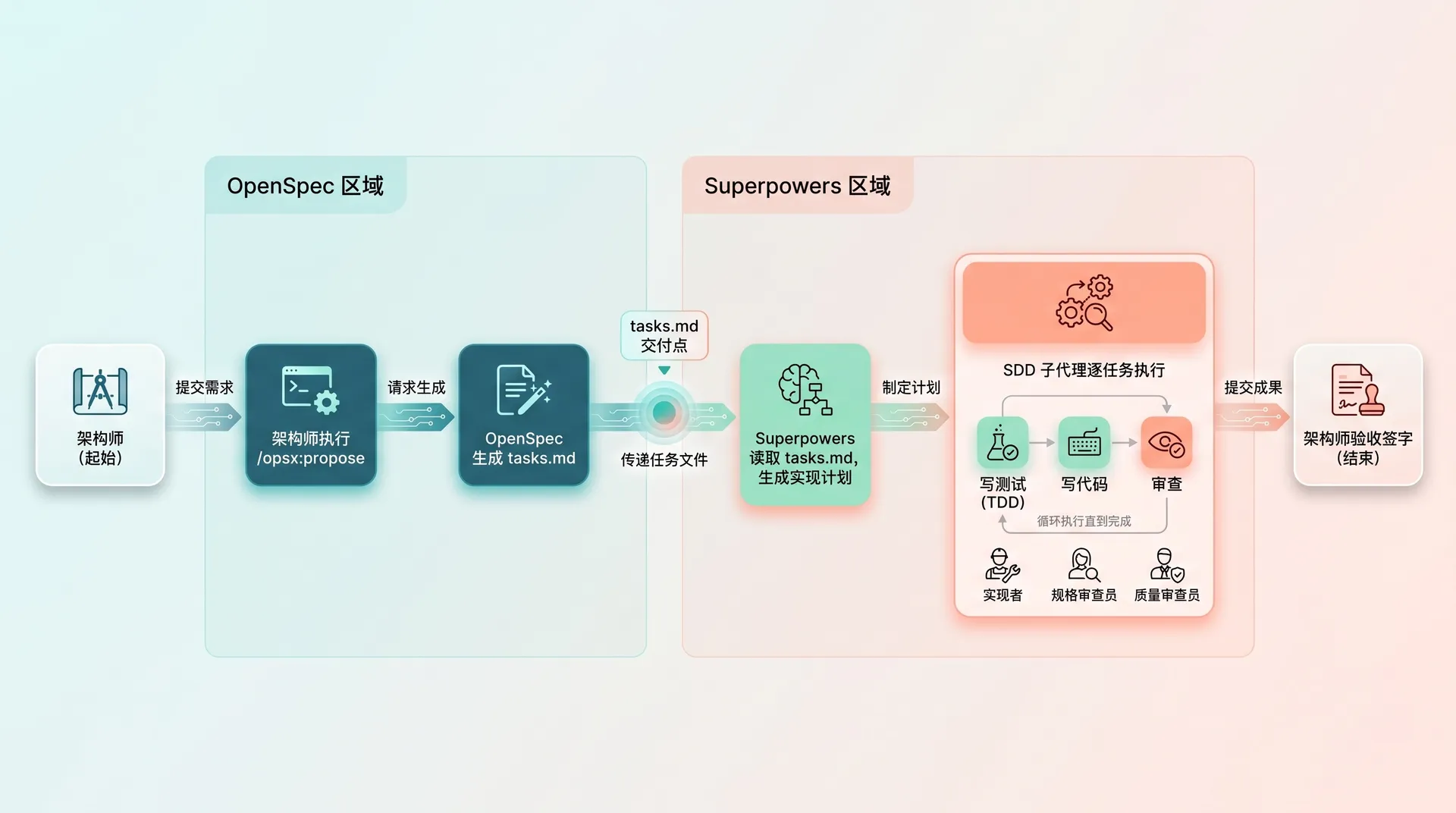
Its core design is SDD (Subagent-Driven Development). Every task gets three roles working in sequence:
- Implementer — writes code, writes tests, runs tests
- Spec Compliance Reviewer — line-by-line diff between code and spec
- Code Quality Reviewer — once spec compliance passes, review code quality
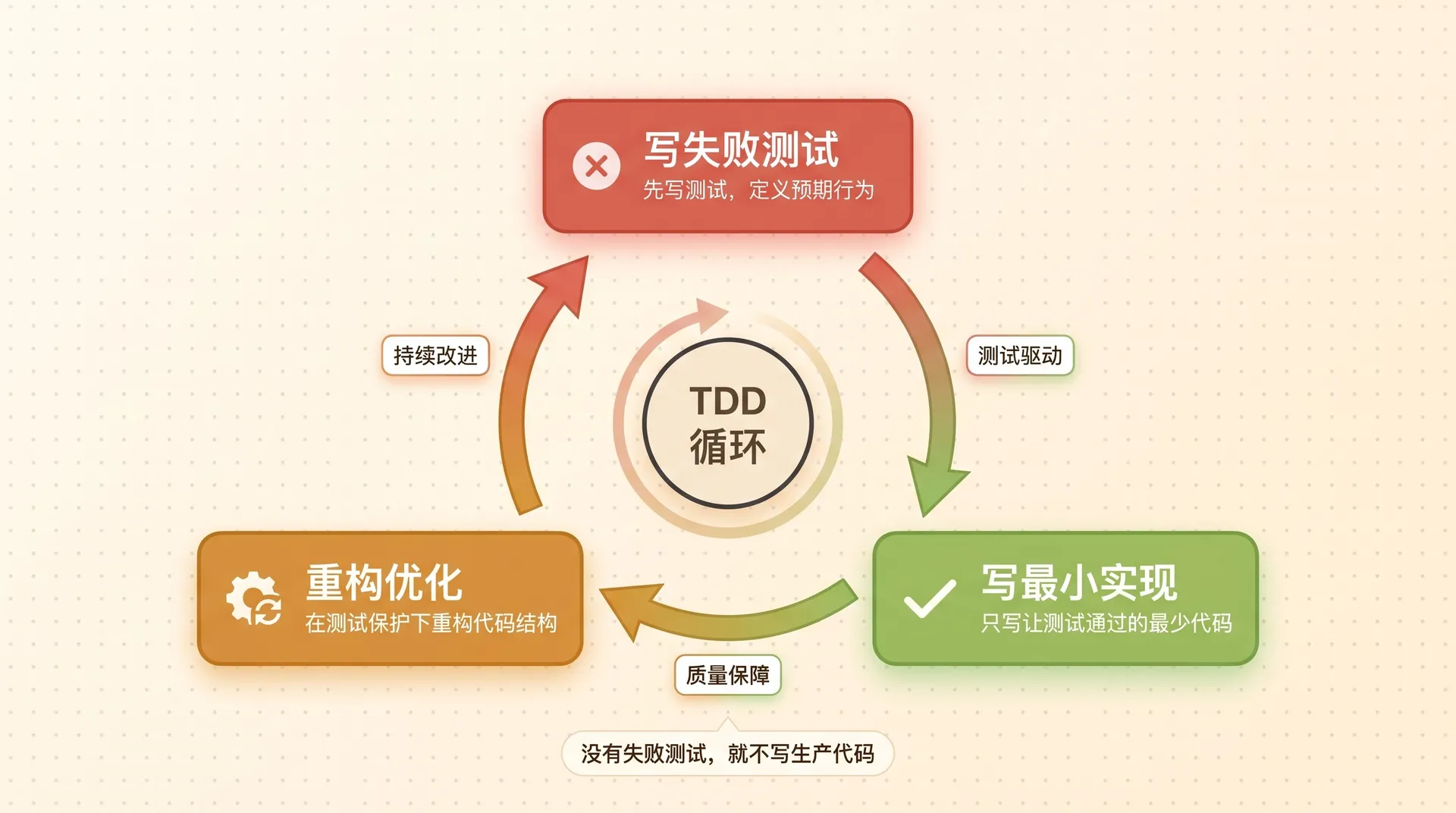
The execution loop is strict TDD: no failing test, no production code.
1.3 How the two connect
One fact first: OpenSpec and Superpowers are independent projects that don't know about each other. There's no API integration, no file format contract.
Each tool has its own complete closed loop:
- OpenSpec's loop:
/opsx:propose→/opsx:apply(implements code itself) →/opsx:archive - Superpowers' loop: brainstorming (auto-triggered) → writing-plans (auto-jumped) → subagent-driven-development (auto-executed) → finishing-a-development-branch (cleanup)
The "link" between them is the architect stringing both loops together — use OpenSpec for spec definition (its strength), use Superpowers for implementation (its TDD + code-review strength), skipping OpenSpec's own /opsx:apply.
[OpenSpec owns]                      [Superpowers owns]

/opsx:propose
    ↓
generates proposal / specs / design / tasks
    ↓
architect reviews docs                 brainstorming (auto)
    ↓                                       ↓
architect passes docs as context,  writing-plans → auto impl plan
tells AI "implement per these specs"     ↓
    ↓                                subagent-driven-development
  manual handoff ─────────────────→   (sub-agents run TDD per task)
                                          ↓
                                      finishing-a-development-branch
                                          ↓
architect returns to OpenSpec ←────  implementation done
/opsx:archive
The architect does four things in the whole flow: describe intent, review the plan, hand off context, accept and archive. The two tools connect because the architect operates both in the same Claude Code session — run OpenSpec commands, then Superpowers takes over implementation, then back to OpenSpec to archive.
| Dimension | OpenSpec | Superpowers |
|---|---|---|
| Concern | spec definition, change mgmt | TDD execution, code quality |
| Core artifact | proposal → spec → tasks | plan → code → review |
| Change management | incremental specs (ADDED/MODIFIED/REMOVED) | Git worktree + branches |
| Testing strategy | Given/When/Then scenarios | RED-GREEN-REFACTOR strict loop |
2. Walkthrough one: 0 → 1 kanban board
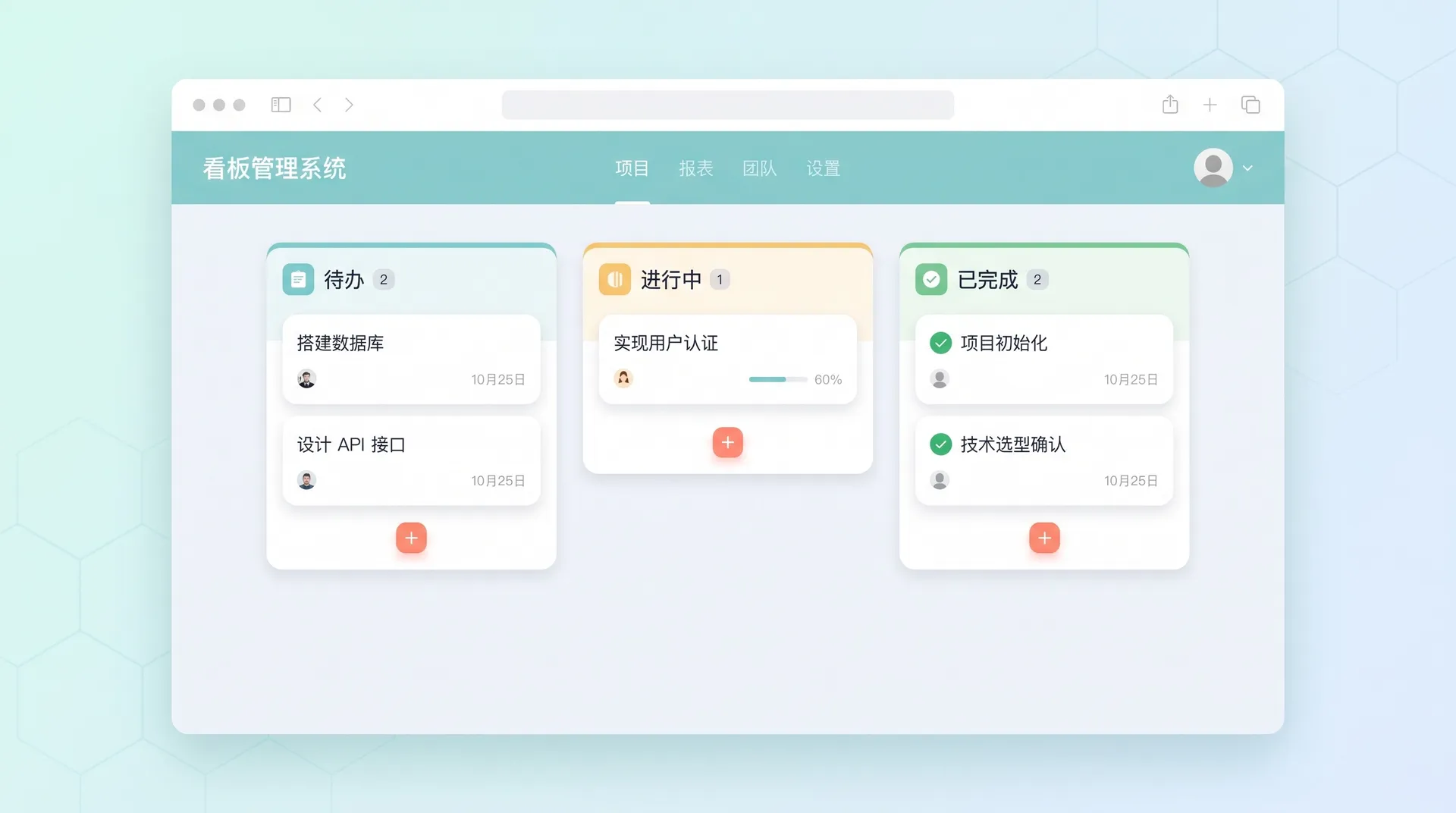
Scenario: implement a kanban management system with two entities, Column and Task, supporting full CRUD. Backend is Go + SQLite, frontend is React + TypeScript.
2.1 Step 1: capture intent
The architect's first job is telling OpenSpec what they want.
In Claude Code:
/opsx:propose "Create a kanban management system with Column(name, position) and Task(title, description, status) entities"After this runs, OpenSpec generates a complete planning document set. Look at proposal.md:
# Proposal: Kanban Board System

## Summary
Build a kanban board management system with two core entities:
Column and Task, supporting full CRUD operations.

## Motivation
Need a lightweight project management tool that supports
task organization across customizable columns.
Then specs/:
## ADDED Requirements

### Requirement: Column CRUD
The system SHALL support creating, reading, updating,
and deleting board columns.

#### Scenario: Create a new column
- GIVEN no column exists with the name "Todo"
- WHEN the user creates a column with name "Todo"
  and position 1
- THEN the column is persisted with the correct
  name and position

#### Scenario: Reorder columns
- GIVEN two columns exist: "Todo" (position 1),
  "Done" (position 2)
- WHEN the user updates "Todo" position to 2
- THEN "Todo" has position 2 and "Done" shifts
  to position 1

### Requirement: Task CRUD
The system SHALL support creating, reading, updating,
and deleting tasks within columns.

#### Scenario: Create a task in a column
- GIVEN a column "Todo" exists
- WHEN the user creates a task with title "Setup DB"
- THEN the task is linked to "Todo" column
  with status "todo"
The architect's job here is review the four docs. If the requirement is off, edit the proposal and regenerate. If the task breakdown is too coarse, adjust tasks.md by hand.
2.2 Step 2: plan + hand off
Once the specs are ready, it's time to implement. Two paths: you can run /opsx:apply to let OpenSpec write the code itself, or — if you want strict TDD plus code review — hand off to Superpowers.
Trigger Superpowers' brainstorming: in the same Claude Code session, just tell AI what you want to build. Superpowers auto-injects a SessionStart hook, so when AI detects creative work it activates the brainstorming skill — no manual command needed.
Say something like:
Please implement this kanban system. Tech stack: Go + SQLite + React.
I've already defined the requirements in OpenSpec, the spec docs
are in openspec/changes/create-kanban/.
AI auto-loads the brainstorming skill and enters a Socratic-questioning flow:
- Explore project context — AI inspects existing files, docs, recent commits
- Ask one question at a time — confirm purpose, constraints, success criteria
- Propose 2-3 approaches — with trade-offs and a recommendation
- Show design in segments — 200-300 words per segment, confirm each
- Write the design doc — to
docs/superpowers/specs/YYYY-MM-DD-<topic>-design.md - Self-check — look for placeholders, contradictions, ambiguity, scope creep
- User approval — architect signs off on the design doc
Important: during brainstorming, AI reads session context. The OpenSpec artifacts (proposal, specs, tasks.md) are already in the context window. The architect doesn't paste them, but should confirm AI understood the specs.
When brainstorming wraps, AI auto-jumps to writing-plans — same way, no manual command.
The generated plan looks like:
# Kanban Board Implementation Plan

> **For agentic workers:** REQUIRED SUB-SKILL:
> Use superpowers:subagent-driven-development

**Goal:** Build a kanban board with Column and Task CRUD,
backed by SQLite, served via Go REST API, rendered in React.

**Architecture:** Three-tier - SQLite storage layer,
Go HTTP API layer, React SPA frontend.

**Tech Stack:** Go 1.22, SQLite3, gorilla/mux,
React 18, TypeScript, React Testing Library

### Task 1: Database Schema & Models

**Files:**
- Create: `internal/models/column.go`
- Create: `internal/models/task.go`
- Create: `internal/db/schema.sql`
- Test: `internal/models/column_test.go`
- Test: `internal/models/task_test.go`

- [ ] Step 1: Write failing tests for Column model
- [ ] Step 2: Run test to verify it fails (RED)
- [ ] Step 3: Write minimal Column model implementation
- [ ] Step 4: Run test to verify it passes (GREEN)
- [ ] Step 5: Repeat for Task model
- [ ] Step 6: Commit

### Task 2: Column API Endpoints
...
Architect reviews, says "go", implementation starts.
2.3 Step 3: TDD execution
After plan approval, AI auto-activates subagent-driven-development. The plan header declares:
> **For agentic workers:** REQUIRED SUB-SKILL:
> Use superpowers:subagent-driven-development
AI reads that, switches to sub-agent mode.
RED — write a failing test. The sub-agent writes the Column model test (internal/models/column_test.go):
package models

import (
    "database/sql"
    "os"
    "testing"

    _ "github.com/mattn/go-sqlite3"
)

func setupTestDB(t *testing.T) *sql.DB {
    t.Helper()
    db, err := sql.Open("sqlite3", ":memory:")
    if err != nil {
        t.Fatalf("Failed to open test db: %v", err)
    }

    schema, err := os.ReadFile("../../internal/db/schema.sql")
    if err != nil {
        t.Fatalf("Failed to read schema: %v", err)
    }
    if _, err := db.Exec(string(schema)); err != nil {
        t.Fatalf("Failed to exec schema: %v", err)
    }
    return db
}

func TestCreateColumn(t *testing.T) {
    db := setupTestDB(t)
    defer db.Close()

    col := &Column{Name: "Todo", Position: 1}
    err := col.Create(db)
    if err != nil {
        t.Fatalf("Create column failed: %v", err)
    }

    if col.ID == 0 {
        t.Error("Expected non-zero ID after create")
    }
}
Run the test — fails, because Column and its methods don't exist yet. RED achieved.
GREEN — write the minimum implementation:
-- internal/db/schema.sql
CREATE TABLE IF NOT EXISTS columns (
    id INTEGER PRIMARY KEY AUTOINCREMENT,
    name TEXT NOT NULL,
    position INTEGER NOT NULL DEFAULT 0
);

CREATE TABLE IF NOT EXISTS tasks (
    id INTEGER PRIMARY KEY AUTOINCREMENT,
    title TEXT NOT NULL,
    description TEXT DEFAULT '',
    status TEXT NOT NULL DEFAULT 'todo',
    column_id INTEGER NOT NULL,
    FOREIGN KEY (column_id) REFERENCES columns(id)
);// internal/models/column.go
package models
import "database/sql"
type Column struct {
ID int64 `json:"id"`
Name string `json:"name"`
Position int `json:"position"`
}
func (c *Column) Create(db *sql.DB) error {
result, err := db.Exec(
"INSERT INTO columns (name, position) VALUES (?, ?)",
c.Name, c.Position,
)
if err != nil {
return err
}
id, _ := result.LastInsertId()
c.ID = id
return nil
}Run the tests — all pass. GREEN achieved.
After each task, Spec Compliance Reviewer compares code against Superpowers' plan line-by-line. After that passes, Code Quality Reviewer runs. Two rounds of review, then the task is done.
3. Walkthrough two: incremental change
The base kanban runs. Now PM says: add a priority field to cards — High red, Medium yellow, Low green.
Traditional: change the DB, the model, the API, the frontend, the tests — at least five files. Here's how OpenSpec + Superpowers handle it.
3.1 Step 1: change proposal
Architect kicks off an incremental update:
/opsx:propose "Add Priority field (High/Medium/Low, default Medium) to Task entity; the Card component must render border color based on priority"OpenSpec doesn't regenerate the full doc set. It only emits incremental specs:
## MODIFIED Requirements

### Requirement: Task Entity
The system SHALL support a Priority field on Task entities.

#### Scenario: Create task with explicit priority
- GIVEN a column "Todo" exists
- WHEN the user creates a task with priority "High"
- THEN the task is persisted with priority "High"

## ADDED Requirements

### Requirement: Priority-Based Card Styling
The system SHALL render task cards with colored borders
based on priority level.

#### Scenario: High priority card display
- GIVEN a task with priority "High" exists
- WHEN the kanban board is rendered
- THEN the task card displays a red border
Plus an incremental tasks.md (only the affected tasks).
3.2 Step 2: review the incremental specs
Note: incremental specs from /opsx:propose sit in openspec/changes/add-priority/specs/ — they don't auto-merge into the main specs. They're the delta description for this change. Merge happens at archive time.
Architect reviews the incremental specs and tasks.md, confirms scope is reasonable and scenarios are complete, then moves on.
3.3 Step 3: auto-inject the change
This is the key step. After the architect approves the incremental specs, in the same Claude Code session tell AI "implement per the new incremental specs". Since OpenSpec's incremental tasks.md is already in session context, Superpowers sub-agents will use it as input.
Backend change — ALTER TABLE plus the Go model:
ALTER TABLE tasks ADD COLUMN priority TEXT NOT NULL DEFAULT 'medium';type Task struct {
ID int64 `json:"id"`
Title string `json:"title"`
Description string `json:"description"`
Status string `json:"status"`
Priority string `json:"priority"` // new field
ColumnID int64 `json:"column_id"`
}
func isValidPriority(p string) bool {
return p == "high" || p == "medium" || p == "low"
}Frontend TypeScript type:
export interface Task {
  id: number;
  title: string;
  description: string;
  status: string;
  priority: "high" | "medium" | "low"; // new
  columnId: number;
}
Card component rendering:
const priorityColors: Record<Task["priority"], string> = {
  high: "#ef4444",
  medium: "#f59e0b",
  low: "#22c55e",
};

export const TaskCard: React.FC<{ task: Task }> = ({ task }) => (
  <div style={{ borderLeft: `4px solid ${priorityColors[task.priority]}` }}>
    <h4>{task.title}</h4>
    <p>{task.description}</p>
  </div>
);
Tests covering all three scenarios — explicit, default, invalid:
func TestCreateTaskWithPriority(t *testing.T) {
    db := setupTestDB(t)
    defer db.Close()

    col := &Column{Name: "Todo", Position: 1}
    col.Create(db)

    t.Run("explicit priority", func(t *testing.T) {
        task := &Task{
            Title: "Bug fix", Status: "todo",
            Priority: "high", ColumnID: col.ID,
        }
        if err := task.Create(db); err != nil {
            t.Fatalf("Create task failed: %v", err)
        }
        got, _ := GetTask(db, task.ID)
        if got.Priority != "high" {
            t.Errorf("Expected priority 'high', got '%s'", got.Priority)
        }
    })

    t.Run("default priority", func(t *testing.T) {
        task := &Task{Title: "Refactor", Status: "todo", ColumnID: col.ID}
        task.Create(db)
        got, _ := GetTask(db, task.ID)
        if got.Priority != "medium" {
            t.Errorf("Expected default 'medium', got '%s'", got.Priority)
        }
    })

    t.Run("invalid priority rejected", func(t *testing.T) {
        task := &Task{Title: "Hack", Status: "todo",
            Priority: "urgent", ColumnID: col.ID}
        if err := task.Create(db); err == nil {
            t.Error("Expected error for invalid priority")
        }
    })
}
Sub-agent runs the tests, RED → GREEN done. Spec Compliance Reviewer confirms all three scenarios are covered. Pass.
3.4 Step 4: accept and archive
Back to OpenSpec for acceptance.
If the project uses expanded workflow (configured via openspec config profile), you can run /opsx:verify for three-dimensional auto-checks — completeness (all tasks done), correctness (implementation matches spec intent), consistency (design decisions reflected in code).
With the default core profile, there's no /opsx:verify. The architect reviews code and tests manually, confirms the change matches the incremental specs' scenarios.
Once accepted, archive:
/opsx:archive add-priorityArchive prompts: incremental specs haven't synced to main specs — sync now? Choose yes — delta specs merge into openspec/specs/, the change folder moves to openspec/changes/archive/. The next iteration starts clean.
4. The architect's authority list
Across the whole flow, the architect signs off at these checkpoints:
| Checkpoint | When | What the architect does | Tool |
|---|---|---|---|
| Intent definition | Each iteration start | Run /opsx:propose, describe the requirement | OpenSpec |
| Plan review | After propose | Review proposal, spec, design, tasks | OpenSpec |
| Context handoff | Planning phase | Trigger brainstorming in same session; confirm AI understood OpenSpec specs | Superpowers (auto) |
| Plan approval | After brainstorming | Review the writing-plans output | Superpowers (auto) |
| Acceptance sign-off | After execution | Expanded profile: /opsx:verify. Core profile: manual code review | OpenSpec |
| Archive confirmation | After acceptance | /opsx:archive, sync incremental specs when prompted | OpenSpec |
The architect no longer writes code, but every decision point needs your judgment. AI can auto-generate docs and code, but whether the requirement is right, whether the plan is sound, whether the implementation hits the bar — only humans can judge.
Summary: one person, one team
The OpenSpec + Superpowers combo does one thing: frees the architect from execution so they only do decisions.
A kanban system used to need: an architect to draw diagrams, a backend to write APIs, a frontend to build the UI — sync meetings, sprint planning, debugging. At least a week or two. Now one architect, two rounds of propose + execute, goes from requirement to code to tests alone.
That said, this pattern has its boundaries.
Fits well: CRUD business systems, admin dashboards, internal tools, solo-dev side projects. These have clear requirements, standard tech stacks, predictable change patterns.
Doesn't fit as well: high-performance computing, complex distributed systems, business domains that need deep modeling (e.g. trading systems, recommendation algorithms). Too many dense decision points — AI-generated specs and code rarely land right the first time, leading to lots of rework.
Tools, however good, are amplifiers. They can amplify an architect's output, but they can't replace an architect's judgment. If your design is broken, AI will just help you ship broken code faster.
A necessary disclaimer: this workflow is a theoretical combo derived from each project's official docs (READMEs, docs folders, SKILL.md source). It's not a transcript of running the whole flow end-to-end. The code (Go models, React components, test cases) is illustrative, written to make the flow complete — not actual AI-generated output from running this.
A few problems you'll almost certainly hit when actually trying this:
- Context handoff is not a hard guarantee. Whether Superpowers' brainstorming actually picks up OpenSpec's
/opsx:proposeartifacts depends on the AI's context window size and session-management strategy. Long sessions or off-topic interruptions in the middle can drop context. - Both tools in the same session have edge cases. Skill-trigger priority, context pollution between tools, command collisions — none of that is covered in the docs. In practice you may need to clear context before switching tools.
- Incremental
/opsx:proposequality is uncontrollable. When OpenSpec does incremental updates on an existing project, the quality of the delta specs depends on how well AI understands the current specs. In complex projects you may need to manually edit the AI-generated incremental specs.
Suggestion: if you want to reproduce this flow, first run each tool's own closed loop separately — OpenSpec all the way through propose → apply → archive, Superpowers all the way through brainstorming → writing-plans → subagent-driven-development. Once you're comfortable with both, try stringing them together. Don't try to chain them from day one — debugging will be miserable.