OpenClaw: Core Architecture, How It Works, and Agent Deployment
If you want to go deeper into OpenClaw, read the source and official docs first — the project is still iterating at high speed. This post focuses on the core framework and the communication mechanism, so that by the end you can explain how OpenClaw actually works and where its limits are. One thing above all: be careful about the security risk. If you deploy OpenClaw, treat the data on your machine as if it were fully public.
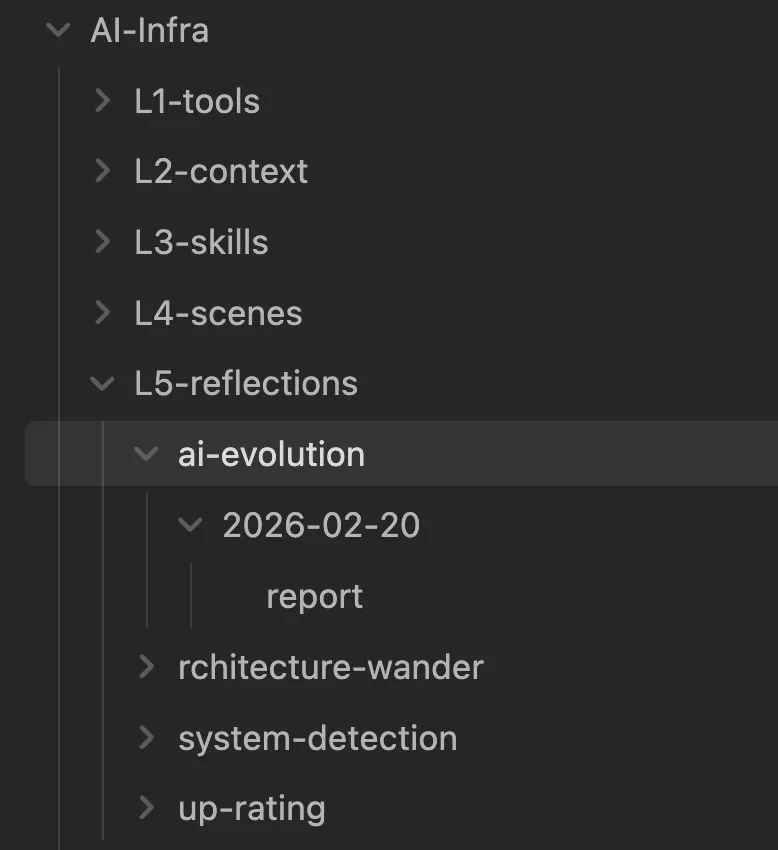
OpenClaw is a personal agent platform that has blown up over the last half year, built on top of the Pi coding agent (@mariozechner/pi-coding-agent). Before it existed, anyone who tinkered with agents basically had their own hand-rolled setup: skills management, agent identity, architecture self-evolution, memory-search, session management — each one built from scratch. Before you could even talk to a friend about agents, you'd spend half the conversation explaining your respective architectures first.
What OpenClaw actually changed is that it standardized all of this.
1. What Makes OpenClaw Different
The framework isn't technically hard — the advantage is in spreading a consensus. As a programmer, a rough analogy: OpenClaw's framework difficulty is about the level of "a client-server app with a basic recommendation algorithm" from before AI coding was a thing. Anyone who's done a few years of development knows that's not hard. So the technical framework isn't OpenClaw's selling point.
The selling point is that it pushed a consensus for agent architecture. Before, everyone's agent was architected differently, making collaboration expensive. Now, when you build on OpenClaw, you skip "here's my architecture" and go straight to "how do I keep it alive, swap the RAG algorithm, deploy multiple agents, reuse a good case" — a completely different level of communication efficiency.
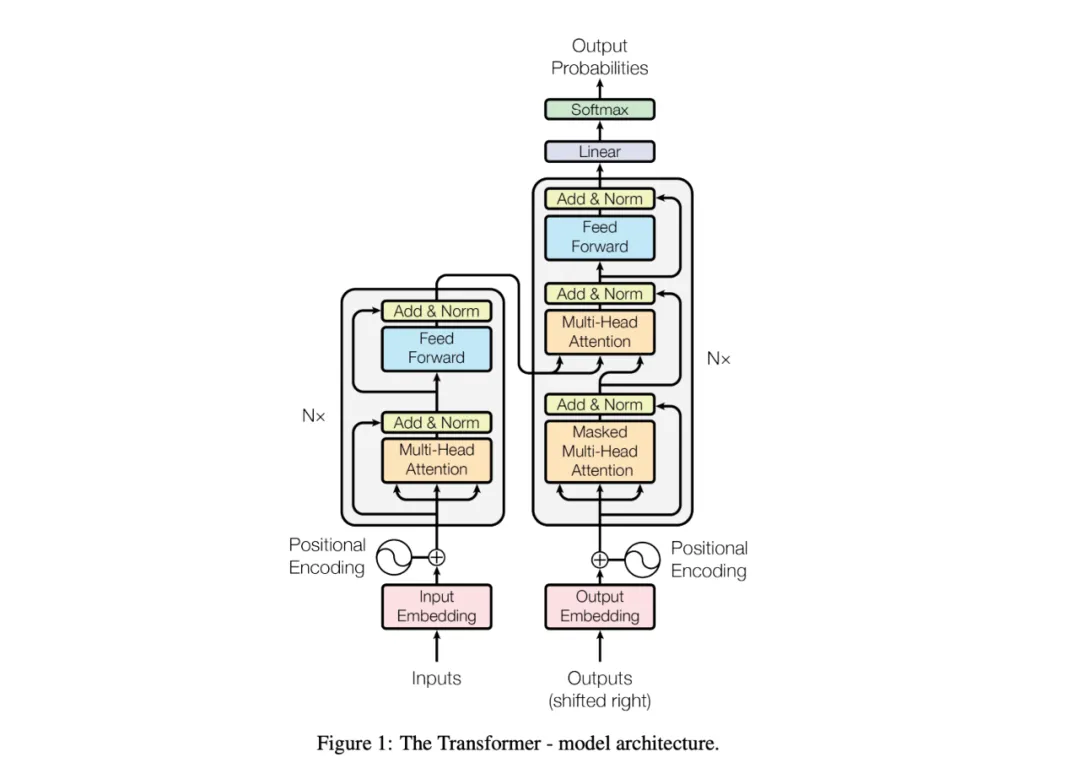
Second, first-class multi-agent support. LLMs win on the transformer and are bottlenecked on the transformer: the context limit strictly constrains what a single agent can do. The traditional "define identity via prompt + pile on skills" is steadily eating the context window. Specialization is becoming the consensus for getting more out of LLMs — and multi-agent is where it lands.
Third, work on things orthogonal to AI capability. What you choose not to do matters as much as what you do. Spending effort iterating on your own agent is orthogonal to AI capability itself: as models get smarter, you only need to upgrade the underlying LLM. The long-term data you accumulate from interacting with AI becomes the private asset that lets you drive AI better later.
2. Three Practical Questions Before You Deploy
Cloud vs self-hosted. Buying hardware isn't required. A cloud box (Tencent Cloud, for one, now supports one-click OpenClaw deployment) is the least effort, and you can download your data anytime. Self-hosting gives you more control and is what most people care about.
If you self-host, prefer a Mac — OpenClaw and many of its tools are naturally friendlier to macOS. Windows works too, just with more fiddling. For hardware, a Mac Mini is the go-to (it just runs locally after deployment); three specs matter:
- Chip: at least an M-series. M1–M4 depends on your needs — if you won't run local text-to-image/video models, the M1 is the best value (OpenClaw mostly calls APIs at runtime and isn't performance-hungry).
- RAM: 24 GB if you plan to run local image/video models; otherwise standard is fine.
- Disk: local ComfyUI models start around 30 GB each, so 256 GB minimum if you're going that route.
Which IM tool. This is where people trip up. Three principles: security, availability, usability.
- Security: for data isolation, don't treat OpenClaw like a "file-transfer assistant", and don't let habit make you forget the risk — once deployed, you're effectively exposing a bot to the internet.
- Availability: a single agent is fine, but with multiple agents your IM quota drains fast. The gateway runs a health snapshot on a 60-second interval (a
healthIntervalthat pings the IM), so with many agents the quota evaporates. Pick an IM with a generous (or unconstrained) quota if you're going multi-agent. - Usability: domestic IM apps are generally easier to use than the ones OpenClaw recommends overseas.
Is configuration painful? Getting the project running plus wiring up one IM bot takes about half an hour. But multi-agent setup — task assignment, debugging skills, custom identities, scheduled tasks, self-hosted models — typically takes 2–3 days by collective experience.
3. Core Architecture: Eight Files Define an Agent
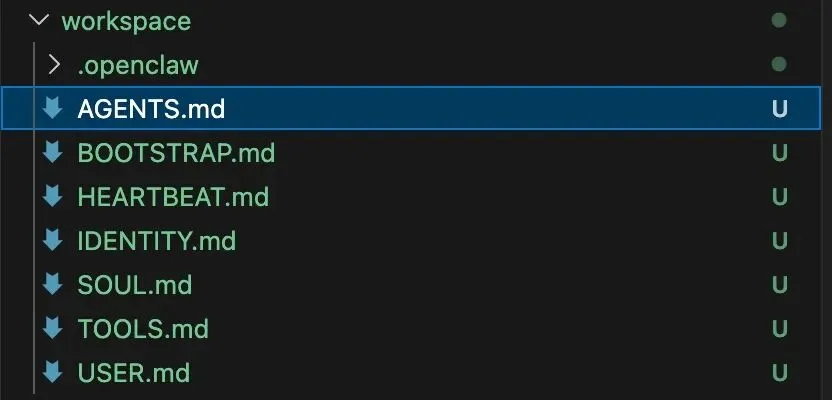
Each agent has its own workspace; the core config files are:
AGENTS.md     # Agent role declaration, decides tool permissions (the core prompt file)
SOUL.md       # Personalization prompt, injected into the system prompt
TOOLS.md      # Tool allow/deny lists — the security boundary
IDENTITY.md   # Identity (name/avatar), shown in the channel
USER.md       # User preferences, context priors
HEARTBEAT.md  # Scheduled task config (optional)
BOOTSTRAP.md  # First-run onboarding guidance (consumed once)
MEMORY.md     # User memory document (RAG source)
File order is priority: AGENTS defines the capability boundary, SOUL injects the soul, TOOLS draws the forbidden zone — together the eight files form the agent's complete "personality." AGENTS.md describes an agent's startup and memory-management flow in detail and is arguably OpenClaw's most important prompt file.
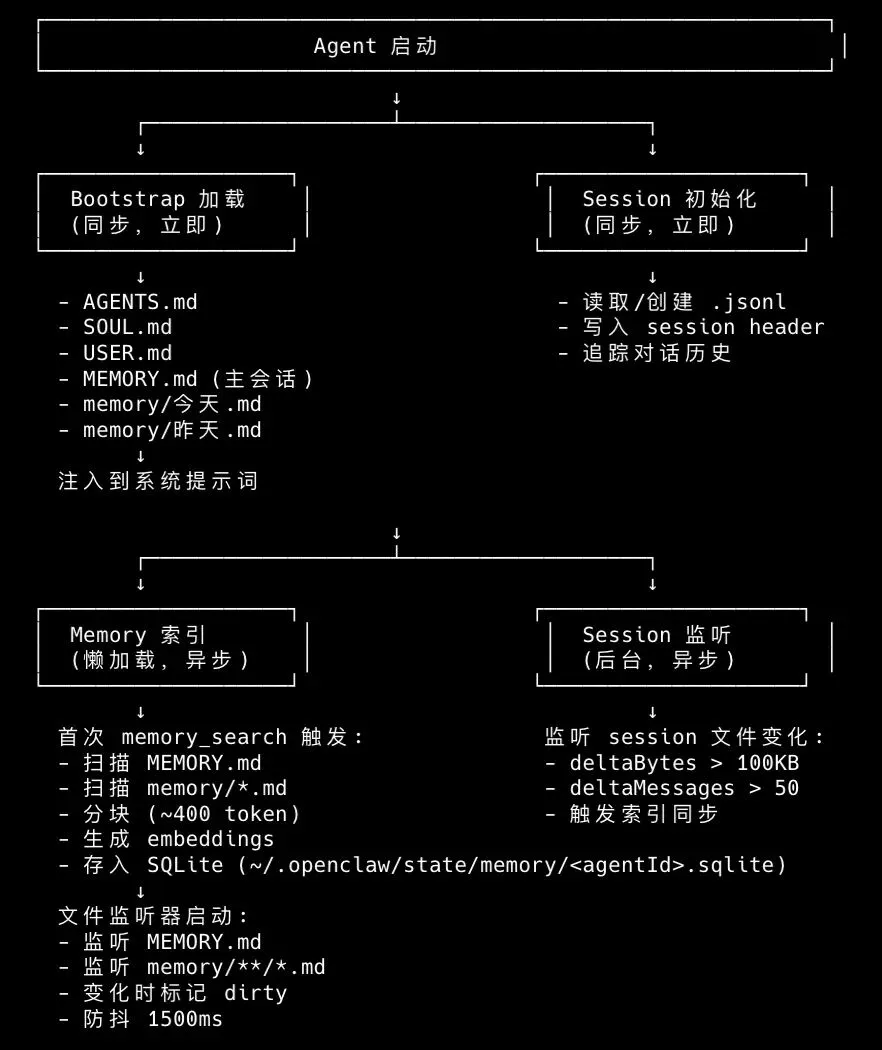
An agent isn't a resident process — it's a per-session transient instance. Every conversation is a full load → execute → destroy cycle: load the bootstrap context → create the SessionManager → dynamically build the system prompt (injecting the workspace file contents) → create the agent session. The system prompt is generated dynamically: every run re-reads the workspace files, so config takes effect live.
4. How It Works: Managing Memory
There are three places memory lives:
.openclaw/agents/ceo/sessions/xxxx.jsonl      # session data
.openclaw/workspace-ceo/memory/YYYY-MM-DD.md  # per-day memory
.openclaw/workspace-ceo/MEMORY.md             # LLM-refined memory
Sessions load on demand. Each conversation has its own .jsonl, whose first line is a Session Header (type / session id / cwd / timestamp / parentSession). Once a message routes to a SessionKey, OpenClaw loads the matching .jsonl into the agent — lazy loading.
What happens when a session gets too long? Obviously it doesn't shove the whole thing into the LLM. Between load and LLM-awareness there are three strategies:
- Compaction (persistent): when a conversation gets too long, old messages get summarized into a summary and written back to the JSONL — the next turn uses the compacted history (
firstKeptEntryIdcontrols how aggressively). - Pruning (temporary): before sending, old tool results get replaced with a placeholder — memory-only, the file is untouched.
- History Limit (optional): cap the number of messages sent.
How memory iterates. The agent updates MEMORY.md via filesystem tools (fsWrite/fsAppend). When a session nears its context limit, OpenClaw prompts the agent to write memory first, then compact the session. That's the mechanism behind "it gets to know you over time."
5. From Single Agent to Multi-Agent
Single-agent problems are concrete: context drains fast, and "wrong search" quietly degrades output. A real example — build a RAG tutor to strengthen your Flutter skills, chat with it about C++ in the middle, and because of the memory mechanism every later turn carries the C++ memory with it: ask for a demo and it gives you C++, not Flutter. So once an agent has a dedicated job, let it specialize.
Adding an agent is easy:
openclaw agents add iostutorIt walks you through onboarding — fill in the IM bot API and LLM API and you're done.
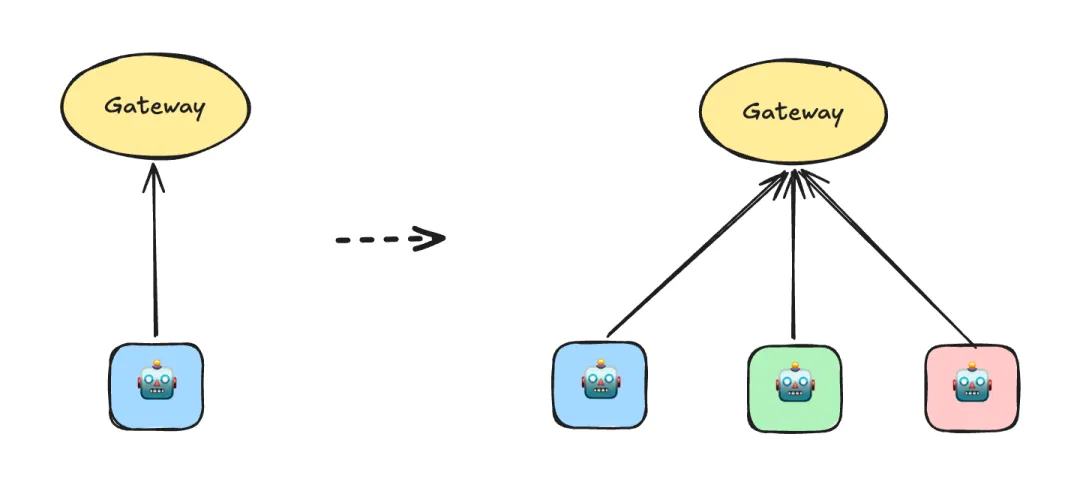
Agents call each other in two ways: sessions_send and sessions_spawn.
sessions_send: sends a message to an existing session; the exchange gets written into each side's memory. Like messaging a colleague — they handle it in their own context.sessions_spawn: runs a task in an isolated environment as a SubAgent — like hiring a temp, they deliver and report back. E.g. the ceo says "have iostutor write a Swift networking wrapper class."
Both are configured in openclaw.json. For sessions_send, sessions.visibility is the easy one to miss:
"tools": {
  "agentToAgent": { "enabled": true, "allow": ["ceo", "iostutor"] },
  "sessions": { "visibility": "all" }
}
sessions_spawn is declared on the main agent via subagents.allowAgents:
{
  "id": "ceo",
  "name": "ceo",
  "workspace": "/Users/.../.openclaw/workspace-ceo",
  "model": "openai-codex/gpt-5.3-codex",
  "subagents": { "allowAgents": ["iostutor"] }
}
Which one gets used is up to the LLM. If you tell ceo "have iostutor generate an article and send it to me," the LLM reads that as a new task → sessions_spawn. If you say "continue the article discussion with iostutor," there's explicit context → sessions_send.
A common trap: agent-to-agent communication gets forgotten. A few days after wiring it up, iostutor may not remember how to talk to ceo — because the config above relies on session memory, and once short-term memory fades, it's gone. The fix is to write the communication rules into each workspace/agent_xx/AGENTS.md, spelling out who the other agents are and to use callAgent("iostutor") to talk directly (AGENTS.md content is injected into the system prompt).
sessions_send doesn't create a session — it only messages an existing one, so even after six hours it reuses the prior session rather than starting fresh.
Three practical rules: keep the company flat (don't deploy too many agents or multi-level reporting chains), prefer bidirectional communication (configure both send + spawn), and draw a boundary around core agents (a pure-tool agent only needs a SubAgent config, not a lot of context).
6. Fine-Grained Control: Skills and Versioning
Skills don't inject every document in full — only a list is injected (name, description, path); the agent reads the full SKILL.md with its read tool when needed. Sources resolve by priority in three tiers: workspace-xxx/skills/ (highest, per-agent) → ~/.openclaw/skills/ (shared) → bundled (built-in). Each skill's requires.bins/env/config filters out anything whose prerequisites aren't met.
Too many skills burden the agent's context, and the wrong skill can trigger the wrong tool call. The recommended shape is "base/common skills + dedicated skills" per agent: brave_search (efficient web retrieval) belongs to the base set, while weather (a scheduled weather report) belongs only to your "Family Agent."
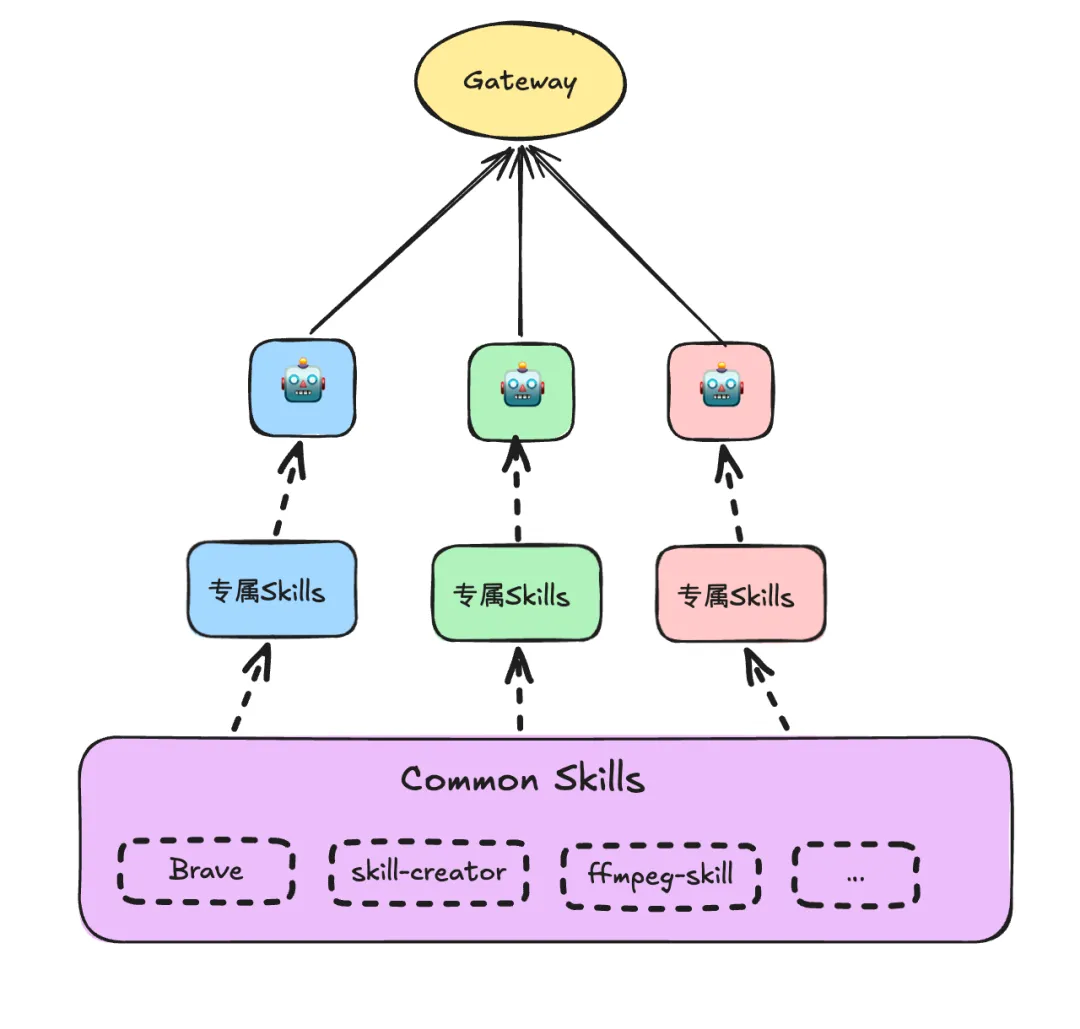
A trap: skills load lazily. After restructuring your skills, the agent may still be using the old config — OpenClaw creates a skills snapshot at session start and reuses it for the whole session; even restarting the gateway leaves old sessions on the old snapshot. Delete the relevant session and re-ask, and the new skills show up.
Clawhub is OpenClaw's skills marketplace:
clawhub search "calendar management"   # semantic search
clawhub install <skill-slug>           # install
clawhub list                           # list installed
clawhub update --all                   # update all (careful)
clawhub sync                           # sync and back up local skills
Two versioning reminders: don't push your memory/chat data to the cloud (exclude it in .gitignore), and openclaw.json stores both secrets and the core config — inject the secret part rather than committing it.
7. Quick Start
curl -fsSL https://openclaw.ai/install.sh | bashAfter install it auto-enters openclaw onboarding; follow the guide to pair your main agent (you can skip skill config for now). Don't use Claude Code to configure OpenClaw — CC's understanding of its config is still off, and "it works, but it also broke" is a real outcome. A better workflow: download the OpenClaw source, let CC study it, then use CC to debug your local config — with enough source context the quality jumps substantially.
Afterword
On model choice: use a SOTA model if the budget allows — a lagging LLM warps your judgment about "whether AI is actually good," so don't conclude "AI isn't there yet" from a single poor deliverable. Also don't subscribe to any single model on an annual basis; models move too fast, and a subscription can be stale within months.
There's a lot more to play with in OpenClaw: swapping the memory-search backend, rewriting AGENTS.md to build richer agent relationships, and so on. For another take on agent runtimes, we previously wrote a teardown of DeepSeek Harness's architecture — worth reading the two "everything-is-a-plugin" approaches side by side.