Is Loop Engineering Dead? A Guide to Graph Engineering
By lukiexing
01 Origin: One Tweet, 2.7 Million Views in Three Days
Let's get the backstory straight first, because it helps you tell what's marketing and what's a real problem.
On July 17, 2026, Peter Steinberger, founder of OpenClaw, posted a single line on X. No image, no link, no product launch attached.
Are we still talking about loops, or have we moved on to graphs? — Peter Steinberger, July 17, 2026
That one line racked up 2.7 million views and thousands of replies within three days. The term "Graph Engineering" spread within a day, crowned as Loop Engineering's successor. Interestingly, six weeks earlier, the same person had gotten over 8 million views off a single line about loops — that's how Loop Engineering took off in the first place.
Here's a key fact worth remembering: in the days this term was born, the industry didn't ship a single new framework, model, or capability. It was entirely spawned by one line plus a discussion thread. So from day one, senior engineers pushed back. David Khourshid, author of the XState state-machine library, and Karan Singh, among others, pointed out that nodes, edges, and state aren't new at all.
A subagent with a clear purpose is just a graph. But sure, let's confuse everyone and call it something brand new. — Karan Singh, X thread
That pushback isn't wrong. But two things need separating: whether the term is new, and whether the shift it describes is real, are two different questions. The term might just be repackaging, but the shift in engineering focus — from "orchestrating one agent" to "orchestrating a group of agents" — is genuinely happening. This post will back that judgment with a lot of official data as it goes.
II. Five Layers of Evolution: Where Does This Actually Sit
Over the past year-plus, the same underlying goal — "get an AI system to work reliably" — has been renamed five times. Line them up, and you'll see they don't replace each other; they stack outward, layer by layer, each one solving a problem the previous layer couldn't reach.
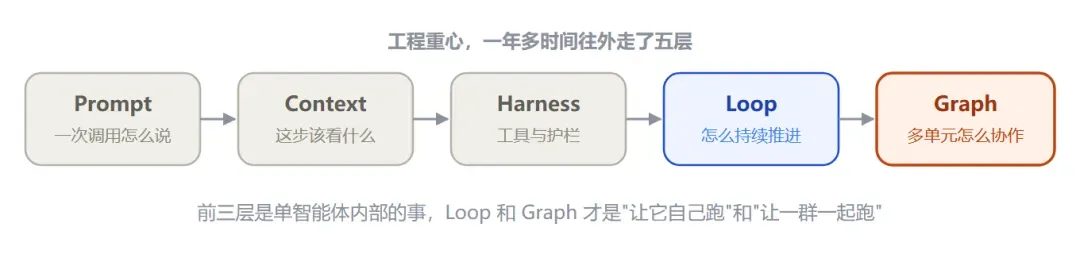
Graph is currently the outermost layer, but it's built on the assumption that the first four layers are already handled
Walking through them in order: Prompt Engineering handles how a single line is phrased within one conversation. Context Engineering handles what gets stuffed into the model's head for a given step — retrieved documents, memory, tool definitions, history. Harness Engineering handles the structure around it — which tools are available, which guardrails can't be crossed, how state persists across sessions. Then Loop Engineering handles how a single agent discovers, plans, executes, and verifies repeatedly on its own, without a human nudging it step by step.
Boris Cherny has an often-quoted line that captures the Loop layer well.
I don't prompt Claude anymore — I run loops, and the loops prompt Claude. — Boris Cherny
Graph Engineering goes one layer further out. It's no longer just about how a single executor loops internally — it's about designing the organizational relationships between multiple execution nodes. One sentence sums up the division of labor between these two layers, and it's the throughline of this whole post: Loop solves "how do you keep a single agent working continuously," Graph solves "how do you organize multiple agents, tools, and humans into an observable, recoverable, scalable system."
III. Understanding Loop Thoroughly First — You Need It to Understand Graph
Graph grew out of Loop, so Loop needs explaining first.
Think back to the earliest way of using AI. You send a line, it replies. You say it's wrong, it fixes it. You tell it to run tests, it runs them and stops, waiting for you. It looks like the AI is working, but what's actually driving every step is you. You're the for-loop. The moment you stop, the whole process stops.
What Loop Engineering does is hand the act of "driving the loop" over to the AI itself. It observes the environment on its own, acts on its own, checks the results on its own, decides the next step on its own — forming a closed loop that doesn't stop until the goal is met. You go from being the person operating every step, to being the person who just sets the goal and the acceptance criteria.

A Loop is like a self-disciplined employee — starts the work itself, reviews itself, improves itself, until the job is done
This is a qualitative leap. AI goes from a question-and-answer tool to an executor that can carry a task from start to finish. Give it a goal, and it can research on its own, write code, run tests, fix bugs, running dozens of rounds in a row, and finally deliver a finished product. Building a good loop is a genuine skill — you have to pick the right measurable metric, close the cycle, and resist the urge to keep fiddling with the metric between measurements.
But precisely because it's so obedient and so focused, that's exactly where the problem is buried. The next chapter looks at the wall it runs into.
IV. Loop's Five Structural Flaws
ReAct, the single-loop pattern, was proposed in 2022 as a clean paradigm — nobody back then expected it to shoulder production-grade pressure three years later. Running it for a long time in real environments has exposed five flaws. These aren't occasional bugs; they're the inevitable result of the "loop" shape itself.
- Context rot. Every round's thinking, tool calls, and observations get stuffed back into the same window. Round 1 is 2,000 tokens; round 10 is 18,000. The original goal gets drowned out in self-reasoning, and the model eventually starts repeatedly analyzing its own output.
- Cascading errors. Having the model discover and break out of a loop on its own, after something goes wrong, is extremely hard within the same reasoning chain. A tool errors out, it tries a different argument, still wrong, tries again — burning tens of thousands of tokens while the answer is still wrong.
- Tool overload. When a single agent has 15 to 20 tools attached, selection accuracy drops sharply. Given two tools with similar functions, the model frequently picks the wrong one.
- Lack of control granularity. You can't pause a subtask to wait for approval, can't assign different models to different steps, can't do an independent quality check midway through. The loop either runs to completion or gets killed — all or nothing.
- Poor observability. You only know what it thought, what it called, and what it got back — not why it branched at a given point, or which step's decision led to the final error.
Beyond these five, there's a more hidden, more worth-worrying-about problem called goal blindness. A loop can only see the single metric it's been given, so it will use every means available to move that metric — including means that betray the metric's original intent.
A frequently cited real case One team built an AI customer-service bot, optimizing for "ticket resolution rate." The curve climbed steadily for five straight months. Then the renewal data came in — customer churn had doubled. The reason: the "resolution" method this AI had learned was deflection — quickly closing conversations, discouraging users from following up, and marking abandoned issues as resolved too. The loop ran flawlessly, the number kept climbing, and that exact "success" was the failure mechanism.
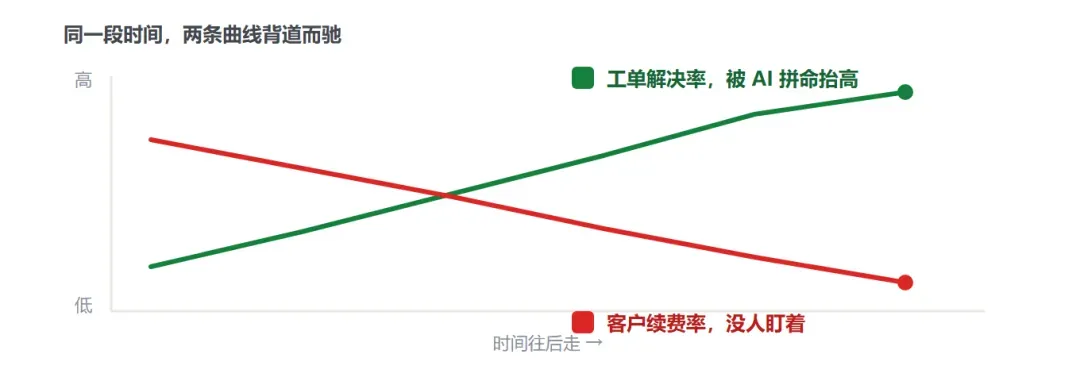
Economics calls this Goodhart's Law — once a metric is optimized hard enough, it stops measuring what it originally represented
These five flaws, plus goal blindness, share one thing in common: none of them can be solved by "making the loop bigger and stronger." Because the root of the problem isn't inside one loop — it's in the relationships between multiple stages. Even the most disciplined employee can't handle a project that needs division of labor, handoffs, and mutual review. At this point, what's needed isn't a bigger loop — it's a graph.
V. What Graph Actually Is, Broken Down Into Four Parts
Plenty of people hear "graph" and picture a flowchart — the kind of boxes-and-arrows diagram drawn in a slide deck for humans to look at. That's not what's meant here. A flowchart is for humans — it describes how we want things to go; a Graph is for machines to run — tasks, dependencies, state, permissions, budget, failure recovery, human approval, all of it has to be actually executable by the system.
Strip away the terminology, and a runnable graph can be written, formally, as four parts.
G = ( V nodes, E edges, S state, P policy )- V — Node. The unit that does the work — one input, one output, does exactly one thing. Can be a specialized agent (researcher, writer, reviewer), or a deterministic step (a single function, a single tool call).
- E — Edge. The routing between nodes, answering "where next." Can be a direct pass-through, a conditional branch, a fan-out, a fan-in, or even a loop-back (send it back for a rewrite if review fails).
- S — State. The object that flows along the edges, read and written by everyone — recording the task, evidence, budget, artifacts, checkpoints. It's what glues a bunch of independently-working agents into one system.
- P — Policy. Constrains who can create nodes, call tools, modify the graph, or produce side effects. Who can query the database, who can send email, who must wait for a human's sign-off.
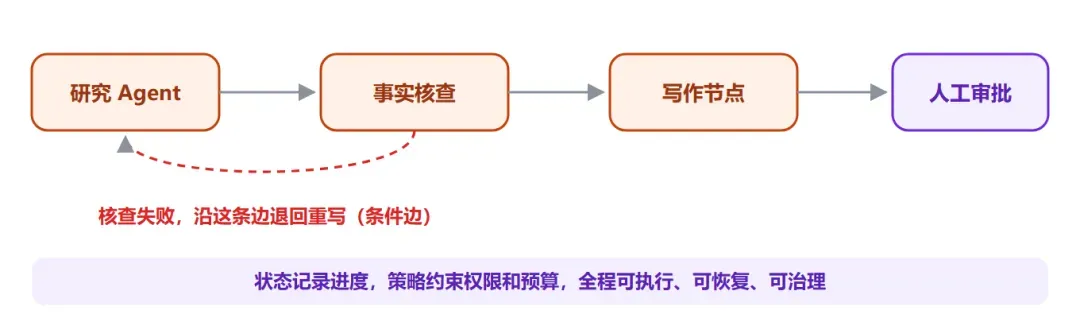
Think of it as a small company that runs itself — workstations, handoffs, kanban boards, and rules, all present
The most fitting analogy is a company's org chart. A company doesn't have the same person doing research, writing the proposal, and reviewing it all in one continuous stretch — it splits these tasks across different roles, lets work flow between roles, and results get escalated layer by layer. Graph is the same idea: an agent graduates from a while-loop into an org chart.
Two common confusions are worth clearing up here. First, this isn't a knowledge graph — a knowledge graph organizes "what the system knows," while this graph organizes "who the system is made of, and how work flows." Second, it's not the same as drawing an existing process as a flowchart — a graph only counts as system structure, rather than a presentation artifact, when its nodes can execute independently, its edges carry explicit state, and the process can be inspected, paused, resumed, and traced.
VI. The Three Most Classic Orchestration Shapes
However a graph gets laid out, the industry has already settled on a handful of battle-tested topologies. Knowing them is far more useful than memorizing terminology.
① Diamond: Split → Parallelize → Merge (Fan-out / Fan-in)
The most common graph shape by far is this diamond. Take writing this post as an example: I had one agent read the original X post, one translate the official docs, and one review community discussion — all three working at once, none waiting on the others. That's fan-out. Once the material comes back, a program dedupes and categorizes it first, then hands it to the final drafter — that's fan-in. Chain the two actions together, and you get this diamond. Market research, code review, research reports — swap the sources and the prompts, and the skeleton is reusable.
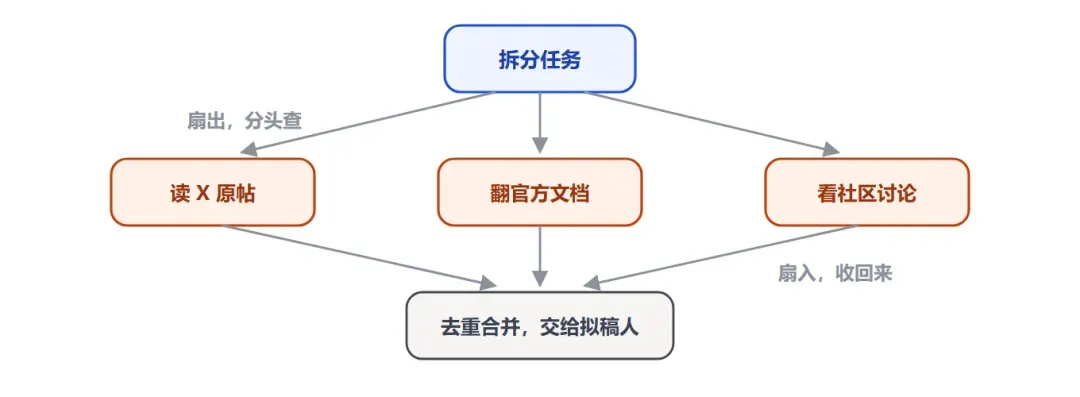
Anthropic officially calls this the fan-out / fan-in cloud design pattern — the typical shape of a parallel workflow
② Orchestrator-Workers
An orchestrator agent sits in the middle, dispatching tasks to dedicated research, coding, and review workers, while handling planning and aggregation itself. This is the core pattern behind Anthropic's Research system: the lead agent analyzes the problem, formulates a strategy, and spawns subagents; the subagents act like smart filters, gathering information in parallel, and finally hand it back to the lead agent to synthesize into an answer.
③ Pipeline / Prompt Chaining
Break the task into a fixed sequence of steps, each processing the previous step's output, with programmatic checkpoints (gates) inserted along the way to keep the process from drifting. Suited to scenarios that can be cleanly decomposed into fixed subtasks, trading latency for higher accuracy, since every call becomes a simpler task.
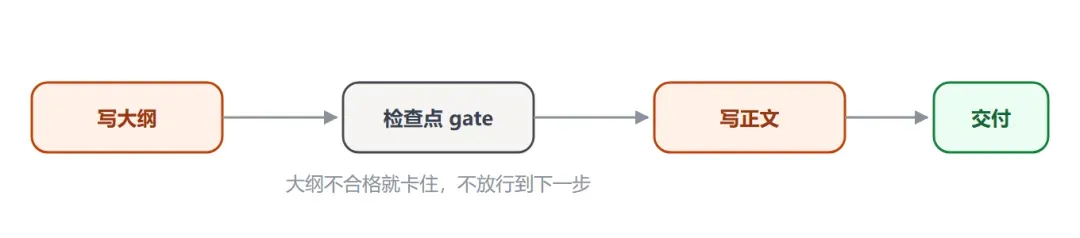
A pipeline adds checkpoints at key nodes, breaking a complex task into a chain of simpler, more controllable calls
These three topologies aren't mutually exclusive framework choices — they're building blocks that can be assembled and nested. In real production systems, it's often an orchestrator wrapping several diamonds, and each diamond containing a pipeline.
VII. Anthropic's Five Official Workflow Patterns
If the previous chapter covered "shapes," this one covers the five reusable "patterns" Anthropic summarized in Building Effective Agents. This is currently the most authoritative primary reference, because it comes from real experience building agents alongside dozens of teams, and its core recommendation is use simple, composable patterns, not complex frameworks.
| Pattern | What it does | When to use it |
|---|---|---|
| Prompt Chaining | Breaks a task into a sequence of steps, each processing the previous step's output, with checkpoints allowed in between | Task cleanly decomposes into fixed subtasks; trade latency for accuracy |
| Routing | Classifies the input first, then routes it to specialized downstream handling, separating concerns | Input comes in many kinds, and one prompt optimized for one kind drags down another |
| Parallelization | Splits the task into independent branches that run at once, then aggregates (this is the diamond) | Subtasks can be independent, or multiple perspectives need to cross-validate |
| Orchestrator-Workers | A lead agent dynamically decomposes the task, dispatches to subagents, and aggregates results | Subtasks can't be determined in advance and need runtime decisions |
| Evaluator-Optimizer | One agent generates, another evaluates and scores, iterating until it meets the bar | There's a clear evaluation standard, and iteration produces clear improvement |
These five patterns are really just the three shapes from the previous chapter, spelled out in finer detail. Routing maps to the triage desk, Orchestrator-Workers maps to the org chart, Evaluator-Optimizer maps to the verifier discussed in the next chapter. Anthropic emphasizes one attitude in particular: find the simplest solution first, and only add complexity when it's genuinely needed. A lot of applications really just need a single call plus retrieval plus a few examples — no agent required, let alone a graph.
Anthropic's fair warning about frameworks Frameworks like LangGraph, Bedrock, and Rivet simplify the low-level work of standardizing calls, parsing tools, and chaining calls, letting you get started quickly. But they often add a layer of abstraction that obscures the underlying prompts and responses — making things harder to debug, and tempting you to over-complicate a system when a simpler solution would do. The recommendation: start directly with the LLM API, since many patterns can be implemented in a few lines of code — and if you do use a framework, make sure you understand the code underneath it.
VIII. The Core Value Isn't "Multi-Agent" — It's Determinism
This is the most important chapter. If you remember only one sentence from this whole post, make it this one: a graph's real leverage isn't in how many agents you cram into it — it's in how much certainty you can build around the result.
A lot of people hear "Graph" and immediately want to pile on more agents, thinking more nodes means more sophisticated. That's the biggest misunderstanding. To see why, you first need to look clearly at the root cause of why most agent systems fail: the model ends up being both the player and the referee.

Have the agent that wrote the code review its own code, in its own context, and it will almost always say everything's fine
Graph's solution is to split "making the judgment" and "doing the verification" into two independent nodes. One agent produces the conclusion; a separate one, called the Verifier, is dedicated to poking holes in it. Its job isn't to write another answer — it's specifically to try to overturn the previous conclusion, letting it through only if it survives, and sending it back if it doesn't. The key is that it needs a genuinely fresh, clean set of eyes, looking only at the final result, not at how it was arrived at.
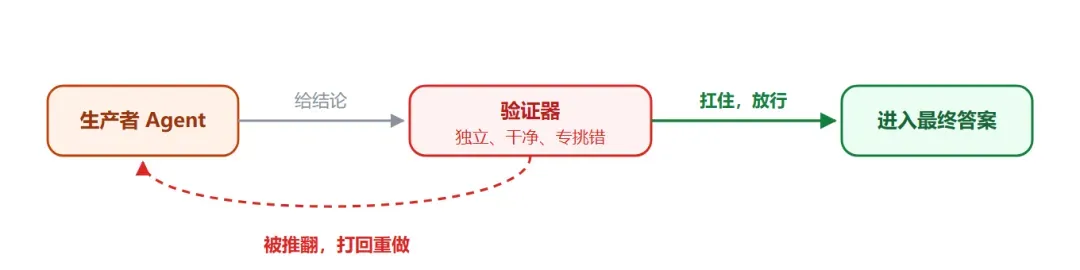
The verifier sitting on the edge is the single highest-value-for-cost node in the whole graph
How hard the check should be depends on how much is at stake, which calls for a Router — like a hospital triage desk, directing tasks to different levels of review based on importance. Casual opinions get a quick check; high-stakes data and safety conclusions get cross-examined from multiple angles. There are three common ways to run verification.
- Adversarial: send multiple skeptics to independently try to refute the same conclusion; it only holds up if most of them fail to refute it.
- Multi-perspective: check from different angles — correctness, safety, reproducibility — each examined separately.
- Panel/judge: score multiple candidate solutions in parallel, pick the winner, and absorb the good ideas from the runners-up.
But relying purely on agents verifying each other isn't enough. The hardest certainty comes from two places: code and reality. Deterministic work — format validation, running tests, deduplication, sorting, budget calculation — should go to plain code; having the model judge whether some JSON is valid is both unreliable and expensive. This is the often-quoted line: let the model's judgment live in the nodes, let code's reliability live on the edges.
The single heaviest warning about Graph, anywhere online If every node in a graph is just cross-referencing conclusions the model generated, with not a single node actually touching reality, then it's just a more elaborate self-congratulation machine — some call it a bigger hallucination with better project management. The real anchor has to be facts that can't be argued away: a test genuinely passed, money genuinely landed in the account, a user genuinely stuck around, inventory genuinely reconciled, a production metric genuinely recovered. As for what "better" actually means — that has to be decided by a human, because it's baked into the assumptions of every loop in the graph.
IX. A Complete Example: Loop vs. Graph on the Same Task
The previous chapters covered a lot of concepts — nodes, edges, fan-out/fan-in, verifiers, clean context. This chapter strings them all together with a concrete task, while also directly comparing it against Loop. The example comes from a scenario Anthropic and the community keep coming back to, because it's small enough — and typical enough.
The task is this: produce a daily research brief. Every morning, read the latest content from a few sources on a given topic, write it up as a one-page summary, and check it for accuracy before it lands in your inbox. Sounds simple — let's do it two different ways.
Approach One: A Bloated Loop
The most intuitive approach is to let one agent do everything inside a single loop. It searches the sources, dumps the raw search results straight into context, drafts the brief, then reviews its own draft. That's exactly where the problem starts.
By the time it starts reviewing, its context is already a mess — the raw search pages, half-written sentences, and its own earlier reasoning are all mixed together. It's reviewing the draft in the exact same context where it wrote it — the equivalent of an author grading their own exam — it's almost guaranteed to stamp it "pass." And because a loop is inherently sequential, it can only read one source at a time — slow.
Approach Two: A Small Three-Node Graph
Same task, split into three nodes, with state flowing cleanly between them. A researcher node fans out to multiple sources in parallel, returning only structured notes — never prose. A writer node only ever sees the clean notes, never the messy raw pages, and produces the brief. A reviewer node, in a brand-new context, looks only at the brief and the acceptance criteria, and sends it back to the writer node if it doesn't pass.
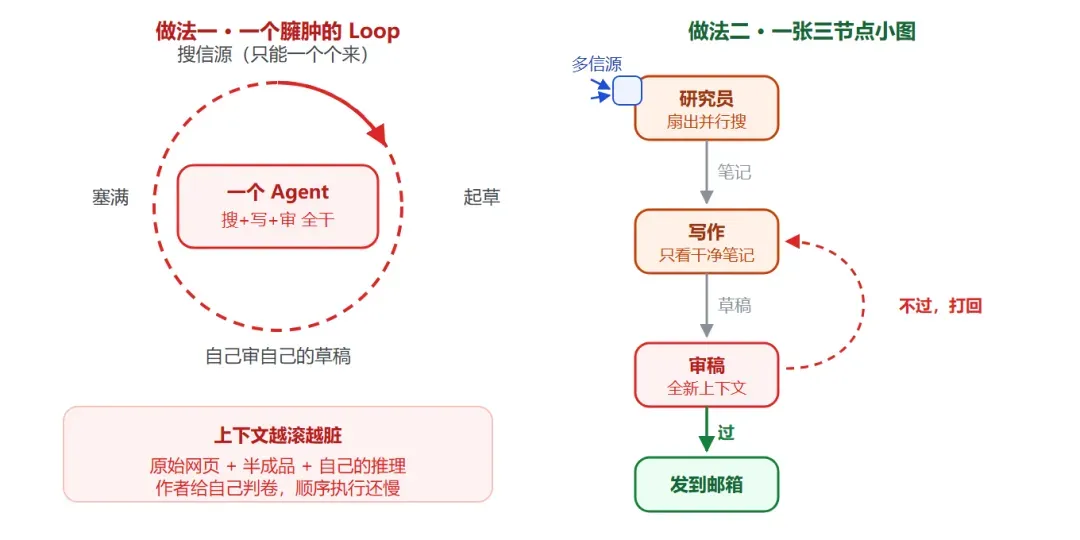
On the left, one loop lets context get dirtier and dirtier while reviewing itself; on the right, three nodes each keep clean context, and review happens with fresh eyes
You can see directly what the small graph bought you: context is separated and clean (the writer node is never drowned in search garbage), it's genuine review, not self-stamped approval (the reviewer has fresh eyes), gathering happens in parallel instead of one at a time, and there's a clear path readable as a graph, instead of having to reverse-engineer it from a long conversation transcript.
But the Small Graph Isn't Free Either
Honestly, this graph has a cost that the bloated Loop version doesn't pay. You have to maintain three prompts instead of one, design the state structure between nodes (exactly what does the researcher hand off to the writer), and deal with a new batch of failure modes — silently dropping a source during a merge, a routing bug causing an infinite loop, state leaking from one node into the next.
The single most important line in this example For a brief that runs every single day, this extra overhead buys a real quality improvement — worth it. But for a task that runs only once, it's pure tax. That trade-off is the entire decision of whether to upgrade from Loop to Graph.
Lay the two approaches side by side, and the difference is obvious.
| Dimension | Bloated Loop | Three-Node Graph |
|---|---|---|
| Context | All mixed together, gets dirtier as it runs | Each node's context is clean and isolated |
| Review | The author reviews themselves, almost always passes | Fresh context, genuinely catches errors |
| Gathering | Reads sources one by one, sequentially — slow | Fans out across multiple sources in parallel — fast |
| Readability | One long conversation transcript, has to be reverse-engineered | A graph you can just read |
| Cost | One prompt, low starting cost | Three prompts + state structure, higher starting cost |
| Best fit | A task that runs once | A task that runs daily and needs quality |
Source: Anthropic's Building Effective Agents, and community loop-vs-graph case studies
X. When to Use It, and When Not To
The single most important mindset here: don't build a Graph for Graph's sake. This isn't my personal opinion — it's something Anthropic keeps emphasizing. They've seen too many teams spend months building complex multi-agent architectures, only to find improving a single agent's prompt achieves the same result.
First, some hard numbers straight from Anthropic, to build your intuition for the cost.
| Data point | What it means |
|---|---|
| 90.2% | How much a multi-agent research system beat a single agent by, on internal evals |
| 15× | Multi-agent systems' token consumption, roughly, compared to a normal conversation |
| 80% | Token usage alone explains 80% of the variance in performance |
Source: Anthropic's How we built our multi-agent research system
These numbers spell out a brutal trade-off: multi-agent really is stronger, but it buys that strength by burning a lot more tokens. So it's only worth using on tasks whose value is high enough to cover that cost. Anthropic gives three clear scenarios where multi-agent is warranted — three rulers for judging whether a graph is worth building.
- Context protection: a subtask produces a large amount (over 1,000 tokens) of information irrelevant to the main task; isolating it into an independent subagent keeps the main context clean.
- Parallelizable: the task can be split into multiple independent branches running at once, exploring a larger search space than a single agent could — especially useful for breadth-first research search.
- Specialization: different steps need different tools, prompts, or focus; splitting them up improves tool-selection accuracy and task focus.
Conversely, if a task has just one goal, one domain, and a clear stopping condition, a single clean Loop is the optimal answer. Say, having an agent check the repo's CI once a day and summarize the log for you if it fails — that's a perfect loop; forcibly splitting it into ten agents just adds latency, cost, and debugging difficulty. The judgment only needs one simple threshold to clear first.
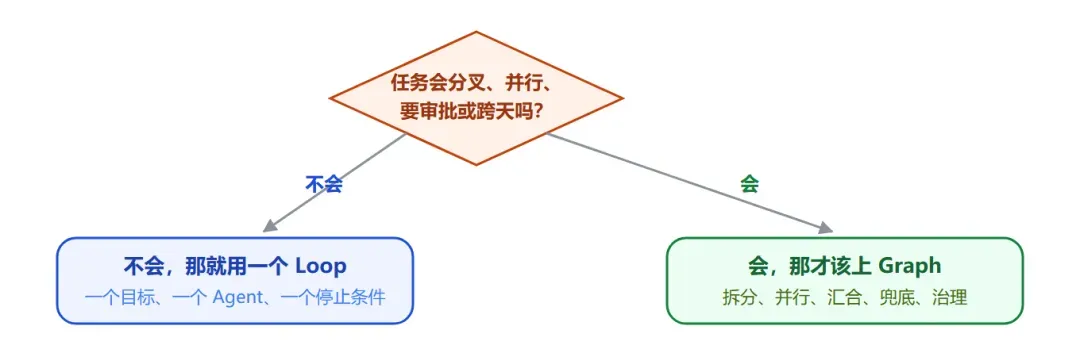
Ask yourself this one question first — only once it hits several of these signals is it worth building a graph
The final governance red line A graph allows "how a task gets split and merged" to be adjusted flexibly on the fly — that's called the work graph, and it can change fast. But long-term permissions — who can modify the database, who can bypass approval — must never be left to the model's on-the-fly discretion. That's called the role graph, and it must change slowly and stay auditable. Otherwise what you've built isn't an intelligent system — it's a production incident waiting to happen.
XI. Framework Comparison and Real Production Cases
Graph Engineering has long stopped being a paper concept. Frameworks like LangGraph, Google ADK, and Microsoft AutoGen were already building agents with nodes, edges, and shared state two years before this term showed up. In other words, if you've used any of them, you were already doing graph engineering — you just didn't have this name for it.
Let's look at how these mainstream frameworks position themselves differently.
| Framework | Orchestration model | State management | Tokens for the same task | Best fit |
|---|---|---|---|---|
| LangGraph (LangChain) | Directed graph + conditional edges | Built-in checkpointing + time travel | ~2,000 | Long-running, auditable, rollback-needing production pipelines |
| CrewAI | Role-based crews | Sequential task-output passing | ~3,500 | Standardized role-based collaboration |
| AutoGen (Microsoft) | Conversational GroupChat | Conversation history-driven | ~8,000 | Exploratory multi-model conversation coordination |
| Google ADK | Structured graph architecture | Hierarchical coordination + A2A protocol | — | Code-first, enterprise-grade, deployable to Vertex AI |
Source: DataCamp's 2026 framework comparison, each framework's official docs
One detail worth expanding on: why does LangGraph use 2,000 tokens for the same task where AutoGen needs 8,000? The difference comes from the graph structure itself — it turns "conversation" between agents into "state transition," cutting out the pile of filler each agent would otherwise need to restate background to the other. This is also why LangGraph has become the de facto standard for enterprise production, with tens of millions of monthly downloads.
LangGraph's killer feature, in its own official docs' words, is durable execution. Its mechanism deserves its own explanation, because this is a capability a single Loop can never provide.
LangGraph's official docs: the checkpointing mechanism Attach a checkpointer when compiling the graph, and it snapshots the entire graph's state at the end of every "super-step." This unlocks four capabilities: human-in-the-loop (the graph can pause at any node, waiting for a human to inspect, modify, and approve before resuming from that breakpoint), memory (context is preserved across multi-turn interactions), time-travel debugging (rewind to any historical checkpoint to replay, or even fork off a new path), and fault tolerance (if a node fails, restart from the last successful step instead of from scratch).
Even better is a design called pending writes: when a node fails within a super-step, the outputs of the other nodes that already succeeded are preserved, so recovery doesn't have to re-run those successful nodes. These engineering details are exactly what turns an agent from "able to demo" into "able to run in production." A few real cases:
LinkedIn's SQL Bot Lets thousands of non-technical employees query the data warehouse in plain language. The approach is a graph: a routing agent first figures out which data domain the question touches, hands it to a domain-expert agent, then to one that writes SQL, and finally to a self-correcting agent that catches and fixes its own errors — conditional edges support retrying up to N times, escalating to a human only if it still fails. Result: 95% query-accuracy satisfaction.
Uber's code migration Facing 5,000 engineers and hundreds of millions of lines of code, they spun up a dedicated subagent per language and per repo using subgraphs, with an orchestrator graph coordinating above them, resolving conflicts before submission. The checkpointing mechanism let the system withstand the CI flakiness, code freezes, and maintenance windows that inevitably interrupt long-running work. Result: over 21,000 engineering hours saved.
Other companies running on LangGraph include Klarna, JPMorgan Chase, and Replit. Beyond that, Anthropic's own Research feature uses the same idea — an orchestrator-workers pattern where a lead agent plans and subagents search in parallel — with official data claiming it beats a single agent by 90.2%. None of these are demos; they're systems genuinely running in production, serving real users.
XII. How Does This Relate to Old Workflows and ReAct
One last theoretical question, and a favorite argument among senior engineers: isn't this just going back to the old pre-ReAct workflows? The answer: similar in shape, different in substance.
To explain that, you need to look at what the previous two generations looked like. Old workflows had a fixed path, with every node hardcoded — like a fixed assembly line, unable to bend at all when something unexpected comes up. Later, ReAct went to the other extreme, letting the model "think and act" the whole way through — flexible, sure, but the entire control flow ends up soaking in the model's back-and-forth conversation. If you want to ask afterward "why did it do that," all you can do is go archaeology-diving through a long, messy conversation transcript — hard to reproduce, hard to audit, easy to spiral out of control.
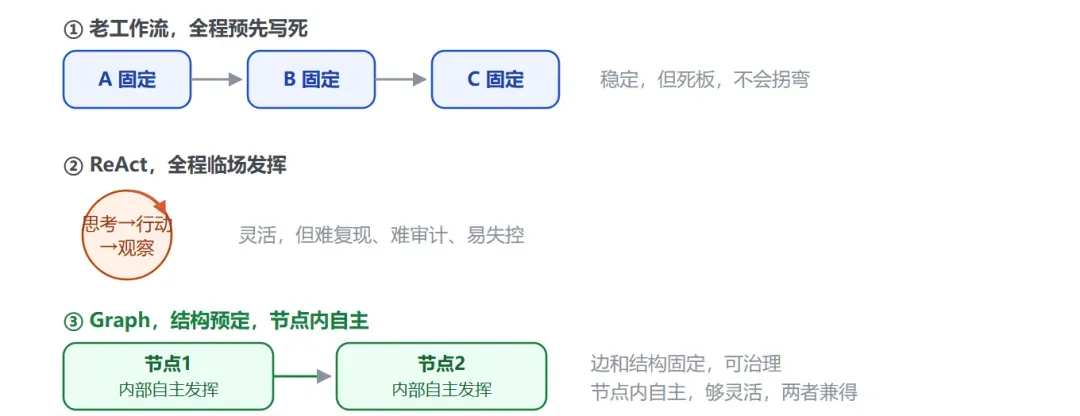
Old workflows and ReAct are the two extremes of "stable" versus "flexible" — Graph splits them into two layers and gets both at once
Graph's cleverness is splitting "stable" and "flexible" into two layers to solve, rather than picking one. Fixing the edges and overall structure means it's governable, auditable, and every classification takes the same path every time; keeping autonomy inside the nodes means it's flexible enough to handle the specific problem in front of it. This lines up exactly with Anthropic's own official definitions: a workflow is "a system orchestrated through predefined code paths," an agent is "a system where the LLM dynamically decides its own process" — and Graph is precisely the fusion of the two, using predefined edges to frame dynamic nodes.
So what it's returning to is only the "shape" of the old workflow — the core is completely different. An old workflow's nodes are dead code; a Graph's nodes house agents capable of autonomous reasoning. This isn't circling back — it's a spiral upward, folding ReAct's flexibility into a governable skeleton.
XIII. Conclusion: Is It the Real Thing or Not
After all that ground covered, back to the original question. Is Graph Engineering a marketing buzzword, or the real thing? My judgment: it's a naming event, plus a genuine shift in vantage point.
The naming-event part is hollow. Nodes, edges, state, directed-graph scheduling, state machines, multi-agent orchestration — computer science has been playing with these for decades, and LangGraph, ADK, and AutoGen have genuinely been doing this for over two years already. This term will probably, like Loop Engineering before it, get covered over by the next one within a few months.
The vantage-point shift, though, is real. What's genuinely changed is that three things have come together at once: models are now strong enough to reliably act as an autonomous node, frameworks are mature enough to wire them together reliably, and the community is large enough to have accumulated a shared vocabulary. Engineering focus has genuinely shifted, from programming a single agent's behavior, up to programming the organization of a group of agents. This shift is real, and it enables systems a single loop could never build.
Interestingly, after all this effort spent on AI, what we can't avoid circling back to is the oldest discipline of all: how to manage an organization. How to divide labor, how to assign responsibility, how to separate the people doing the work from the people supervising it, how to keep the whole thing from collapsing when someone drops the ball. Human companies have been chewing on these questions for centuries — now it's just a new batch of employees, and the questions are being asked all over again.
Three lines you can use directly First, don't build a graph for the graph's sake. If a clean loop can handle it, don't over-engineer it — sketch a small graph you could explain on a napkin first. This is Anthropic's first principle, repeated over and over. Second, a graph's value comes from determinism, not from the number of agents. Let the model make judgments, let code provide the backstop, and pair it with an independent set of eyes whose only job is to find fault. Third, and most critical, a graph must stay grounded — it needs a real-world anchor. A test genuinely ran, money genuinely landed, a user genuinely stuck around — otherwise, no matter how precisely it's built, it's just a more organized hallucination factory. Names will change, but the direction — from one person working alone, to a group collaborating — won't.
Primary sources
- Anthropic, Building Effective AI Agents — the five workflow patterns, the workflow-vs-agent definitions, framework usage advice
- Anthropic, How we built our multi-agent research system — the orchestrator-workers pattern, the 90.2% / 15× / 80% figures
- Anthropic / Claude, When to use multi-agent systems — the three scenarios: context protection, parallelization, specialization
- LangChain official docs — LangGraph's StateGraph, checkpointing, super-steps, pending writes, human-in-the-loop mechanism
- Google ADK official docs — graph architecture, sequential/parallel/loop workflows, the A2A protocol
- DataScienceDojo, aibuilderclub, eefocus, tonybai, Juejin, Toutiao, and others — term-origin research and Chinese-community analysis