Dissecting Grok Bot: Long-Term Agents, Async Collaboration, and Layered Memory
TL;DR: A Grok Bot agent is a bot with identity, long-term state, memory, tools, and a run queue. Multiple bots coordinate through async messages or enter the same Group for turn-by-turn discussions. Coordination is handled by deterministic Host scheduling — no extra Supervisor model required. Context doesn't grow indefinitely; it layers recent dialogue, summaries, memory, and a searchable transcript. Plugin, Skill, and MCP handle capability distribution, operation methods, and real system connections respectively.
1. What Is Grok Bot: From Code Agent to Always-On Bot
SpaceXAI launched Grok Bot early beta on August 11, 2026, describing it as a team of all-day AI teammates. They can operate cloud computers, use enterprise tools, handle scheduled tasks, and pull humans back when authorization or judgment is needed.官方发布页 listed scenarios covering sales follow-ups, invoice processing, office operations, and bug fixes — the product scope already exceeds code generation.
Grok Build and Grok Bot target different workflows. Grok Build is a terminal coding agent centered on codebases and Shell; Grok Bot's unit is a long-lived bot that continuously receives chat messages, scheduled tasks, other bots' messages, and connector events. Cursor and SpaceXAI then placed Grok 4.6 simultaneously in Cursor and Grok Build, listing long tasks and tool invocation as primary directions.
Grok Bot's code lineage comes from Cursor Sand Runtime. The 0.18.0 release package still uses com.anysphere.sand Bundle ID; the protocol and runtime libraries show heavy shared code from Cursor Agent, Cursor Dashboard, Cursor Plugin, and Cursor MCP. This article uses grok-bot-0.18-reconstructed source code: reconstructed from the public release package into readable TypeScript, not the original Anysphere monorepo. Router, Codex/Claude/OpenRouter, and local Docker experiments added to the repo later are not treated as native Grok Bot design evidence.
2. Agent Architecture: One Long-Life Bot, Plus an On-Demand Tool Set
Grok Bot's agent is better understood as a "long-running work account" than a chat window wrapped in tools. A bot contains at minimum: stable identity, its own session state, continuously updatable memory, and a run queue that never writes conflicting state from concurrent turns. The model is only the judgment part of each turn — the bot itself doesn't disappear when a response ends.
The desktop app is the control plane. Renderer receives messages and displays state, Electron Main handles accounts, authorization, local capabilities and windows, and Coordinator maintains connections; the real agent loop runs in Sand Host. Host loads bot state, organizes this turn's context, provides appropriate tools, executes the model request, then writes the result and new state back.
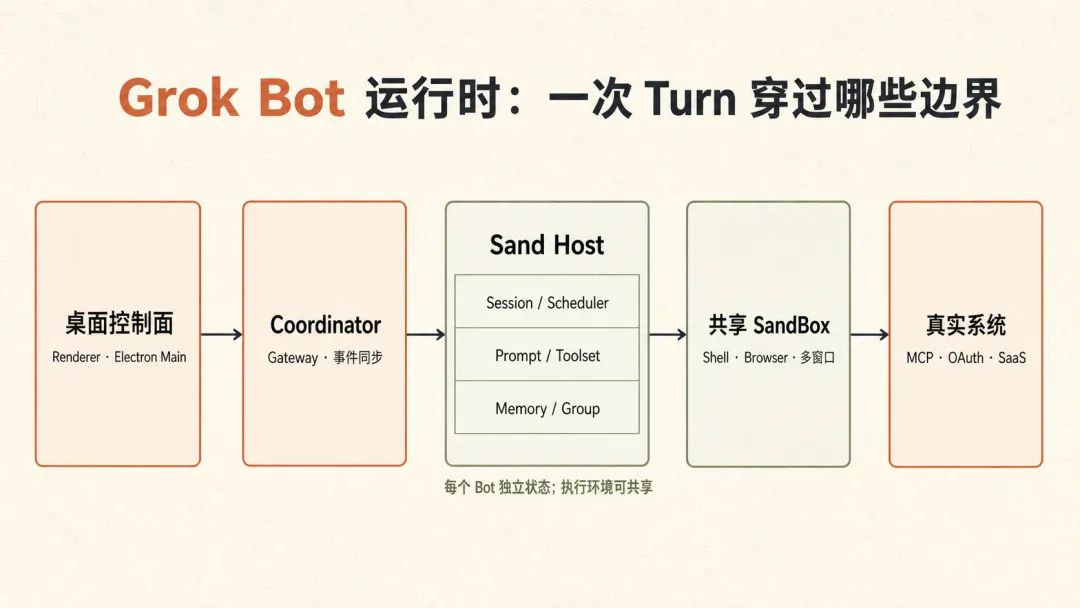
A normal turn follows this path:
User message or external event
  ↓
Load this bot's identity, session, memory, and unfinished work
  ↓
Assemble turn context, select tools by run type
  ↓
Model decides: respond, call tools, spawn Subagent, or contact other bots
  ↓
Tool results return to current turn; final reply writes to transcript
  ↓
Update session state, memory, and background tasks
The most interesting part of this architecture is "tools selected on demand." Main Bot, regular Subagent, Computer Use Subagent, and Browser Use Subagent each see different tool sets. GUI operations go into a dedicated Subagent; MCP tools only join the current turn after successful connection. Regular local Group members still use their full tool set; only cross-user shared rooms have private connectors and most state capabilities removed. This reduces tool schema context overhead and prevents shared rooms from inheriting a bot's private chat permissions.
Core Tools Grouped by Responsibility
| Capability | Core Tools | Solves |
|---|---|---|
| User delivery | SendMessage, ReactToMessage | Actually posts results to the chat UI; plain assistant text is just internal draft |
| Execute work | Shell, Read, WebSearch, WebFetch | Operate remote workspace, read files, query the web |
| Interface ops | Screenshot, Browser/Computer Use Subagent | Handle tasks with no stable API, requiring login or web clicks |
| Real systems | MCP tools | Call Slack, GitHub, Notion, etc., and handle account authorization |
| Split tasks | Task, CheckSubagent, MessageSubagent, StopSubagent | Put complex tasks in isolated context, allow background running, correction, abort |
| Multi-bot | SendToAgent, CreateAgent, UpdateAgent | Contact other long-lived bots or create new specialized roles |
Two capabilities don't fit the simple tool list. update_state modifies the bot's own memory, identity, scheduled tasks and workflows; Cloud Agent hands code tasks to an independent cloud environment. They solve "how long-term state changes" and "where long-running code work executes" respectively.
Skill, MCP, and Plugin Relationships
These three concepts are often conflated but the division is clear. Skill is the operation method — telling the bot what steps to follow for a certain task type. MCP is the tool protocol — letting the bot call real systems like Slack, GitHub, and Notion. Plugin is the distribution package — organizing Skill, MCP configuration, version, and installation info.
Grok Bot has no independent Plugin format; it reuses the Cursor/Claude-compatible Plugin package. The shared parser recognizes Skills, Agents, Commands, Rules, Hooks, and MCP servers, but in Grok Bot Host's explicit implementation path, the most complete落地 paths are Plugin Skills and MCP: Skills are converted to Workflows visible to all bots, and MCP servers are managed by the account-level connection manager for discovery, authorization, and invocation. Existing source code doesn't prove that Rules, Hooks, Commands, and Agents from Plugins become first-class Grok Bot capabilities.
Multiple bots share one persistent SandBox: filesystem, /workspace, and process environment; each allocates its own GUI window and window ownership. Session state and window operations are separated, while the workspace stays shared. This lets bots exchange artifacts via files, but also means one bot's accidental deletion or process interference can affect another.
3. Multi-Agent Coordination: Async Private Chat vs. Group — Two Mechanisms
Grok Bot has no fixed Supervisor Agent. Long-lived bots are peers; who coordinates depends on who the user assigns the task to. The system provides two coordination paths: SendToAgent for directed分工, Group for public discussion.
SendToAgent: Like Sending Messages, Not Calling Functions
When a user asks Researcher to get Bot A and Bot B to debate, there are genuinely three agents running. Researcher sends tasks to A and B separately; the send returns "queued" immediately without synchronously带回 the other side's answer. A and B each work in their own Session, and replies arrive later as new messages in Researcher's conversation, waking Researcher again.
User ──topic──> Researcher
                 ├── message: argue A side ──> Bot A
                 └── message: argue B side ──> Bot B
     <── A's later reply
     <── B's later reply
     │
     └── Compare and summarize in its own new Turn
Different bots have different run queues, so A and B can run in parallel. Inside a single bot, execution stays serial: user messages first, then other bots' messages, then background tasks like timers. This matters. If the same bot receives multiple requests simultaneously, the system doesn't let two model runs concurrently write to the same state.
Researcher also has no hard barrier waiting for all results. When the first reply arrives, it may give a preliminary judgment; when the second arrives, it enters a new Turn to synthesize. Whether to wait, how to judge, and whether to keep追问 another side — all decided by Researcher autonomously based on the current dialogue. It's more like a temporarily designated moderator than a special agent type in the framework.
Group: The Coordinator Is Code, Not a Fourth Agent
A Group is created from the multi-recipient selector in a new chat. User adds two or more bots to To:, sends the first message, and the system creates an independent Group session. The Group has its own public timeline, but members continue using their original identity and Session.
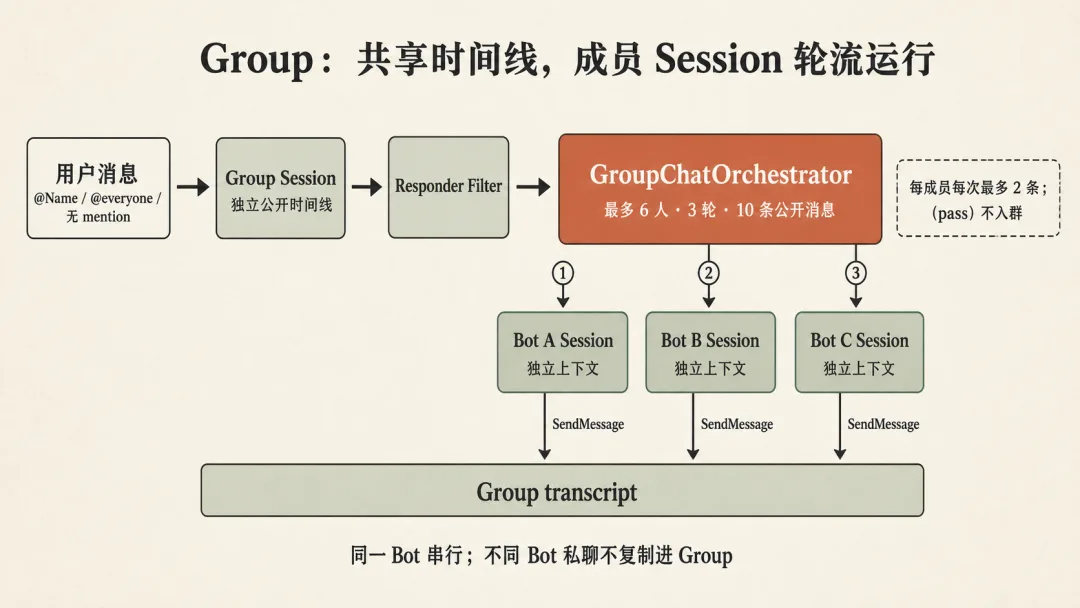
Group coordination runs on fixed Host scheduling logic. It reads mentions first: @Name selects only the named member, @everyone or no mention selects all members; then runs members one by one. Each member sees Group's new message, decides to speak or pass, and only content that explicitly calls SendMessage enters the public timeline.
To prevent bots from endlessly debating or questioning each other, Group has clear limits: maximum 6 members, one user message drives at most 3 rounds of 10 public replies total, each member posts at most 2 messages per turn; a full round with no speakers ends the Group. There is no hidden Researcher. If Researcher is also in the Group, it's just an ordinary member; the code in Host is what actually selects speakers, controls rotation, and stops.
| Dimension | SendToAgent private | Group |
|---|---|---|
| Who decides next | Recipient bot + temp coordinator | Host rotates first, members decide to speak |
| Can parallelize | Different bots can run in parallel | Members run sequentially |
| Shared what | Only explicit messages and attachments | Shared Group public timeline |
| Private chat copied | Not copied | Not copied |
| Right for | Dividing labor, delegation, result collection | Discussion, mutual response, public handoff |
4. Memory and Context: Isolating Private Chats Without Trapping Agents in Information Silos
Grok Bot's context design doesn't "pile history higher and higher." It separates information into three layers: current dialogue handles immediate tasks, Memory stores long-term reusable facts, and shared workspace saves files and execution results. Different layers have different sharing scopes — more precise than saying "each agent is completely isolated."
Three Memory Scopes
| Memory scope | Who sees it | Good for |
|---|---|---|
| Agent memory | Current bot only | Role experience, user's preferences for this bot, long-term responsibilities |
| User memory | Multiple bots under same user | User identity, general preferences, facts needed across tasks |
| Project memory | Bots joined to same Project | Project agreements, shared decisions, continuously updated project context |
Each bot's private chat transcript remains independent. Bot A doesn't automatically see Bot B's full chat just because they're under the same user. But if a fact is written to user memory or a shared project memory, it can enter other bots' context in future turns. What's shared is refined facts, not raw private chats.
Memory can be written explicitly by bots, or extracted after each turn from user messages and final replies. Stable preferences go into long-term profile; time-sensitive content goes into logs; failed extraction doesn't affect the current reply. It saves information that might be useful in the future, not every utterance as memory.
Each Turn Loads Only What That Turn Needs
The system assembles four types of context for each turn request. First: stable identity — bot name, responsibilities, user info. Second: long-term state — Memory, scheduled tasks, enabled Skills. Third: current session — history summary, recent messages, uploaded files. Fourth: capability description — available tools, MCP status, remote computer info.
Not all of this is stuffed into system prompt. MCP tools only join after successful connection this turn; Browser/Computer tools mainly stay in the dedicated Subagent; cross-user shared-room members also have private connectors and most state capabilities removed. Context changes with run type — not every agent shares one massive prompt.
Reading Compressed History
The underlying session has two views. The chat interface uses a time-ordered event log, convenient for search, unread tracking, and message display. The model runtime state uses content-addressed structured storage — dialogue turns, summaries, todos, and Subagent state can be updated separately. With the two views decoupled, interface history, model's current context, and large task state don't need to be rebound to the same JSON repeatedly.
When a session approaches the context window limit, Grok Bot compresses earlier dialogue into a summary, keeping recent messages and ongoing work. Full visible dialogue is still mirrored as JSONL transcript; when an agent needs a precise path, error message, or old decision, it searches keywords first then reads a small nearby segment. Three types of history each serve a purpose: summary keeps the current Turn continuous, Memory enables cross-task fact reuse, JSONL transcript retrieves details omitted by summarization.
Another detail: "compression cycle freeze." Within the same long context cycle, injected Memory and bot profile remain stable; if identity or memory changes, the system first notifies the model with a hidden update, then folds it back into stable context at the next compression. This prevents a model from suddenly confronting a quietly rewritten identity description mid-long-task.
Long-term agents must remember the user, but each request can't hold all past; multiple agents must isolate private chats but also exchange conclusions and artifacts. Grok Bot combines private Session, layered Memory, searchable transcript, shared Group timeline, and shared workspace to thread this needle.
References
- Introducing Grok Bot — SpaceXAI
- Introducing Grok 4.6 — Cursor
- Cursor is now a part of SpaceX
- Cursor Plugins Documentation
- Claude Code Plugins Reference
- grok-bot-0.18-reconstructed
- Source index: Agent lifecycle and tool selection in
source/host/runner/; multi-bot and Group insource/host/extensions/transcript/; Memory insource/host/extensions/memory/; Plugin/MCP insource/host/extensions/mcp/