I Built a 3D Game You Can Build, Shelter, and Defend In with GPT-Astra + Three.js
From a one-line idea — "make a woodland building game" — to a browser world you can actually play, the point of this project wasn't how much code got generated. It was keeping GPT-Astra continuously involved in design, implementation, testing, and fixing. What came out of that is Wildwood: construction, furniture, day/night weather, character pathfinding, monster raids, and local saves.
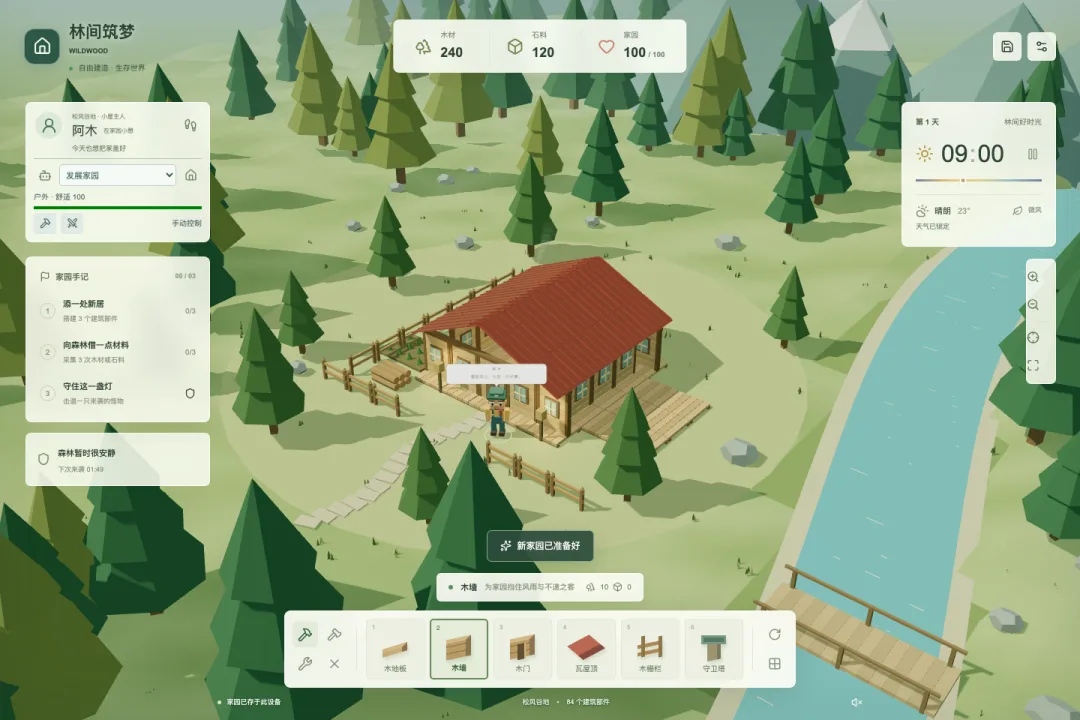
Open the browser and you're looking at a low-poly forest. A wooden cabin sits at the center of camp, a river runs along one side, and your character stands by the door. You gather wood and stone, expand the house, and furnish it with beds, tables, chairs, rugs, and lamps. Night and thunderstorms change the environment, and monsters path toward your home and tear down whatever they reach.
None of this is a pre-recorded animation or a 3D-looking page faked with static images. The scene is rendered live by Three.js — buildings can be placed block by block, rotated, damaged, and torn down, and characters and monsters actually pathfind across the grid.
What GPT-Astra Actually Did Here
One thing worth clarifying up front: GPT-Astra is a collaborator during development, not part of the game's runtime.
I used it to read the project, break down requirements, modify code, run tests, open the browser to check interactions, and then keep fixing based on screenshots and actual click results. Once a player opens the game, weather, pathfinding, auto-management, and combat all run locally — no model connection required, and nothing breaks if a model service goes down.
Two separate layers, worth keeping distinct:
Development phase
Requirements & feedback -> GPT-Astra -> code changes -> tests & browser verification -> next round of feedback

Runtime phase
Player input -> React UI -> GameEngine -> Three.js scene
                              -> local rules / A* / save system
What actually matters isn't getting the model to spit out one giant "complete" project in one shot — it's getting it into an engineering loop. Take something as small as "the building shouldn't keep following the mouse." That ends up as an explicit placementArmed state: activated when you click a catalog item, cleared after one successful placement; if nothing is queued for placement, clicking an existing building rotates it instead. A seemingly trivial interaction fix touches the state machine, raycasting, the preview mesh, and the test suite all at once.
Splitting the Game Into Three Layers
Three files carry most of the weight, each with a distinct responsibility:
app/game/model.ts: building recipes, resources, durability, placement rules, save validation.app/game/engine.ts: the Three.js scene, game loop, interaction, weather, enemies, and save sync.app/page.tsx: React state and UI — the resource bar, toolbar, character panel, and settings.
With that split, rules don't depend on rendering. Whether a wall can go on a given tile, whether furniture inventory is sufficient, whether an old save is still valid — all of that can be unit tested directly, while Three.js is only responsible for drawing whatever state is already determined.
Core data doesn't live inside a Mesh — it's kept as a plain object:
type Block = {
  id: number;
  kind: Kind;
  x: number;
  z: number;
  rotation: number;
  hp: number;
};
The engine separately maintains an id -> THREE.Group mapping. Rotating a wall updates Block.rotation first, then the corresponding mesh; saving only serializes the data, never the Three.js objects. That keeps saving, loading, and rule testing all much simpler.
The Building System: Raycasting, Grid, and Single-Shot Placement
3D building in the browser starts with projecting a 2D mouse position into 3D space.
The engine casts a ray from the camera with THREE.Raycaster, intersects it with the ground plane, then divides by tile size and rounds:
private cellAtPointer() {
  const point = new THREE.Vector3();
  if (!this.ray.ray.intersectPlane(this.plane, point)) return null;
  return {
    x: Math.round(point.x / TILE),
    z: Math.round(point.z / TILE),
  };
}
Getting a valid cell doesn't mean you can build there yet. placementError checks camp boundaries, the riverbank, the home core, resource tiles, character occupancy, roof support, and furniture clearance. The preview model turns green or red depending on the result.
The mouse interaction model went through several iterations before converging on something that actually feels like a building game:
- A follow-mouse preview only appears after clicking a building or furniture item in the catalog.
- Clicking the ground places it once, and the preview disappears immediately — no accidental chain-building.
- With nothing queued for placement, clicking an already-placed object rotates it 90°.
- The scroll wheel zooms the camera by default; holding Shift while scrolling rotates the item queued for placement.
Rotation only snaps to four directions: 0°, 90°, 180°, 270°. Early versions allowed arbitrary angles, which made it easy to accidentally drag something to 259°. For grid-based building, that freedom didn't add enough value — it just made wall orientation hard to read. Four-way snapping was added later, and arbitrary angles from old saves get snapped to the nearest direction on load.
Procedural Low-Poly Scenes
The project has no dependency on remote model assets — houses, trees, rocks, furniture, characters, and monsters are all assembled from Three.js primitives. The upside of procedural assets is very concrete: fast load times, a consistent style, easy-to-tweak parameters, and it's straightforward for GPT-Astra to adjust proportions and materials directly in code.
Each object category is organized as a THREE.Group. Wall panels, posts, and window frames are modeled separately, then merged into fewer geometries to cut draw calls. Materials are cached by parameter to avoid recreating a MeshStandardMaterial for every instance of the same color.
const materials = new Map<string, THREE.MeshStandardMaterial>();

function mat(color: string, options = {}) {
  const key = color + JSON.stringify(options);
  if (!materials.has(key)) {
    materials.set(key, new THREE.MeshStandardMaterial({
      color,
      roughness: 0.9,
      flatShading: true,
      ...options,
    }));
  }
  return materials.get(key)!;
}
Low-poly doesn't mean "throw a few boxes together." Roofs need a readable pitch, walls need a visible front and back, and a character's face, backpack, tools, and umbrella need to stay legible from a top-down camera. The clearer the style constraints, the less new assets drift off-model later.
Furniture Isn't Decoration — It Follows the Same Rules
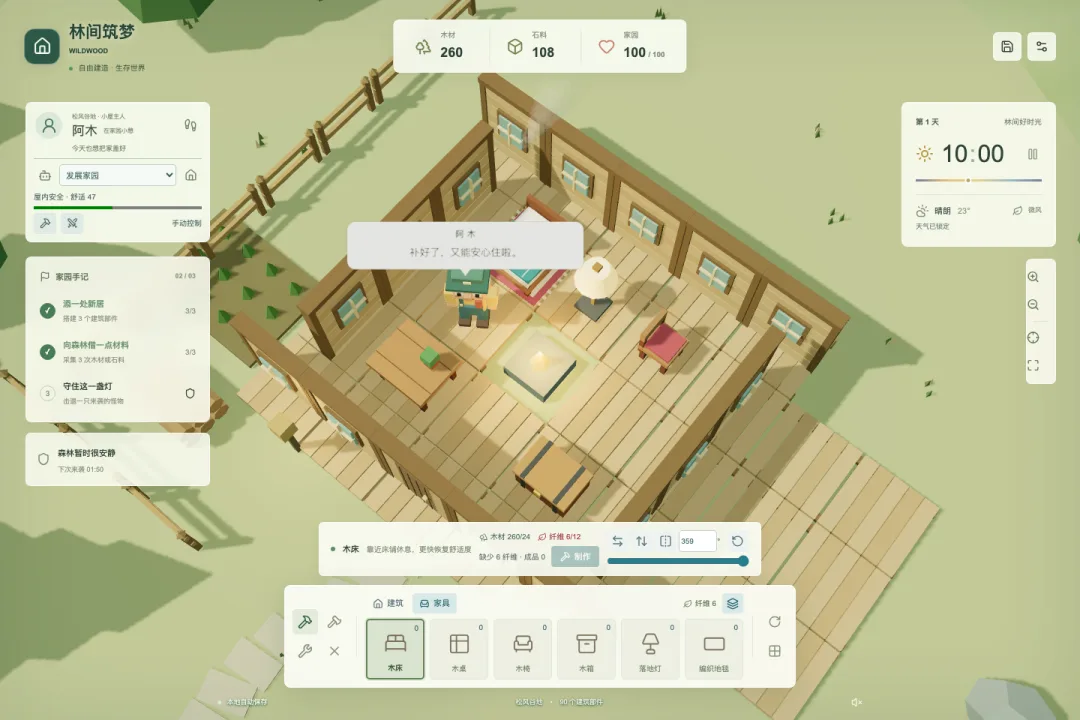
Furniture reuses the same object model, rotation, durability, and save mechanics as buildings, with added crafting inventory and indoor placement rules: items must be crafted before they can be placed, and placing one consumes a crafted unit; beds and tables/chairs block pathfinding, while rugs can stack under other furniture; the sole path through a door can't be blocked by solid furniture.
Switching into the furniture category moves the camera to a higher indoor angle and hides nearby roofs. This is where "visually hidden" and "removed from the ruleset" have to stay separate: the roof is invisible, but it still blocks rain, and monsters can still destroy it.
Beds and chairs also affect comfort. When the character is idle indoors, proximity to a bed restores 2 points per second, and a chair restores 1. Furniture isn't just decoration — it's tied into the survival mechanics.
Character Pathfinding and Local Auto-Management
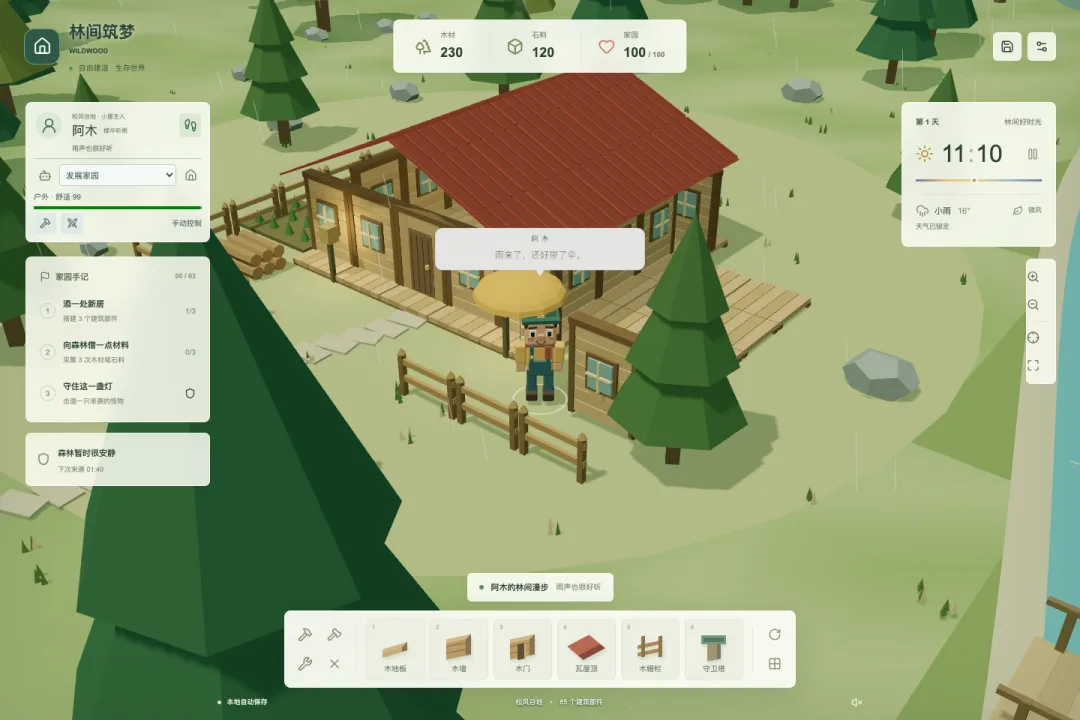
The character uses javascript-astar for four-directional pathfinding. The grid marks walls, resources, the river, the core, and solid furniture as impassable; since a labor target itself is usually not standable, the character has to path to a reachable tile adjacent to it.
Auto-management isn't a large model controlling things live — it's a set of predictable, local planning rules. Players can choose to develop the home, keep gathering, or patrol and repair. Under light rain, auto-management tries to head indoors; during thunderstorms or monster raids, it prioritizes taking shelter or defending; at night, it heads inside to rest.
"Is this shelter safe" isn't a simple "is there a roof nearby" check either. The system verifies that walls and doors form a closed boundary, that there's a roof above the character's current tile, and that a walkable path to the entrance exists. A gap in the wall, a destroyed roof, or furniture blocking the doorway all invalidate shelter.
This is exactly the kind of section where GPT-Astra is most useful for filling in edge cases: it can trace through the state and call chain and check things like "does the path get recalculated after being blocked," "can a shelter task deduct materials too early," and "can manual movement take over immediately" — then turn those edge cases into tests.
Day/Night, Weather, and a Real Flicker Bug
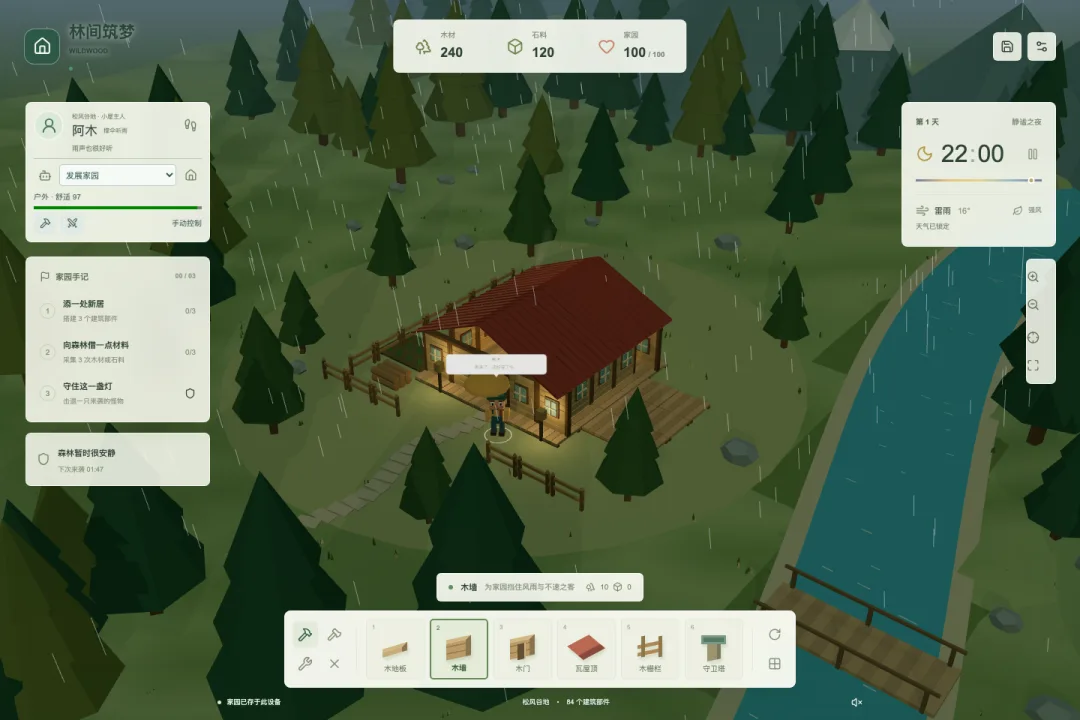
Game time advances continuously, with each day/night cycle randomized between 4 and 6 minutes. Weather cycles between clear, light rain, and thunderstorms, each lasting 45 to 120 seconds. Sun intensity, ambient light, sky, fog, and firelight all shift smoothly based on time and weather.
An early thunderstorm build had an obvious bug: the lightning logic would periodically set sun intensity directly to 7, while the normal lighting update kept resetting it back to a baseline value. Two write sources fighting over the same property produced a screen that kept flashing.
The fix wasn't lowering the lightning frequency — it was making sure each frame has exactly one writer for a given lighting property, approaching the target value through exponential smoothing instead:
const blend = immediate ? 1 : 1 - Math.exp(-Math.max(0, dt) * 3);

this.sun.intensity = THREE.MathUtils.lerp(
  this.sun.intensity,
  targetSunIntensity,
  blend,
);
Raindrops read roof tiles the same way. Where a tile has a roof, the rain line resets above it instead of falling through into the interior. It's a small detail, but it's the difference between a house that actually blocks rain and one that just shows a "safe" label in a panel.
Monsters, Defense, and a Single Unified Game Loop
The game loop runs on requestAnimationFrame, capping per-frame time at 0.05 seconds to avoid a jarring jump after the tab regains focus.
private animate = () => {
  this.frame = requestAnimationFrame(this.animate);
  const dt = Math.min(this.clock.getDelta(), 0.05);

  this.controls.update();
  this.updateAgent(dt);
  this.updateEnemies(dt);
  this.updateResident(dt);
  this.updateShelterVisuals(dt);
  this.updateLighting(dt);
  this.renderer.render(this.scene, this.camera);
};
Monsters approach buildings using A*, and will seek a target, move, attack, and replan their path as needed. Guard towers attack any monster within range; the character can also attack nearby enemies while guarding indoors, reducing damage taken by nearby buildings.
One important principle here: mouse input, keyboard-driven labor, and auto-management all end up calling the exact same gather/repair/build settlement functions. Otherwise it's very easy for the three entry points to disagree on resource deduction, or for auto-management to bypass constraints the player is otherwise held to.
Local Saves: Validate First, Then Restore
The game autosaves every 15 seconds, plus once more when the page is being left. Saves capture resources, weather, buildings, furniture inventory, rotation, character position, and gathered resources.
Loading never trusts the raw JSON pulled from localStorage. validSave checks version, value ranges, building types, coordinates, durability, and furniture inventory. A corrupted save falls back to a safe default; an old save missing new fields gets backfilled from defaults.
This matters a lot for ongoing iteration. AI-assisted development makes it very easy to add new fields quickly — without a compatibility strategy, one feature update can permanently lock a player out of their own home.
Mobile Isn't Just the Desktop Layout Shrunk Down
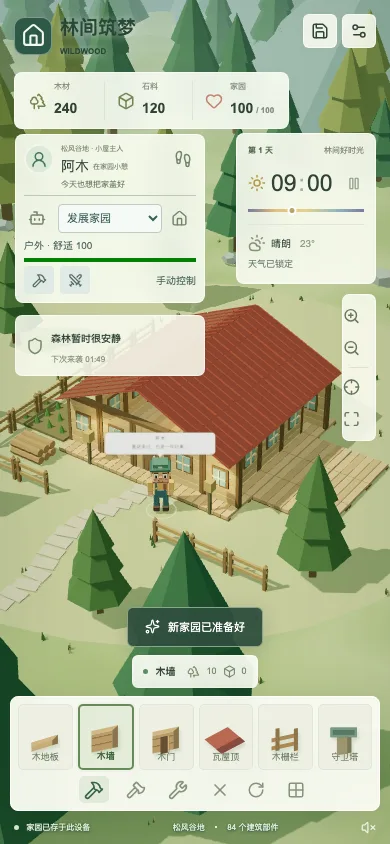
Getting the Three.js canvas itself to fit the screen isn't the hard part — the HUD is. Desktop shows character info, tasks, weather, resources, and the build bar all at once; compress that as-is onto a phone and the scene ends up buried under panels.
Mobile makes real trade-offs: the task panel collapses, character info shortens, the resource bar switches to a compact horizontal layout, the bottom catalog keeps a tappable size, and weather/pause state stay visible. Touch input uses one-finger pan and two-finger zoom/rotate, with on-screen buttons for every key action — nothing can depend solely on keyboard shortcuts.
How Do You Verify a 3D Game That "Looks Playable"
Projects like this can't be validated by "does TypeScript pass." The current build's verification runs across four layers:
- Rule unit tests: crafting transactions, placement boundaries, save validation, pathfinding, shelter logic, weather, and rotation.
- Type checking and a production build: catches static export issues a dev server would otherwise mask.
- Browser behavior tests: actual clicks for building, gathering, rotating, crafting, demolishing, saving, and recovering after a refresh.
- Visual and pixel checks: at desktop, 390×844, and 360×740 sizes — checking the canvas isn't empty, control boundaries, horizontal overflow, and animation changes.
The project currently has 18 rule-level unit tests. A visual regression script separately checks whether furniture actually renders on canvas, whether thunderstorm brightness stays stable, whether the river visibly moves, and whether mobile buttons overflow their containers.
GPT-Astra's value in this step is direct: it doesn't just edit code — it runs the verification, reads the failures, and goes back to the relevant module to keep fixing. Without this loop, "AI-written" software very easily stalls at "the page loads."
The Prompting Approach I Actually Used
Prompts don't need to read like a formal spec — but they do need to state the goal, the boundaries, and how success will be verified. The templates below can be used directly as a starting point for a GPT-Astra + Three.js project.
1. Bootstrap a Playable Core Loop
Build a single-player browser 3D building-and-defense game using React, TypeScript, and Three.js.

Phase one is the playable core loop only:
- A low-poly 3D scene you can pan, rotate, and zoom;
- Wood, stone, and a home health value;
- Build, gather, repair, demolish;
- Monsters approach and attack buildings; the game ends when home health hits zero;
- A local save using localStorage.

Keep business rules separate from Three.js rendering. Don't fake the 3D scene with static images or fake interactions.
When done, run unit tests, TypeScript checks, and a production build, and verify manually at desktop and mobile sizes.
The single most important part of this prompt is scoping it to "phase one." Ask for networking, multiplayer, a quest system, and dozens of building types all at once and the model will happily generate a lot of code — none of it forming a stable core loop.
2. Establish a Procedural Low-Poly Scene
Establish a unified low-poly visual system for the existing Three.js game.

Requirements:
- Compose assets from primitives like BoxGeometry, ConeGeometry, and CylinderGeometry;
- Keep trees, rocks, houses, and furniture consistent in scale, color, and flatShading style;
- Reuse identical materials, and merge static geometry where it makes sense;
- Preserve shadows, fog, day/night lighting, and readable object silhouettes;
- No remote model dependencies.

Read the existing asset-generation functions first, and follow the project's existing helper functions and naming conventions. After changes, verify the canvas isn't empty, shadows render correctly, and take screenshots to confirm desktop and mobile composition.
Don't just say "make it prettier." The more specific you are about scale, materials, performance, and how it'll be verified, the more stable the output.
3. Implement Mouse-Driven Building
Implement grid-based building interaction for the existing Three.js scene.

Interaction rules:
- Placement mode only activates after clicking a building or furniture item in the catalog;
- Project the mouse to the ground with a Raycaster and snap to an integer grid;
- A green preview means placement is valid, red means conflict;
- Exit placement mode immediately after one successful placement;
- With nothing queued for placement, clicking an existing object rotates it 90 degrees;
- Clicking empty ground with nothing queued does nothing;
- The scroll wheel zooms the camera by default; Shift + scroll rotates the queued item.

Placement must check boundaries, resources, character occupancy, duplicate buildings, roof support, and furniture clearance before committing. Don't let UI state be the sole source of truth for the rules — rules belong in a testable model layer.
This was the most-iterated prompt category on this project. Being explicit about "when does the preview follow the mouse" and "what does clicking an existing object do" prevents building, selection, and camera controls from fighting over the same events.
4. Add a Character and A* Pathfinding
Add a visible 3D resident character to the existing grid-building game, using a mature A* library for pathfinding.

Requirements:
- Clicking the ground walks the character to the corresponding reachable tile;
- Walls, the river, resources, the core, and solid furniture are impassable;
- Gather, repair, and build targets may themselves be unstandable, so the character should walk to an adjacent tile;
- Replan when the path changes or gets blocked — never walk through walls or teleport;
- Walking, hammering, chopping, and weather-affected animations should be driven by character state;
- Manual input should immediately cancel any automated task and take over the character.

Reuse the existing Block data and grid checks — don't maintain a second, conflicting collision world. Add tests for wall avoidance, target adjacency, unreachable targets, and furniture blocking.
5. Add Local Auto-Management
Add fully local rule-based auto-management for the resident — no online model calls.

Provide three goals: develop the home, keep gathering, or patrol and repair.
Auto-management must actually pathfind and perform labor, deducting or adding resources only after the action completes.

Priority order:
- Seek shelter during thunderstorms or monster raids;
- Rest indoors at night;
- Repair damaged buildings when there's a target for it;
- Gather when materials are low;
- Otherwise proceed with the scheduled build plan.

Shelter safety must be determined jointly by closed walls, a door, a roof, and a reachable entrance. If a route is blocked, surface the reason and wait to replan — never teleport. Exit auto-management immediately if the player moves or clicks the scene.
Being explicit about "local rules" matters a lot here — otherwise the AI-collaboration story in this post easily gets confused with in-game AI behavior.
6. Diagnose a Thunderstorm Flicker
The current Three.js game flickers between bright and dark during thunderstorms. Reproduce the issue first and locate every code path that writes to sun light, ambient light, background color, fog, or exposure — don't guess it's a CSS issue.

Fix goals:
- Exactly one clear writer per visual property per frame;
- Weather and day/night only compute target values, which a single unified lighting update then smooths toward;
- No brightness jumps when pausing, switching weather, or loading a save;
- Keep the rain and wind effects — no need for an intense full-screen lightning flash.

After the fix, run a fixed timestep for at least 720 frames, log the min/max sun intensity observed, and check both desktop and mobile canvases.
For this class of debugging prompt, ask the model to "list every write source" first. If you just say "fix the flicker," it'll likely add a delay or reduce opacity in the wrong place.
7. Audit Save Compatibility
Review the local save system's load, validation, and upgrade path.

Requirements:
- Never trust the object parsed straight out of localStorage;
- Validate version, resources, building types, coordinates, durability, rotation, and furniture inventory;
- Backfill missing new fields from defaults;
- Reject invalid values, Infinity, NaN, negative inventory, and unknown types;
- A corrupted save falls back to a new game — it must never crash the page;
- Keep existing save versions loadable; never wipe user data.

Add unit tests for a valid old save, a save missing fields, and several kinds of corrupted data, then run a production build.
8. Run a Full Browser Regression
Run an end-to-end browser regression on the current game — don't just check that the page loads.

Verify at minimum:
- Selecting a building shows a preview, which disappears after one placement;
- Clicking an existing building rotates it 90 degrees with no change to resources, durability, or count;
- Resource settlement is correct for gathering, repairing, demolishing, and crafting furniture;
- After saving and refreshing, buildings, inventory, character position, and orientation are all restored;
- Light rain, thunderstorms, night, and monster raids all run correctly;
- No horizontal overflow or overlapping controls at desktop 1440×960, mobile 390×844, or small mobile 360×740;
- The Three.js canvas isn't empty, key objects show visible pixel changes, and the console has no errors.

Fix anything found and re-run the affected checks, then list what passed and what boundaries remain.
9. Small Iterations Driven by Screenshots
Day-to-day tweaks don't need the full requirement spec restated. This shorter prompt form gets used far more often:
Look at the area I marked in the browser. The selected building currently keeps following the mouse, which causes accidental placements.

Read the existing placement state and pointer events first, then change it to: place once after clicking a catalog item; cancel follow-mode after a successful placement; with nothing queued, clicking an existing building rotates it instead. Preserve existing camera controls, save compatibility, and mobile behavior.

Once done, run the relevant tests, type checks, and a production build, and verify by clicking through it in the current browser. Don't touch unrelated UI.
This shape stays consistent: state the observed problem, describe the expected behavior, list the boundaries that shouldn't break, then require verification. It works much better than "improve the interaction."
What GPT-Astra + Three.js Adds Up To
Having finished Wildwood, my take on this combination is clear: Three.js provides a computable, interactive real-time world, and GPT-Astra's job is to keep helping a developer understand, modify, and verify that world as it gets more complex.
Three.js is genuinely well-suited to AI-assisted development. Scenes, cameras, lights, materials, geometry, and animation all have a clean code representation, and the visual result is immediately observable in a browser. After GPT-Astra changes a material parameter, a collision rule, or a pointer event, it can run the project and see the result directly. The distance between a code change and its visual feedback is short, so iteration speed naturally picks up.
But the real value of this pairing isn't "the model can write Three.js." Generating a single tree, a house, or a rotation animation in isolation isn't hard. What's hard is once the project grows — construction, pathfinding, weather, furniture, saves, and UI all start interacting with each other. That's where GPT-Astra's advantages actually show up.
1. It can trace a full call chain to understand a problem
"The building keeps following the mouse" looks like a rendering bug on the surface, but it actually spans tool selection in React, placement state inside the engine, Raycaster pointer events, the preview mesh's visibility, and state cleanup after a successful placement.
GPT-Astra can read through these relationships first and decide where the state should actually live, instead of just hiding the model temporarily at the UI layer. That matters a lot for Three.js projects, because the root cause of many visual glitches isn't in the rendering layer at all.
2. It's good at cross-module consistency
A single change to rotation rules touches new buildings, already-placed buildings, furniture, keyboard shortcuts, the scroll wheel, save restoration, and the angle shown in the UI. GPT-Astra can check all of these entry points at once and make sure they all end up calling the same underlying rule.
This kind of cross-module consistency is worth more than generating a single code snippet. The most common class of bug in a game like this is the same action behaving differently depending on which entry point triggered it — mouse-driven building deducts materials but auto-management forgets to; new objects only rotate in four directions but an old save restores an arbitrary angle.
3. It can turn natural-language feedback into a state machine
Users rarely describe internal implementation — they say things like "stop it from constantly following the mouse," "clicking a placed building should rotate it," or "the screen flickers too much during thunderstorms." GPT-Astra can translate that kind of feedback into explicit state: whether placement mode is active, what was clicked, which module owns the write access to lighting.
That lets non-technical feedback reach the code faster — but only if the requirement lands on verifiable behavior. "Improve the rotation" is too vague; "clicking an existing building with nothing queued rotates it 90° clockwise, with resources and durability unchanged" can be implemented and tested directly.
4. It can close the loop from change to verification
GPT-Astra's clearest advantage is following through: after changing code, it runs unit tests, type checks, and a production build, then opens the browser and actually clicks through desktop and mobile layouts. If verification fails, it goes back to the relevant module and keeps fixing based on what it found.
Three.js projects need this loop especially badly. Correct types only prove the code compiles — they don't prove the camera actually sees the object, that rain doesn't pass through the roof, that furniture doesn't block a doorway, or that a button isn't covering the canvas. Feeding browser results back to the model for judgment is far more reliable than stopping at "build succeeded."
5. It's well-suited to maintaining fast-growing context
As a game's feature set grows, a developer has to keep resource rules, building occupancy, character collision, weather state, and old-save compatibility all in their head at once. GPT-Astra can reconstruct that context from project files, state docs, tests, and the current browser view, cutting down the cost of re-orienting before every change.
That doesn't mean context can grow without limit, though. The project still needs clear module boundaries, trustworthy state documentation, and automated tests. The messier the code, the easier it is for the model to break something else while fixing a local issue.
The Boundaries of This Combination
GPT-Astra shouldn't be making every runtime decision in the game itself. Wildwood's pathfinding, weather, and auto-management all run on local rules, because they need low latency, predictability, testability, and no dependency on network availability. GPT-Astra fits better on the development side, helping design and maintain those rules.
It also can't substitute for product judgment. Arbitrary-angle rotation is technically completely feasible — whether it actually fits a grid-based building game still comes down to how it feels in practice. The model can implement multiple options and produce verification evidence, but the final call still comes from player feedback and a sense of the game's pacing.
So the conclusion here isn't "one sentence generates a 3D game." It's that this pairing pushes the ceiling of project complexity a solo developer can actually manage. Three.js provides a real-time, transparent, programmable 3D foundation, and GPT-Astra handles the growing engineering context, turns natural-language feedback into changes across multiple modules, and follows through on tests and browser regressions.
When the requirements are well-scoped, the rule layer is separated from the rendering layer, and verification is thorough, this combination can carry a vague game idea all the way to something playable, saveable, and maintainable. Its real strength isn't the first generation — it's that the project still works after the tenth round of changes.
Tech stack: React, TypeScript, Three.js, OrbitControls, javascript-astar, local saves Runtime: real-time browser rendering, no remote image or model dependencies Development collaboration: GPT-Astra involved in requirement breakdown, code changes, testing, and browser regression