DeepSeek Harness Hands-On: What the Other Half, Beyond the Model, Actually Buys You
The day DeepSeek-V4-Pro's official release went live, DeepSeek Harness was open-sourced alongside it. There had already been a fair amount of noise earlier when the DeepSeek Harness WeChat account was registered. The V4 Flash release report's model card only leaked a single mention of "DSH," but outsiders had already been speculating for a while — expectations were maxed out.
Once the source was actually laid open, expectation and reality didn't quite line up. A lot of people were waiting for a DeepSeek version of Codex. What actually got open-sourced looks more like a runtime you can keep building agents on top of. There's a web coding agent, sure, but also Headless mode, a Python SDK, ACP, and JSON-RPC. Models, tools, sessions, permissions, sandboxing, the agent loop, and the UI can all be taken apart and reassembled.
I got the open-source repo running locally right away — npm, Web, Headless, and the Python SDK all working — took apart the default config and session logs, ran the same Kimi K3 model through both DSH and Kimi Code side by side, and finally had V4 Pro carry out a complex, continuous task with a real visual artifact.
My overall impression after all that: DSH right now looks more like an open agent-platform scaffold. The default product still has preview-grade rough edges left for the community to sand down. The "everything is a plugin" philosophy is genuinely novel, and Trajectory's source-level design has earned good word of mouth — worth studying.
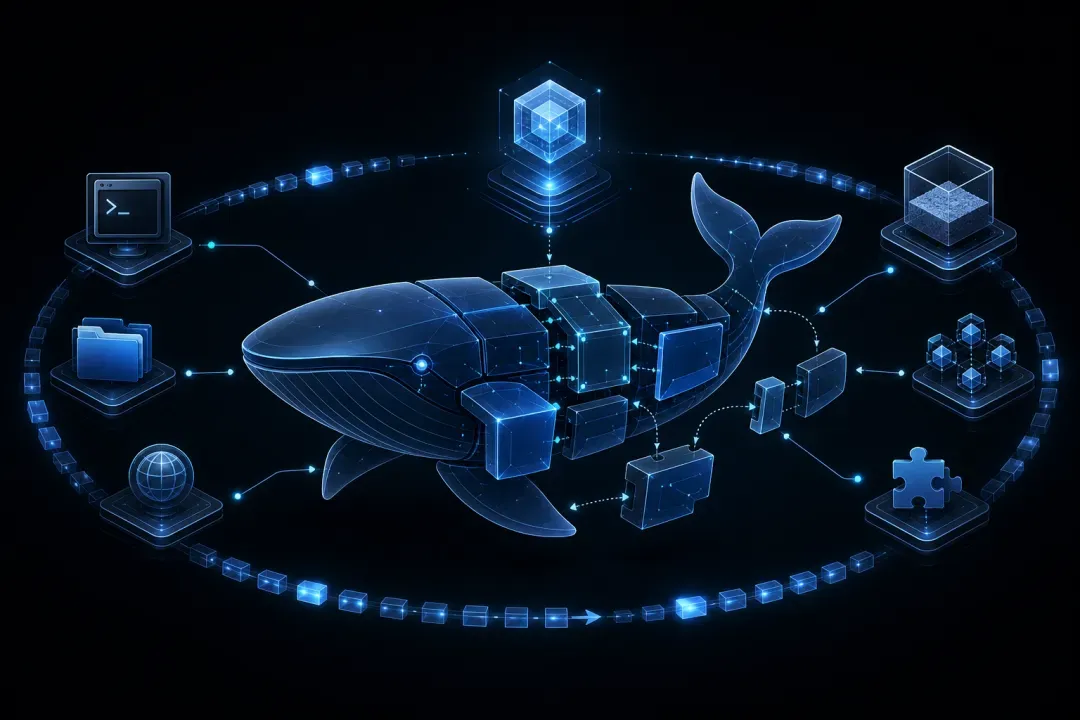
Figure 1. A concept diagram drawn around the plugin tree, swappable capabilities, and the append-only event stream. This image was generated by an image model — it is not an actual product screenshot.
DSH is still in Developer Preview. The numbers in this post come from a single local run plus public user feedback, meant to show differences and boundaries — not to rank products.
The Community Was Watching Two Different Things From Day One
Feedback under the Zhihu question How do you rate DeepSeek Harness, released on August 13 roughly splits into two camps.
One group was waiting for a mature coding agent. They care about a desktop app, terminal experience, Windows support, cache hit rates, day-to-day coding results, and whether the official harness can squeeze more out of V4 Pro/Flash.
The other group of early testers is watching plugins, presets, Trajectory, and runtime self-modification. What they see is a platform for continuing to build agents on.
Neither side is wrong. DSH genuinely holds both identities at once, but the two aren't equally finished. The runtime is already quite open; the default product experience hasn't caught up to Claude Code, Codex, or Kimi Code yet.
The Steadiest Praise Goes to Trajectory
Duan Xiaocao compares Trajectory to DevTools for an agent. You can see the timeline, every round's request, and the logs — useful for checking context compaction, too many skills loaded, or where the model made a mistake.
Bu Hanxi specifically calls out the runtime info panel — cache hits, input/output tokens, and token speed are all displayed directly.
This checks out against the source. DSH requires that anything the model sees must already be recorded in the log; Trajectory is projected directly from the session event log. There's no separate monitoring data buried elsewhere, so what you see in the trajectory is close to the actual request the model received at the time.
Where Plugins Actually Earn Their Keep Is Narrowing the Agent Down
Plenty of the community's early plugins are reskins and novelty projects — the more worthwhile ones are domain-specific agents.
The Data Agent shared by Kitt is Evolving keeps only read, edit, and write, replacing bash with sqlcmd. The model stays focused on database execution results, without carrying tools or context irrelevant to data analysis.
This example makes the division of labor between Plugin and Preset clear. A plugin provides a new capability; a preset decides which capabilities a given kind of agent can see. Where DSH actually delivers production value tends to be in what gets removed or swapped out — not in stacking more tools, which just burns more tokens and makes it harder for the model to choose.
Long Tasks Can Run — But Check the Bill Alongside Them
Adam Platin describes using the week-one preview build to manage a machine learning competition — the agent read the rules, ran scripts, advanced experiments, and drove a browser, wrapping up after 89 steps.
Melon-Face Handsome Guy gives a different timeline: hooking a DSH agent up to WeChat, from requirement to receiving a reply on a real device, took about 87.6 minutes and roughly ¥18. The process included SDK research, a zero-dependency client, a mock server, a smoke test against the real endpoint, and QR-code binding.
Both of these are self-reported and can't be treated as benchmarks. They still give a genuinely useful yardstick, though: whether a long task finishes is only half the story — the other half is how many minutes, how many steps, how many tokens, and how many manual takeovers it took.
Getting It Running Isn't Hard — the Trouble Is Where the Context Comes From
The official fastest path is npx @deepseek-ai/dsh web. Node needs to be ^22.19.0 || >=24; after launch, fill in your API key, pick a workspace and agent preset, and you're up. Installing from source also involves pnpm, a build step, and Git hooks — better suited to people preparing to develop plugins.
Locally, I got all four entry points running:
- The Web UI can create local workspaces and sessions normally
- Headless can execute one-off tasks — on success, it only writes the final reply to stdout
- The Python SDK bundles its own runtime and doesn't depend on a system Node install
--dump-configcan print the final plugin tree directly
The default config is also directly inspectable. The Web profile assembles a 129-line plugin config; Headless comes to 81 lines. The default model is DeepSeek V4 Flash, with workspace-write + ask permissions. The different modes aren't just UI toggles — the prompts and tool sets they load are genuinely different.
The System Prompt Can Be Reconstructed From the Logs
DSH doesn't hide runtime requests in memory. The system prompt is assembled from the persona, tool descriptions, and prompt sections registered by plugins. Before a request goes out, request/header records the system prompt, model, temperature, max tokens, and tools; request/context records the provider and context window.
The official Python SDK's minimal composition makes this structure easier to see clearly. It pins the persona to a single line — "You are a helpful software engineer assistant." — turns off the workspace prompt, Skills, and compaction, and keeps only a persistent bash and str_replace_editor. The model's prefix stays frozen, and there's a lot less noise coming from the tool surface.
Underneath Trajectory Is an Append-Only Event Stream
Sessions are stored as zstd-compressed JSONL, with every record sharing a uniform envelope.
{"type": "tool/call", "seq": 31, "time": 1786632922876, "data": {}}A single write-file task produced 61 events locally: a turn/start, three step/starts, a user message, a request header, reasoning chunks, two tool call/result pairs, an assistant message, and a turn/end. The model writes first, reads back to check, then reports.
So Trajectory can answer three kinds of question at once:
- What did the model actually see at the time
- Which step called which tool
- How did tokens, cache, and the stop reason change
A Four-Letter Task Can Still Eat 13,000 Input Tokens on the First Request
I ran a minimal test using DSH Headless's default config, where the user instruction was nothing but "reply PONG." Even though the task was tiny, the first-turn request still came in around 13,467 input tokens. Digging into the logs, the bulk of that cost came from the default-loaded system prompt, tool descriptions, repo rules, and skill summaries.
The test directory sat inside a large repo. DSH walked up to the nearest .git to find the repo root, injected AGENTS.md/CLAUDE.md, and picked up 27 summaries from the user's skills directory. The write-file task's subsequent steps showed roughly 13,000 cache-read tokens — those fixed prefixes made it into the cache, which also confirms they genuinely made it into the model request.
For later evals and sensitive projects, I've since switched to an isolated Git root each time, explicitly setting a separate DSH_HOME and DSH_AGENTS_HOME. When comparing models, I use the minimal composition so the context stays cleaner.
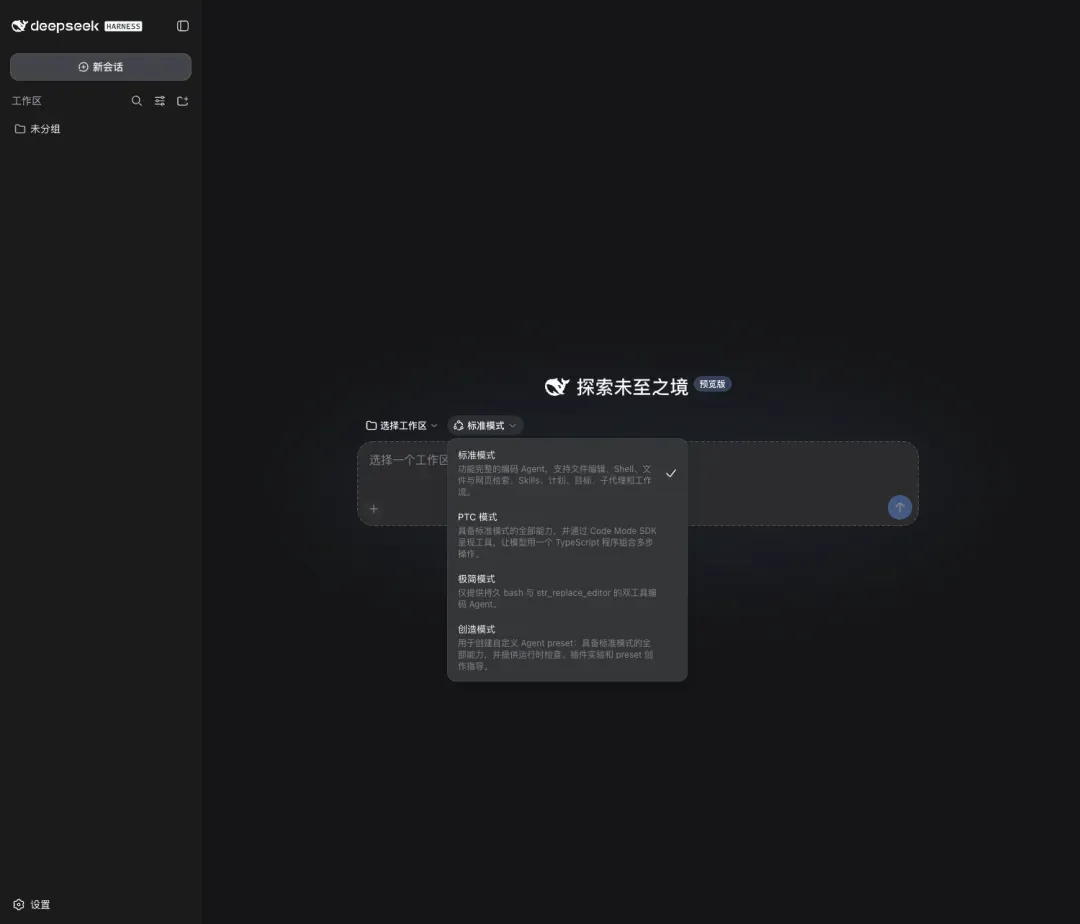
Figure 2. Standard, PTC, Minimal, and Creative — four presets, each mapping to a different plugin combination.
Standard mode provides the full coding toolset, suited to day-to-day development tasks directly. PTC builds on that by letting the model compose multi-step tool operations in TypeScript. Minimal keeps only bash and a text editor. Creative adds runtime inspection and the capabilities needed for plugin experimentation and custom presets.
Same Kimi K3, Different Harness — What Changed
Kimi Code and DeepSeek Harness are both domestic, MIT-licensed, multi-model-capable coding agents/harnesses. Their starting points aren't the same, though.
| Dimension | DeepSeek Harness | Kimi Code CLI |
|---|---|---|
| Official positioning | A reassemblable agent runtime | An out-of-the-box terminal coding agent |
| Primary entry points | Web, Headless, Python SDK, ACP | TUI, -p, ACP, Web |
| Extension mechanism | Cordis Plugin, Preset, Patch, Skills, Hooks, MCP | Plugins, Skills, Hooks, MCP, Subagents |
| Agent loop | Registered as a plugin; architecturally replaceable | An agent-scoped service inside the v2 DI system — source is open, but it's part of the fixed engine core |
| Default model | DeepSeek, plus multi-provider support via pi-ai | Kimi, with compatible-provider support |
| Default tools | ~25 in standard mode, covering files, shell, tasks, subagents, workflows, web | Read, Write, Edit, Grep, Glob, Bash, Web, Todo, Task/Subagent, etc. |
| Permissions | read-only / workspace-write / danger-full-access | Standard approval, yolo, auto |
| Observability | Session Event, Trajectory, token/cache, programmable projection | stream-json, session export, kimi vis |
| Distribution | npm, requires Node 22.19+ | Official single-file distribution needs no Node; the npm install still needs Node |
The Kimi Code CLI repo is itself open too. Both are open source; the difference is in how the runtime is organized. Kimi Code builds its extensibility around one terminal product; DSH puts the loop, provider, session, and UI all into the same plugin-composition model.
Public feedback generally agrees that swapping harnesses under the same model changes the output — but the task, permissions, and context often aren't held constant across those comparisons. Here, I fixed the Kimi K3 API, the prompt, the workspace, and a hidden acceptance check, and watched how the two products completed the identical task.
- Both use
kimi-k3as the model - Identical prompt, task template, and hidden acceptance checks
- A fresh Git workspace and empty skills directory each time
- DSH uses the official minimal tool surface
- Kimi Code runs in non-interactive mode, version
0.35.0 - Each task gets exactly one run, so this only looks at the trajectory
There's one place I deliberately left different: DSH uses minimal, exposing only a persistent bash and str_replace_editor; Kimi Code uses its default tools. This isn't set up to compare "who has fewer tools" — it's set up to observe how the two harnesses steer the same model down different execution paths. To compare default-product capability, you'd need to run DSH standard for another pass.
The two tasks were dependency-batch planning and session-event projection, each with 7 public tests and 8 hidden tests the model can't see.
| Task | Harness | Score | Time | Trajectory unit | Tool calls |
|---|---|---|---|---|---|
| Dependency planning | DSH minimal | 15 / 15 | 112.2s | 9 steps | 11 |
| Dependency planning | Kimi Code | 15 / 15 | 48.9s | 4 assistant messages | 5 |
| Session projection | DSH minimal | 15 / 15 | 111.3s | 7 steps | 7 |
| Session projection | Kimi Code | 15 / 15 | 123.1s | 5 assistant messages | 6 |
Correctness didn't diverge — all four trajectories on both sides passed 15/15. Kimi Code was about a minute faster on the first task; DSH was about twelve seconds faster on the second. Neither side won consistently on speed.
The process differences are much clearer.
Kimi Code's first round read the README, source, and tests in parallel, then did a full-file Write, then verified with Bash — the dependency-planning task used only 5 tool calls. Its default toolset is richer, and its system prompt leans more toward finishing a coding task as fast as possible.
DSH minimal mostly bounced back and forth between persistent bash and str_replace_editor — the dependency-planning task took 11 tool calls, in smaller, choppier steps. What that buys you: the model's prefix, tool surface, and request logs stay much easier to freeze, and the session log gives you a complete set of request, tool, and usage events.
Kimi Code's stream-json didn't return token usage in this run, so cost isn't compared. DSH logged 7,593 / 5,082 input tokens across the two tasks, plus 22,515 / 18,632 cache-read tokens.
The same Kimi K3 passed both tasks either way, but the path it took was clearly different. Kimi Code feels like an already-tuned finished product. DSH minimal makes it much easier to freeze the prefix, swap out tools and providers, and reproduce the experiment.
If the goal is everyday terminal coding, Kimi Code's installation and default tools are more convenient. If the goal is researching context, swapping providers, customizing a domain agent, or reproducing an experiment, DSH's plugin tree and event log are more useful.
Where the Difference Lands in the Source
The trajectory differences above map onto three corresponding areas in the source code.
The first is the agent loop. Kimi Code currently defaults to its v2 engine, organizing the loop, tool dispatch, and context management into a set of DI services, with features like Plan and Swarm injectable as needed. DSH, instead, registers ReactLoopAgent itself as a Cordis plugin — the loop uses the same install/uninstall mechanism as the model provider, tools, and other services. Kimi Code's center of gravity is an extensible terminal agent; DSH leaves developers a wider scope to modify things, down to how the agent loops at all.
The second is session recording. Kimi Code v2 saves events at agent boundaries via wire.jsonl; DSH also uses Session Events to restore state and drive the UI. DSH adds one more runtime constraint on top: whatever the model sees must already be written to the log. That's exactly why Trajectory can reconstruct requests, tool calls, and token changes.
The third is tools and the execution environment. Kimi Code uses an Agent Profile to control tool scope, then abstracts local and SSH environments through KAOS. DSH uses Preset to decide tools and prompts, then splits the filesystem, subprocesses, and sandbox into swappable services. Both sides can swap models and execution location; DSH puts more emphasis on keeping upper-layer tools unchanged when these underlying services get swapped out.
So both projects have plugins, event logs, and environment abstraction — the difference is mainly in how far down that openness goes. Kimi Code prioritizes tuning the terminal coding experience; DSH hands more runtime components over to developers to recompose. That's also why the same Kimi K3 can pass both tasks on either side, while the execution steps and log shapes look clearly different.
Same V4 Pro, Two Harnesses, Each Building a Jump Game
The two small tasks above are good for looking at tool trajectories, but not enough to observe how a harness shapes a complete artifact. This round fixes the deepseek-v4-pro API, the prompt, and the acceptance criteria, and has DSH and Kimi Code each build an original jump game in two separate workspaces.
The task isn't just "draw a webpage." Players need to be able to charge a jump with mouse, touch, and spacebar; the game needs to handle platform collisions, "Perfect" bonuses, combos, failure, and restart. The project also needs a zero-dependency Node.js backend providing a leaderboard, stats, JSON persistence, input validation, and path protection, plus a deterministic test interface it leaves behind. Drawing on the VISTA approach, final acceptance looks at code tests, real browser behavior, and the visuals together.
Look at the final results first: Kimi Code produced a full-screen 2.5D block stage; DSH produced a 2D side-scrolling canvas with a leaderboard and instructions panel on the right.
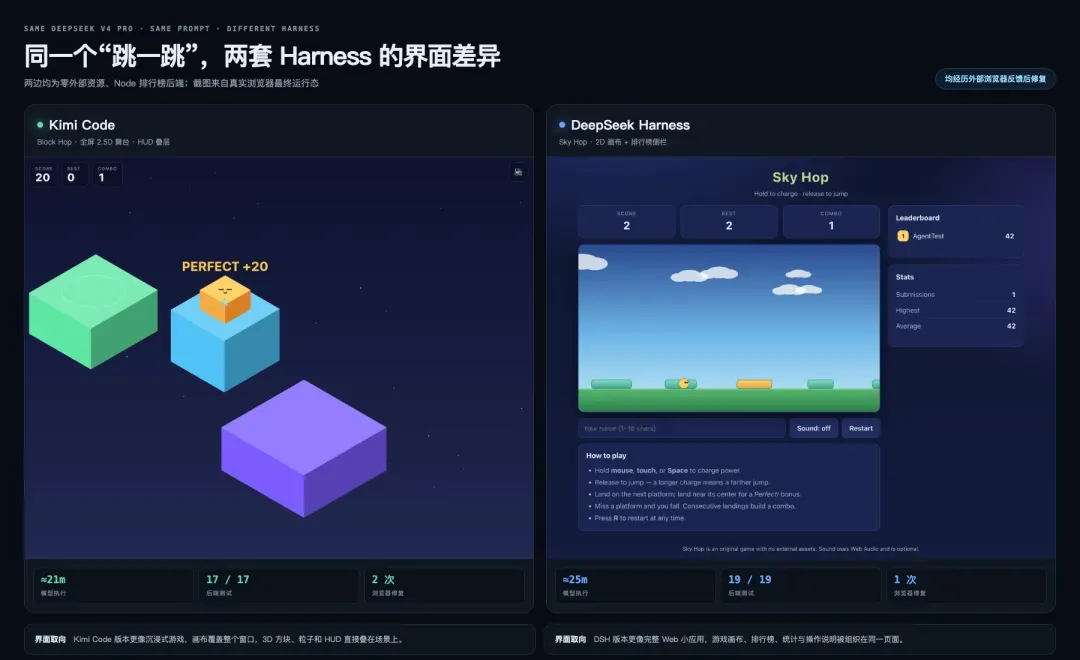
Figure 3. The final game UI from the same model and the same prompt. Kimi Code on the left, DSH on the right — both from real browser runtime state.
Readers can try the Kimi Code version and the DeepSeek Harness version directly. Both pages are single-file frontend builds and the game runs as-is; the leaderboard and stats features still need the accompanying Node backend.
I played a few rounds of each myself. Both versions are more than just "openable" — charging jumps, landing spots, and chained jumps already have the feel a small game like this should have. The Kimi version has a stronger sense of stage presence; the DSH version feels more like a web game with a complete information panel.
Both harnesses delivered a frontend, a backend, leaderboard persistence, and automated tests, but the process differed. DSH finished across three session segments, roughly 25 minutes, 85 steps, and 96 tool calls total, shipping 19 backend tests. After its first run got interrupted, it was able to pick back up and fill in roughly 880 lines of game logic and a browser smoke test.
Kimi Code's initial generation took about 14 minutes 30 seconds; counting two rounds of fixes, about 21 minutes total, shipping 17 backend tests. Its first draft already had the full 2.5D visual style, and it later fixed an updateHUD call issue and an overlay-display problem based on real browser feedback.
This round of evaluation left three impressions.
First, the same model and the same prompt still grew into two different products. Kimi Code leans more toward a full-screen game experience; DSH leans more toward a complete page with a leaderboard and instructions area. A sample this small can't prove this is a stable tendency, but it's enough to show that the harness does participate in shaping the output.
Second, both sides can carry a roughly twenty-minute task with a frontend, a backend, tests, and a mid-course fix. DSH's fixed physics timestep, seeded PRNG, and atomic writes, and Kimi Code's 2.5D stage and full interactivity, both go well beyond a one-shot page demo.
Third, both sides hit a case where the model's own tests passed but the real browser failed. DSH had a canvas backing-store size bug that left only sky visible. Kimi Code first ran into a function-ownership bug, then had a hidden attribute get overridden by CSS. Both got fixed once reported back to V4 Pro, and each side's browser tests picked up a regression check as a result.
This shared failure mode is the most worth remembering. Tests an agent writes itself can easily share the same blind spot as the implementation. A harness can preserve the full trajectory and help the model keep fixing things, but confirming an artifact is genuinely usable still comes down to an independent browser, external acceptance criteria, and a human actually playing it.
DSH Can Also Drive Other Models
DSH ships both a direct DeepSeek adapter and a multi-provider adapter built on pi-ai. Locally, I used Kimi K3, GPT-5.6 Sol, and Claude Opus 4.8, each completing a file write, read-back, and tool call.
This smoke test only shows that the provider, OpenAI-compatible messages, SSE, and the tool protocol work — it's not meant to compare the three models. Real integration should still verify text, streaming, tool calls, error mapping, and long-lived connections one provider at a time.
Where This Experience Comes From in the Source
The repo is a TypeScript monorepo. The backbone compresses down to roughly this:
deepseek-harness/
├── apps/cli + apps/web        CLI and browser entry points
├── packages/boot + bundle     Profile and plugin-tree assembly
├── packages/core/
│   ├── agent-loop             Turn / Step driver
│   ├── session                Append-only event log
│   ├── tools                  Tool registration and execution
│   └── system-prompt          Prompt-section assembly
├── packages/preset            Per-session agent composition
├── packages/llm               DeepSeek and multi-provider adapters
├── packages/fs + sandbox      Swappable execution capabilities
├── packages/code-runtime      PTC / Code Mode
└── vendor/cordis              Plugin lifecycle substrate
This map explains DSH's tech stack. Cordis handles plugin lifecycle and service dependencies; DSH defines the agent-domain concepts — session, loop, tools, LLM, sandbox, and UI — on top of it. KM's runtime teardown maps Fiber, Preset, Code Mode, and tool shadowing to the source in finer detail; here I'll only keep the five points most relevant to the hands-on experience.
Everything Is a Plugin, Thanks to Cordis's Reversible Lifecycle
Code entry points: vendor/cordis/src/context.ts, fiber.ts, and service.ts.
A plugin declares the services it depends on via inject. While a dependency hasn't appeared yet, its Fiber sits at PENDING; once the service shows up, it enters ACTIVE. When a provider exits, dependent components unload first, then reclaim their own effects.
Every time a service, listener, or timer is registered, its disposer has to be handed to ctx.effect() together with it — cleanup runs in reverse order on unload. The agent loop being able to become an ordinary plugin only works because the substrate underneath can already manage the loading, dependencies, and teardown of a component at this scale.
This mechanism has clear boundaries too: external files, network messages, and business actions that have already happened don't roll back automatically. Dependency injection also can't substitute for a sandbox against malicious code.
Profile and Preset Control the Process and the Session, Respectively
Code entry points: packages/boot/app-boot/src/profile.ts and packages/preset/agent-presets/src/.
A Profile starts from an empty list and layers bundles on top, then applies the profile, home, and command-line patches. Web and Headless are therefore two different plugin trees. dsh --profile web --dump-config uses the exact same patch algorithm to print the final result — the config display and the real startup path don't maintain two separate pieces of logic.
Preset then decides which tools, prompts, and projection units a given session can see. Standard, minimal, or a domain agent can all run inside the same process at once. The Data Agent example earlier, swapping bash for sqlcmd, is exactly this scoping mechanism landing on a real product.
What the Model Sees Must Be Reconstructible From the Log
Code entry points: packages/core/agent-loop/src/agent.ts, invariant.ts, and packages/core/session/src/.
Every step's request derives its messages from the session. Before the request goes out, an invariant check compares the current request against session.deriveMessages(), checking the model, system prompt, temperature, max tokens, and tools.
const expected = session.deriveMessages()
if (JSON.stringify(options.messages) !== JSON.stringify(expected)) {
  fail('log-reconstruction desync')
}
This constraint is why Trajectory is so clear, and why fork, resume, and the UI can all share the same event stream. It also carries a privacy implication: once context gets injected into the model, it also enters the log and the data boundary.
The Capability Seam Splits Tools From the Execution Environment
Code entry points: packages/fs/fs/src/types.ts, fs-local/, fs-sandbox/, and tool-str-replace-editor/.
The filesystem first defines FileSystem, an opaque target, and a version; local and sandbox providers implement it; read, write, and editor tools consume it. Swapping the file and subprocess providers out to a remote sandbox doesn't require the upper-layer tools to fork along with it.
Writes also support createIfAbsent and replaceIfVersion. After the model reads a file, if that file has since been changed by someone else, the provider can refuse a stale overwrite. Concurrency safety therefore lives below the tool layer, instead of every editing tool having to reimplement it.
PTC Uses Code to Cut Down on Tool Round Trips
Code entry point: packages/code-runtime/.
PTC lets the model write a piece of TypeScript to compose multiple tool calls. The program executes inside worker_threads; tool requests go back to the host over a message channel, still passing through the same pre-execute, approval, dispatch, and post-execute pipeline.
Intermediate data can stay inside the execution environment instead of getting stuffed back into the model's context at every step. That matters more than the model simply being able to write code. The cost: executing model-generated code needs extra isolation, and a worker thread still isn't a complete security boundary.
Who's Worth Spending Time on This Right Now
People building agent infrastructure should look at this immediately. DSH lays the loop, session, provider, tools, and UI all out in source code you can actually inspect.
Teams that need a domain-specific agent should run a small experiment. Copy a minimal/standard preset, then strip tools and swap providers — that's easier to validate the payoff of than migrating a whole workflow.
Model evaluators can use the minimal composition, while locking down the model version, inference tier, endpoint, and external acceptance criteria at the same time.
People just looking for a daily coding tool can hold off for now. Products like Kimi Code, Claude Code, and Codex are more mature on terminal experience, desktop entry points, IDE integration, and default workflows.
Production adoption means supplying your own governance. Plugin provenance, config diffing, credential boundaries, Windows acceptance testing, log retention, and data egress all fall on whoever deploys it.
If a team is designing its own harness, here are three questions worth taking away.
- What did the runtime actually end up loading — can that be printed with a single command?
- What did the model actually see — can that be fully reconstructed from the logs?
- When you swap out the filesystem, sandbox, or model provider, how many tools have to change along with it?
DSH already has a runnable, verifiable answer to these three questions. Whether the default product, plugin quality, and governance can catch up to this structure is a matter for the next stage.
Reference Roundup
Official sources and code
- DeepSeek Harness source
- Chinese architecture docs
- Python SDK minimal agent guide
- Cordis source
- The temporal/spatial composability paper
- V4 Pro 0813 model card
- Kimi Code CLI source
User feedback and methodology
- The original Zhihu question
- A week of preview testing and an 89-step competition task
- Estimating default-tool and token overhead
- An 87.6-minute WeChat integration log
- A Data Agent preset in practice
- VISTA, a visual web-app benchmark
Local reproduction materials
- Baseline results —
working/eval/results.md - Kimi K3 comparison —
working/cross-model/harness-compare/ - Kimi Code source snapshot —
working/kimi-code/ - Multi-model smoke test —
working/cross-model/compat/ - V4 Pro jump-game case —
working/jump-game/workspace/ - Zhihu feedback excerpts —
working/eval/zhihu-feedback.md - KM images and HTML attachments —
output/attachments/
All figures are as of a single local run on 2026-08-14.