94% AI-Generated Code: How We Ran the Full Feature-Development Pipeline Through a Single Skill
I. The Problem: Why AI-Written Business Code Always Falls Just Short
Put "AI-assisted coding" into a real enterprise-scale project, and you hit a wall fast. Every mobile engineer will recognize these scenarios:
| Real pain point | What it looks like |
|---|---|
| Context doesn't fit | 9,000+ source files, calls spanning 5-6 layers — can't feed it into a single conversation turn |
| Materials scattered everywhere | PRD lives in TAPD, mockups in Figma, protocols in WeCom docs, UI changes need Figma Tokens too |
| Inconsistent naming | The user says "the email click entry point," but in code it's actually called didSelectRowAtIndexPath |
| Vague instructions | User says "update it per the PRD," AI skips decomposition entirely and starts editing — overreaching, missing changes, editing the wrong spot |
| Verification never closes the loop | AI reports "done," but it doesn't even compile; fixes one spot without syncing the other |
| Amnesia across sessions | Last session's design decisions, which files got changed, why — all forgotten by the next session |
One sentence sums it up: AI isn't bad at writing code — it's bad at developing a feature "by the engineering rulebook."
Our fix wasn't a bigger model. It was making "feature development" itself pipelined, atomic, and verifiable — then feeding each step to the AI.
II. Overall Architecture: Breaking "Feature Development" into 8 Semantic Stages
At the core of the Skill is a strictly sequential pipeline. Every stage has a clear input, a clear output, and a machine-checkable exit criterion. Mapped against how people actually develop day to day, it breaks down roughly like this:
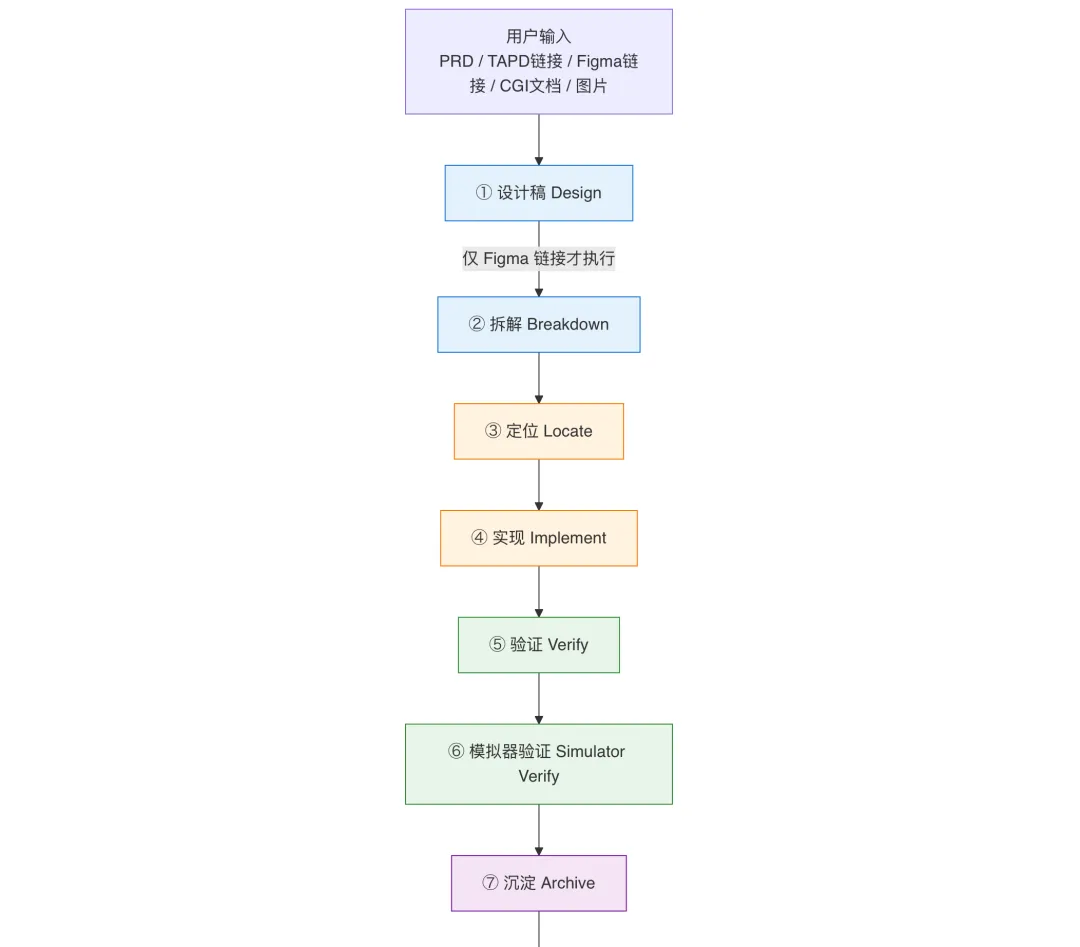

Sub-step naming convention: internally, the Skill uniformly names things "Stage·Action" — e.g.
Design·Script Filtering,Implement·UI·Slicing,Decompose·TAPD Ingestion— so the AI always knows exactly which cell of the grid it's standing in when it reports where it is.
| Stage | Input | Key output | Core move |
|---|---|---|---|
| ① Design | Figma link | Mobile-candidate shortlist + PNG overview | Scripted histogram filtering — LLM "gut feel" bucketing is never allowed |
| ② Decompose | PRD + design + CGI + TAPD | Five-column requirement list + subtasks.json relay ledger | Multi-source ingestion + destination validation (every design must map to one of three categories) |
| ③ Locate | Requirement item | File + line number + call chain | Five-step localization (see below) |
| ④ Implement | Call chain + context | Code changes | Bottom-up: data → parsing → enums → business logic → UI → logging |
| ⑤ Verify | Source changes | Build report (exit code 0) | bazel build + up to 3 rounds of self-repair |
| ⑥ Simulator verify | Build artifact | Post-install screenshots + logs | "Second-level human/machine confirmation, ≤2 in-stage retries" |
| ⑦ Persist | git diff + timeline | TECH_SPEC.md single source of truth | The vehicle for cross-session knowledge transfer |
| ⑧ Commit | All artifacts | git commit + branch | Three-part commit message + AI signature + code-generation rate |
III. First Principles: Why the Skill Is Designed This Way
The entire pipeline answers exactly one question: how do you get an AI that never participated in the original implementation to finish the job in a new session, like "a colleague who was there from the start"?
Around that goal, the Skill's design principles converge into four axioms:
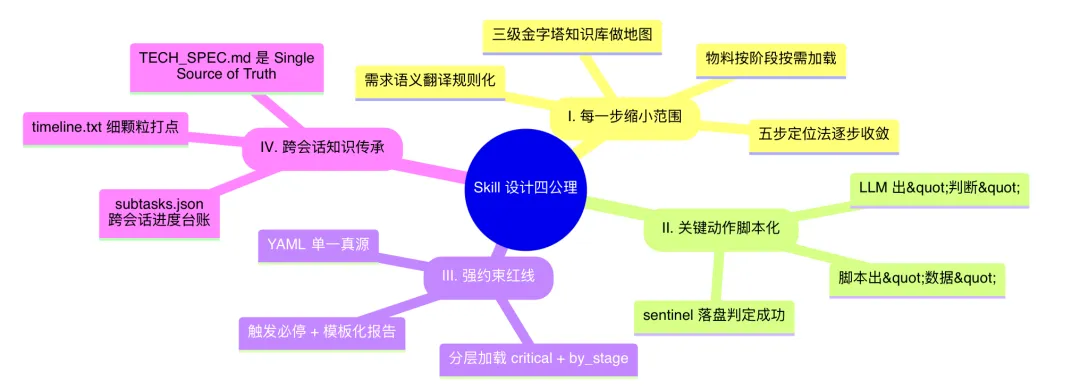
Let's take each of these four axioms apart, one at a time.
IV. Axiom I: Every Step Narrows the Scope — Five-Step Localization
A large model isn't a search engine — throwing an entire project's find . at it is pointless. The Skill breaks "find the change point among 9,000+ files" into 5 converging steps, each with strictly capped token consumption.

| Step | Input volume to the LLM | Output |
|---|---|---|
| 1. Intent disambiguation | ~2K project overview + the user's original words | "This goal could map to 4 possible technical interpretations" |
| 2. Module localization | Directory tree + interpretation | 2-3 candidate file paths |
| 3. Keyword search | (doesn't touch the LLM) rg runs directly | Function declarations + locations |
| 4. Call-chain tracing | ~10K of the relevant snippet from a single file | Complete call chain |
| 5. Verification | ~5K of function implementation | Final change point + rationale |
The real trick: the first 2 steps only look at directory and file names; only step 3 lets a script grep; only step 4 actually reads code. All the way down the funnel, the model is never drowned by the whole codebase.
But there's a prerequisite left unsolved here — steps 1 and 2 of the five-step method both depend on one thing: the project itself needs a map the AI can actually read. Otherwise, where does that "~2K project overview" even come from? What makes the "directory tree + interpretation" accurate in the first place?
The next section covers exactly that: how this map gets built, how it's maintained, and how it never goes stale.
V. The Code Knowledge Base: Giving AI the Project's "Map"
Precise localization requires the AI to have structured, up-to-date, indexable project knowledge in hand. The Skill invests heavily at this layer — we built a three-tier pyramid knowledge base, paired with an automatic drift-detection mechanism, to make sure the map never falls behind the code.
5.1 The Three-Tier Pyramid: From Overview to Field, Expanding as Needed
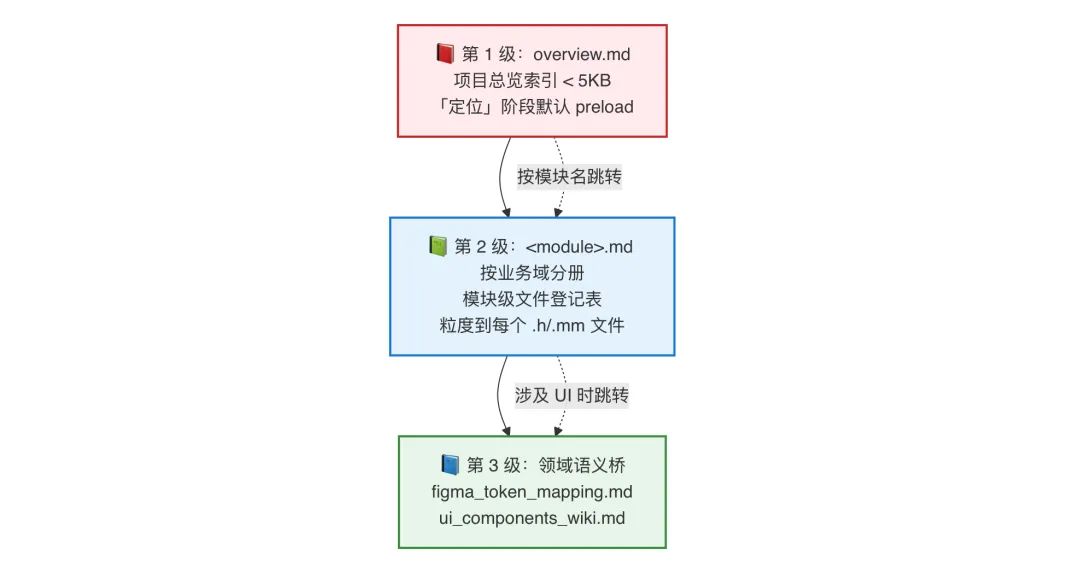
| Level | File | Granularity | When it loads |
|---|---|---|---|
| L1 Overview | project_wiki/overview.md | Module name + one-line responsibility | Preloaded by default during "Locate" (< 5KB) |
| L2 Module | project_wiki/<module>.md | Every .h/.mm file + what it does | Loaded on demand once a module is hit |
| L3 Semantic bridge | figma_token_mapping.md / ui_components_wiki.md | Precise mapping from Figma Tokens to engineering APIs | Mandatory reference during "Implement·UI" |
L1: Project Overview — the AI's "Lobby Directory"
overview.md does exactly one thing: tell the AI, in one table, "what modules this project has and what each one is responsible for." For example:
| Module | Responsibility | Detail doc |
|---|---|---|
MList/ | Email list display, sync, filtering, multi-select editing | mlist.md |
RMail/ | Email body rendering, attachment preview, AI summarize/translate | rmail.md |
CMail/ | Email composing, rich-text editing, attachment upload, AI polish | cmail.md |
Model/ | Domain models + DB persistence + business managers | model.md |
| ...(N top-level modules total) |
Scale example: the Model module's stats (686 .h files, 456 .mm files, top 5 largest files). The whole file stays under 5KB, so it drops into every localization context with zero overhead.
L2: Module Level — a File-Granularity "Street Map"
Every <module>.md has a block of machine-readable metadata at the top:
<!-- module_id: mlist -->
<!-- root_dirs:
  - App/Mailbox/MList/
-->
<!-- desc: Email list display, sync, filtering, multi-select editing -->
Followed by a file registry table, grouped by Controller/ ViewModel/ View/ Helper/ Lab/, one row of responsibility per file:
| File | What it does |
|---|---|
XYZMListController.h/.mm | Main email list controller — manages list display, sync, filtering, long-press, multi-select editing |
XYZMListViewModel.h/.mm | Email list ViewModel — manages data loading, pagination, filtering, sorting, unread count |
XYZTipsView.h/.mm | Email list top notice bar (sync status, collection failures, promo campaigns, etc.) |
| ... |
This is essentially printing out, explicitly, "the project map that lives in the veteran engineer's head": what each file is for, how it relates to its siblings — read 70 lines once, and you've built the whole module's topology in your head.
L3: Domain Semantic Bridge — Closing the Gap Between "Design/Protocol" and "Code"
This layer is the most easily underrated, yet the most engineering-value-dense part.
Take an example: a design mockup says Mobile/callout. How should the AI write that? Eyeball the font size? Hardcode [UIFont systemFontOfSize:15]? Neither is right. The Skill has all of these translation rules distilled into figma_token_mapping.md:
// ❌ Wrong: eyeballed font size + hardcoded color
self.titleLabel.font = [UIFont systemFontOfSize:15];
self.titleLabel.textColor = [UIColor colorWithRed:0.1 green:0.1 blue:0.1 alpha:1.0];

// ✅ Correct: translate the Figma Token per the mapping rules
self.titleLabel = [UILabel xyz_styledLabel:@"callout"];       // Mobile/callout
self.titleLabel.textColor = XYZColor(base_gray_100);          // Base/base_gray_100
self.titleLabel.text = R_NSSTRING(XYZ::XXX::TITLE_KEY);       // i18n
The full mapping table covers:
- Text styles:
Mobile/title_1 ~ caption_2↔xyz_styledLabel: - Colors:
Base/base_gray_100↔XYZColor(base_gray_100)(automatically responds to Dark Mode) - Button components:
button_blue_large↔[UIButton xyz_styledButton:...] - Shadows / gradients / font fallbacks and ~20+ other spec categories
⛔ RL-29: any UI change must be checked against figma_token_mapping.md; hardcoded font sizes/colors are forbidden — a red line distilled from countless "the design drifted" incidents.
5.2 Self-Maintenance: Keeping the Knowledge Base From Ever Going Stale
Building a knowledge base isn't hard. What's hard is keeping it from drifting away from the code. This project gained 200+ net new files and 1,000+ changed spots over six months — manual upkeep collapsed long ago.
The Skill's answer is one core script: check_project_wiki_stale.py.
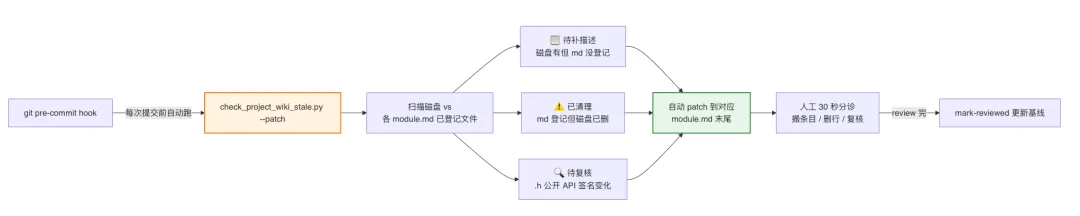
Key design points:
| Mechanism | What it does |
|---|---|
SHA baseline cache (.review_cache.json) | Records each file's SHA at last review. Flags "needs re-review" automatically when it changes again |
| Three-color triage list | New / deleted / heavily-changed signals listed separately — scannable in 30 seconds |
| Pre-commit hook block | Exit code 1 = stale signal present → blocks the commit, forcing the developer to update the wiki while they're at it |
| Metadata-driven overview | Change desc at the top of <module>.md, and overview.md's index follows automatically |
Effect: across the past 6 months, none of this project's module wikis have ever drifted out of sync with the code — because every time someone changes code and tries to commit, the hook reminds them to sync the wiki while they're right there.
5.3 Knowledge Base + Localization: 1 + 1 > 2
Back to Chapter IV's five-step localization method — combine it with the knowledge base, and the complete closed loop of precise localization becomes clear:

- Step 1: pick "MList" module in 1 second from the L1 overview (no grep needed)
- Step 2: lock onto
XYZTipsView.h/.mmin 5 seconds from the L2 module wiki (no need to read source) - Step 3: once inside the file,
rgsearches precisely (a script, not the LLM) - Step 4: read only the relevant snippet (~10K tokens)
- Step 5: check the L3 mapping table before writing code (no hardcoding)
Total token consumption drops from ~10M+ (dumping the whole project in) to ~30K — a 300× compression ratio. That's the fundamental efficiency gain the knowledge base buys.
✨ An interesting side effect: this knowledge base is just as useful for human newcomers. New engineers on our team no longer need to "spend a whole morning talking to a veteran" to understand the project structure — read
overview.mdplus a few module wikis, and they can start fixing bugs within half a day. "AI-friendly" and "newcomer-friendly" turn out to be exactly the same thing here.
But this only solves half the problem.
The knowledge base gives AI a "map of the code side" — but it still needs to understand "the description on the requirements side." When a product person says "add a red dot" and the engineer's code says setMailboxBadgeValue:, there's a semantic gap in between: natural language is vague, colloquial, framed from a business perspective; code is precise, formal, organized from a technical perspective.
To let AI run this independently, that gap has to be closed too. That's what the next section covers.
VI. Requirement Semantic Translation: Turning "Product Language" into "Code Instructions"
Intuitively, AI is boosting efficiency, but the process is heavily dependent on humans — a large chunk of that "manual cost" is spent on this exact translation: developers read the PRD/Figma/CGI, mentally complete the "product language → code language" conversion, then feed the translated result to the AI. Skip this step, and AI frequently overreaches, misses changes, or edits the wrong spot. The Skill, in the "Decompose" stage, makes this translation rule-based and executable, so the AI can complete it independently too.
6.1 Where's the Gap?
The diagram below shows a typical "product → code" translation chain. Any layer can go wrong:
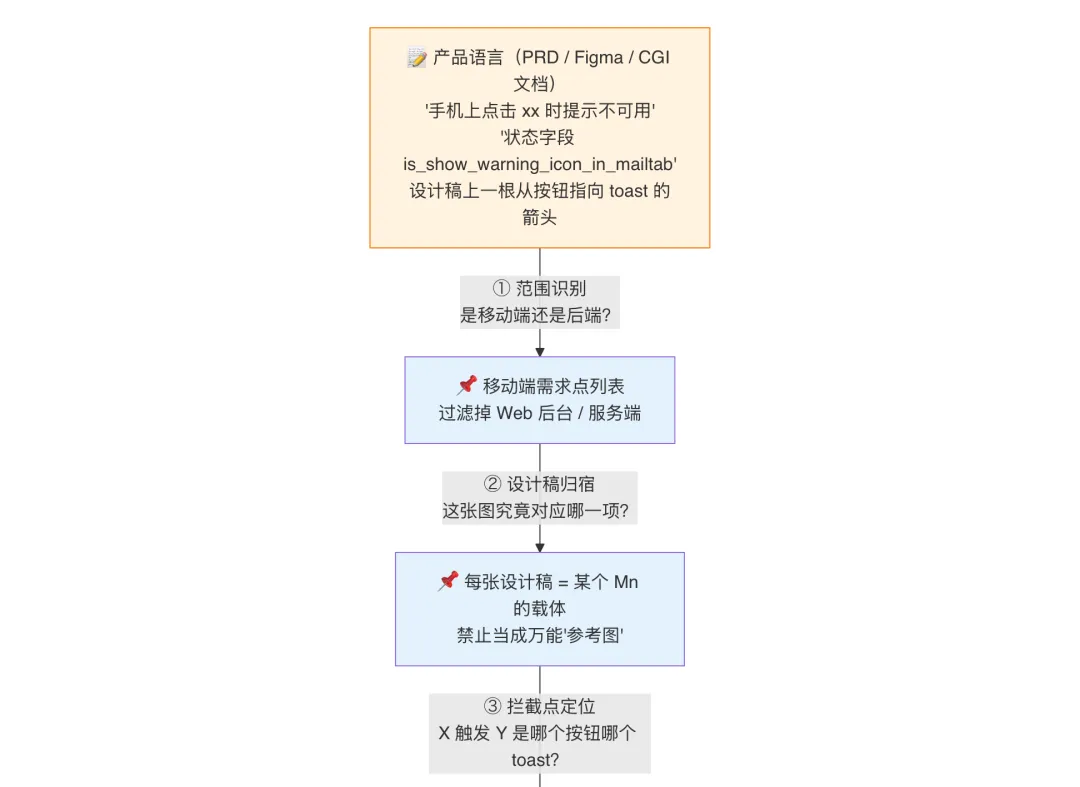
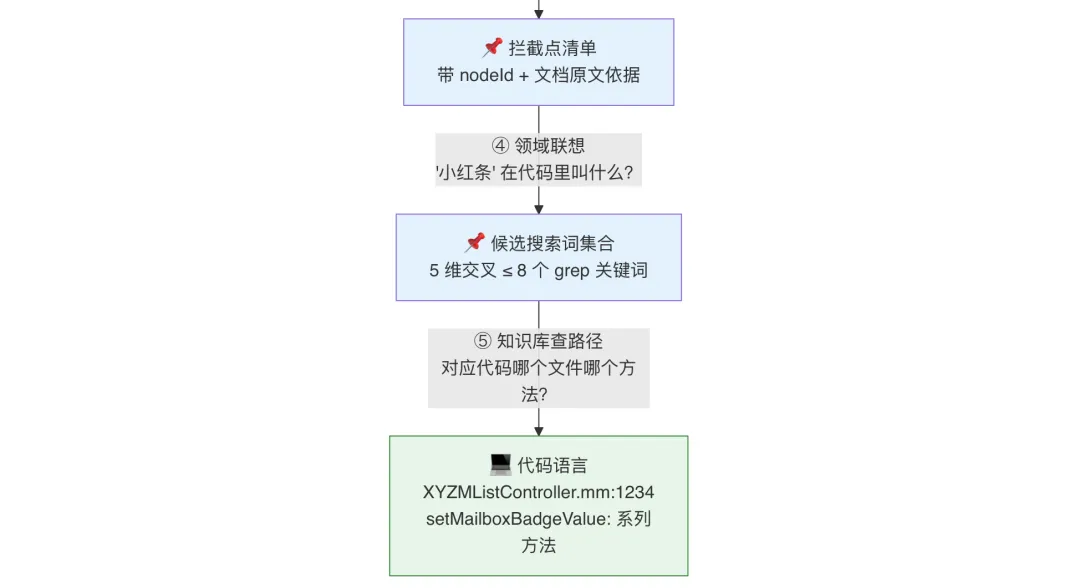
Every failure point here is real:
| Failure point | Real scenario | Cost |
|---|---|---|
| ① Scope misjudged | A PRD paragraph is mostly about "backend config," and a single line about "what's seen on the phone" gets dismissed as colloquial filler | Mobile UI implementation gets missed |
| ② Unclear destination | 9 mobile-candidate mockups; AI only picks 2 as requirement items, lumping the rest into a vague "reference image" bucket | 7 independent pages missed |
| ③ Overreaching by association | User says "intercept click on A," AI reasons "for consistency, B should be intercepted too," and overreaches on its own | Logic that shouldn't have been touched gets changed |
| ④ Keyword can't be found | Directly grep "red bar" → 0 hits; just grep "tips" → drowned in 800+ hits | Localization fails or false-positives |
| ⑤ Wrong file found | "Email red dot" gets translated to the wrong location — RMail instead of MList | The feature lands in completely the wrong place |
The Skill uses five deterministic rules to block each of these failure points, layer by layer.
6.2 ① Scope Recognition: A "Hard Keyword Table" Instead of LLM Intuition
A PRD is written from a product perspective, and web-backend and mobile content are often mixed in the same paragraph. Letting an LLM "judge by semantics" is a disaster — when a paragraph mentions both "backend config" and "client-side display," the LLM frequently judges the whole thing as non-mobile just because the paragraph's subject is the backend.
The Skill's fix is a strong-signal keyword table, hard-triggered, with no dependence on LLM semantic understanding:
| Category | Keywords (any hit forces a "mobile" tag) |
|---|---|
| Platform/client | "on the phone," "mobile client," "mobile," iOS, Android, "client app," App |
| Native controls/interaction | Toast, popup, overlay, "red bar," "red dot," tab badge, badge, "pull to refresh," swipe, long-press |
| iOS system components | status bar, nav bar, Home Indicator, bottom safe area, notch |
| Mobile page terms | keyboard/IME, keyboard expanded, fullscreen modal, action sheet |
Hard rule:
Even if a paragraph's main subject is backend/config/push rules, as long as any keyword hits, the feature point described in that section must be split out as a separate mobile item. Scope judgment isn't "what the AI thinks" — it's "keyword hit." Objective, machine-reproducible, no exceptions allowed.
This rule is dead simple, but its impact is huge: it compresses "AI misjudges scope" — one of the most typical failure modes — from a probabilistic event down to zero.
6.3 ② Design Destination: Every Image Must Map to One of Three Categories
⛔ RL-12: every mockup in the candidate list must have an unambiguous destination — "uncategorized" is not allowed.
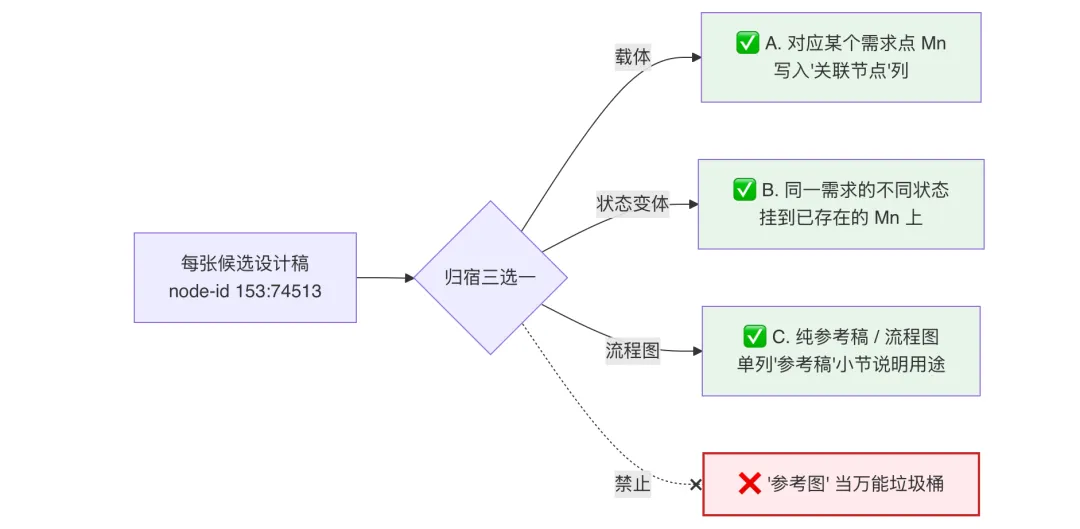
Key iron rule: if an image can't be mapped to any requirement item —
- Either it was mistakenly included during filtering (go back and remove it from the candidate list)
- Or a requirement item is missing (add a new one)
Not allowed: using "reference image" as a catch-all bucket. This rule fully surfaces "missed requirements" — one of the most easily-hidden failure modes.
6.4 ③ Intercept-Point Checklist: No "Semantic Association" Allowed
⛔ RL-21: any "click X → triggers Y" style intercept requires X to have a specific citation as evidence — extending scope by semantic association is forbidden.
The most error-prone part of requirements is "interaction intercepts." Product docs often gloss over them in one sentence, which is exactly where AI most easily "goes off-script."
The Skill mandates a verifiable checklist as output:
| # | Trigger element X | Trigger event | Response Y | Evidence source |
|---|---|---|---|---|
| 1 | Email list "Select All" button | Click | Toast: "Can't select all — over 100 emails" | figma_overview_p3.png's green arrow pointing from the select-all button to the toast |
| 2 | Top red notice bar | Click | Navigate to management page | TAPD original text: "clicking the red bar navigates to https://..." |
"Evidence source" only accepts three kinds:
- Design annotation: a connecting line/arrow on the PNG pointing from X to Y (must have a nodeId)
- Document text: a direct quote from TAPD/WeCom docs
- User message: a direct quote of the user's own words
Forbidden as evidence, based on business semantics alone:
❌ "Z looks like it belongs to this category too" → delete. ❌ "For consistency, this should probably be intercepted too" → delete. ❌ "It's the same kind of feature behavior" → delete.
Any line that can't be backed with a specific citation gets deleted outright, not implemented. This is an extremely hard red line, fully locking down the widely-recognized chronic problem of "AI overreaching on its own initiative."
6.5 ④ Domain Association: Expanding "Product Language" into "Code Search Terms"
By this point, we've decomposed the requirement into a precise item like "M1: red notice bar at the top of the email list." But what's it called in the code?
The product person says "red bar." What the engineer might actually find in the code:
XYZMListTipsView         // "Tips" is this component's actual engineering name
XYZMListTipsType_xxx     // enum value
showWarningTips:               // the display method
is_show_warning_icon_in_mailtab // CGI field
XYZLOG_WARN(@"show tips")       // log keyword
Between "red bar" and Tips / Warning / Icon sits a domain-knowledge gap — it's not that AI isn't smart enough, it's that product language and code naming simply belong to two different vocabularies to begin with.
grep "red bar" directly will always return 0 hits. grep "tips" alone gets drowned in hundreds of hits. The Skill's fix: cross-expand using 5 search dimensions, turning one requirement item into a set of high-hit-rate candidate search terms.
The 5-Dimension Search Matrix
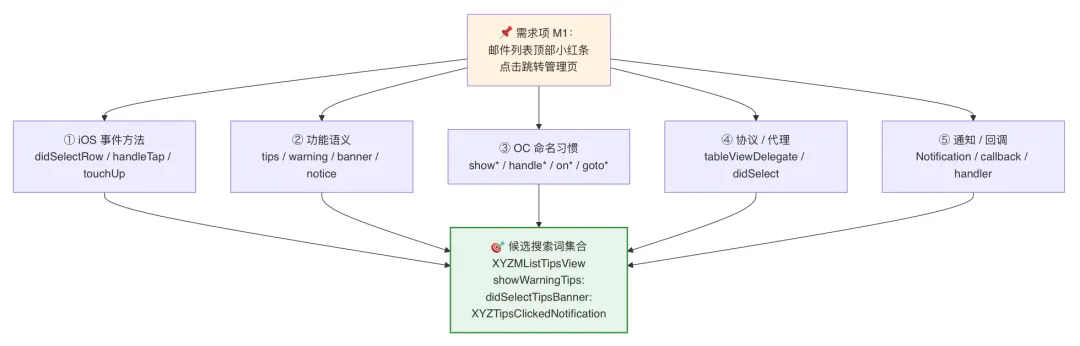
Design philosophy behind the 5 dimensions:
| Dimension | Starting point | What it hits |
|---|---|---|
| ① iOS event methods | Platform-standard APIs | didSelectRowAtIndexPath: / handleTapGesture: / touchUpInside: |
| ② Functional semantics | English synonyms for product intent | "red bar" → tips / banner / warning / notice / alert |
| ③ Objective-C naming conventions | Naming prefixes used in the project | show* / handle* / on* / goto* / setup* |
| ④ Protocols/delegates | Who notifies whom | tableViewDelegate / <XxxDelegate> / didSelectXxx: |
| ⑤ Notifications/callbacks | Cross-module communication | XxxNotification / XxxCallback / XxxHandler / RACSignal |
💡 The key insight: these five dimensions aren't ordered by "most relevant to the requirement" — they're ordered by "where it's actually likely to appear in the code." ① is the platform layer, ② the business layer, ③ the project naming-style layer, ④⑤ the cross-module communication layer — any UI behavior necessarily lands in one of these 5 layers. Treat it as a full map of the code's namespace, not a matter of guessing keywords by luck.
The Basis for Association: Knowledge Base + Glossary
The 5-dimension matrix isn't conjured out of thin air — it rests on two pieces of domain knowledge:
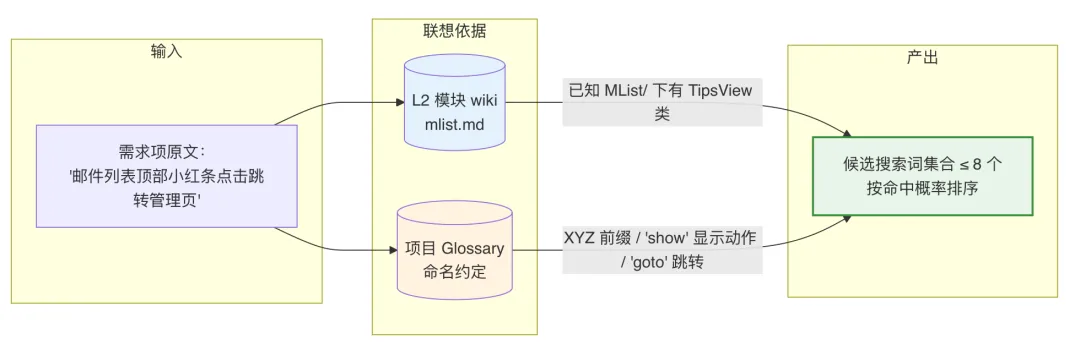
- The L2 module wiki (Chapter V) tells the AI: "the email list module already has
XYZTipsView.h/.mm, described as 'the email list's top notice bar'" — this directly translates "red bar" intoTips - The project Glossary (a summary of naming conventions) tells the AI: "this project uses
show*for display,goto*for navigation,XYZas the mail-plugin class prefix" — matching code naming at the verb level
Without these two pieces of knowledge, the keywords AI associates are just guessing. With them, the hit rate on associated keywords exceeds 80%.
Walkthrough: From One Product Sentence to a Set of Grep Commands
Let's walk through a real example end to end:
📝 Original product text:
   "A red notice bar appears at the top of the email list, warning
    the user their domain is about to expire, clicking navigates
    to the domain management page"

⬇️ Layer 1 association (functional semantics):
   red notice bar → tips / banner / warning / alert
   about to expire → expire / expiry / due / warning
   navigate to management → goto / route / push / open

⬇️ Layer 2 association (project naming style):
   email list prefix → XYZMList*
   notice component class → *TipsView / *Banner / *Notice
   navigation method → goto* / open* / push*

⬇️ Layer 3 (combined with mlist.md's L2 wiki):
   Hit file: XYZTipsView.h/.mm
   "email list top notice bar" — direct match

⬇️ Candidate search term set (by hit probability, highest first):
   1. XYZTipsView                  (strong hit: component class)
   2. showWarningTips:                (strong hit: display method)
   3. XYZMListTipsType_         (medium: enum type prefix)
   4. didTapTipsView:                 (medium: tap response)
   5. domainExpire / domainWarning   (medium: business keyword)
   6. gotoDomainManagement            (weak: guessed navigation method name)

⬇️ Final grep command (funnel-style convergence):
   $ rg "XYZTipsView|showWarningTips" App/Mailbox/MList/ -l
   App/Mailbox/MList/View/XYZTipsView.mm     ← hit!
   App/Mailbox/MList/Controller/XYZMListController.mm ← caller
✨ The whole process never needs "reading source code to guess method names" — the wiki plus naming conventions alone expand the keywords. From the original product text to a grep command, the entire chain is machine-executable.
Counter-Example: What Happens Without Association?
| Counter-example | Consequence |
|---|---|
Directly grep "red bar" | 0 hits (Chinese → English gap) |
Just grep "tips" | 800+ hits (too much historical usage in the project for AI to sift through) |
Just grep "warning" | Wrong-location hits (the project's "WeComKit" also has "warning") |
grep "domain expire" | 0 hits (the business term the product side thought of doesn't appear in the code) |
5-dimension crossing is the only stable path — any single dimension either gets 0 hits or a flood of false positives.
The Boundary With Red Line RL-21
⚠️ 6.5's associative keywords and 6.4's ban on semantic association for intercepts are two different things — don't conflate them: 6.5 permits association: in "finding where in the code to change," domain knowledge must be used to expand candidate search terms, or you simply can't find it (this step only narrows the search space, it doesn't directly affect implementation). 6.4 forbids association: in "which interaction is X-triggers-Y," a specific citation is required — you can't add it to the intercept list just because "it seems similar" (this step directly determines what gets implemented, and is tied to the "AI overreaching" red line). One sentence: association is for searching, citation is for deciding.
6.6 ⑤ The Translation Artifact: A Five-Column Table + subtasks.json
After clearing gates ①②③, the semantics on the requirements side have converged into a structured checklist. This is the output of the "Decompose" stage:
A human-readable five-column table:
| # | Requirement item | Type | Data source | Related design nodeId |
|---|---|---|---|---|
| M1 | Red notice bar at top of email list | New UI | CGI field is_show_warning_icon_in_mailtab | 153:74513 |
| M2 | Tab badge shows exclamation mark | Modify logic | Existing field + priority determination | 153:74600 |
| M3 | Clicking the red bar navigates to management page | New interaction | TAPD original text (already cited) | 153:74521 |
A machine-readable subtasks.json (structured fields):
[
  {"id":"M1","title":"Red notice bar at top of email list","type":"New UI",
   "data_source":"CGI field is_show_warning_icon_in_mailtab",
   "figma_node":"153:74513","depends_on":[]},
  {"id":"M2","title":"Tab badge shows exclamation mark","type":"Modify logic",
   "data_source":"Existing field","figma_node":"153:74600","depends_on":["M1"]}
]
This JSON is the Skill's critical hub — it simultaneously plays three roles:
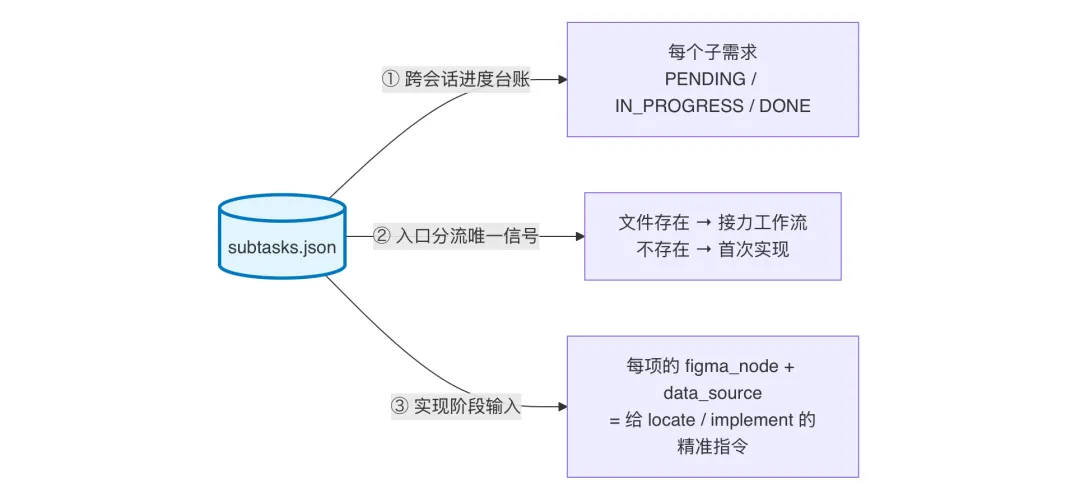
At this point, the "product language → code instruction" semantic gap has been fully closed:
| Input | After Skill decomposition | Becomes the instruction to AI |
|---|---|---|
| A PRD sentence: "Add a red notice bar at the top of the email list, clicking navigates to the management page" | Two requirement items, M1 + M3 | "In XYZTipsView.h/.mm (from mlist.md's L2 wiki), add type XYZMListTipsType_xxx (referencing existing enums); on tap, navigate to XYZWeeklyReportViewController (from manager.md's L2 wiki)" |
6.7 The Complete Translation Chain: Knowledge Base + Decomposition Rules = A Closed Loop
Put Chapter V's code-side map together with this chapter's requirement-side translation, and you can see exactly how the Skill engineers "AI develops requirements independently":
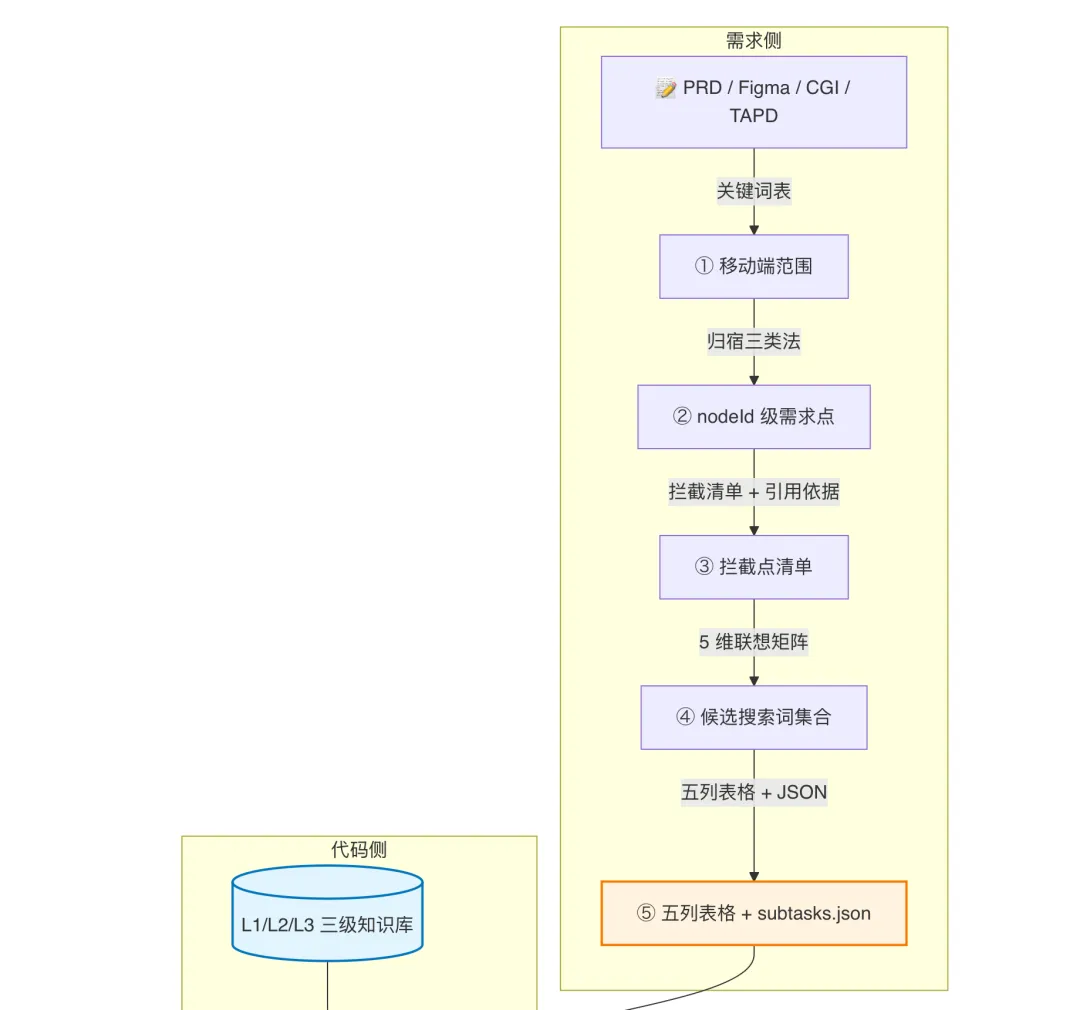
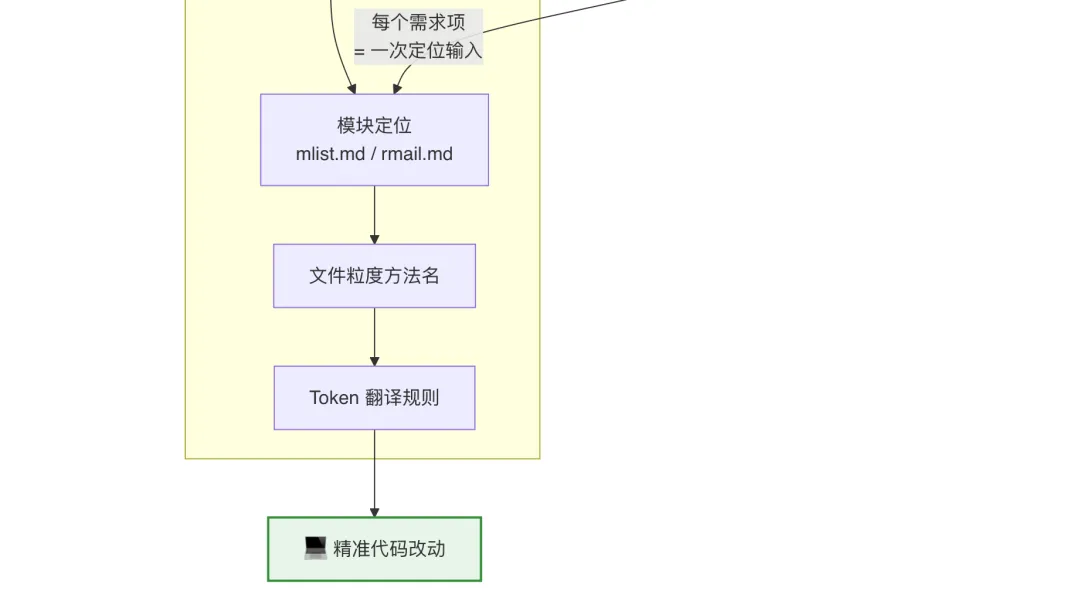
With the two chains connected, the AI has all the deterministic input it needs to "independently develop a complete requirement":
- Requirement side: what each requirement item is, where its scope lies, which design nodeId it relates to, what the evidence is
- Code side: what modules the project has, what files each module contains, what each file does, how UI Tokens translate
💡 The real efficiency gain isn't in "AI writing code" — it's in "AI no longer needing a human as a translator." Once semantic translation is rule-based, executable, and produces artifacts that can be verified, the developer is freed from the role of "PRD translation machine" and becomes "the AI's product manager" instead — making decisions only at the hard checkpoints. This is the real mechanism behind the 98% code-generation rate.
VII. Axiom II: Leave Judgment to the LLM, Hand Data to Scripts
There are two things LLMs are worst at: precise numbers and idempotent execution. The Skill pushes both categories of work down to scripts entirely — the LLM's job is only to "read the result and make a decision."
7.1 Multi-Source Material Collection: One Dedicated Script Per Source
The Skill supports six categories of input overall, each with its own "dedicated channel" — generic web_fetch is strictly forbidden:
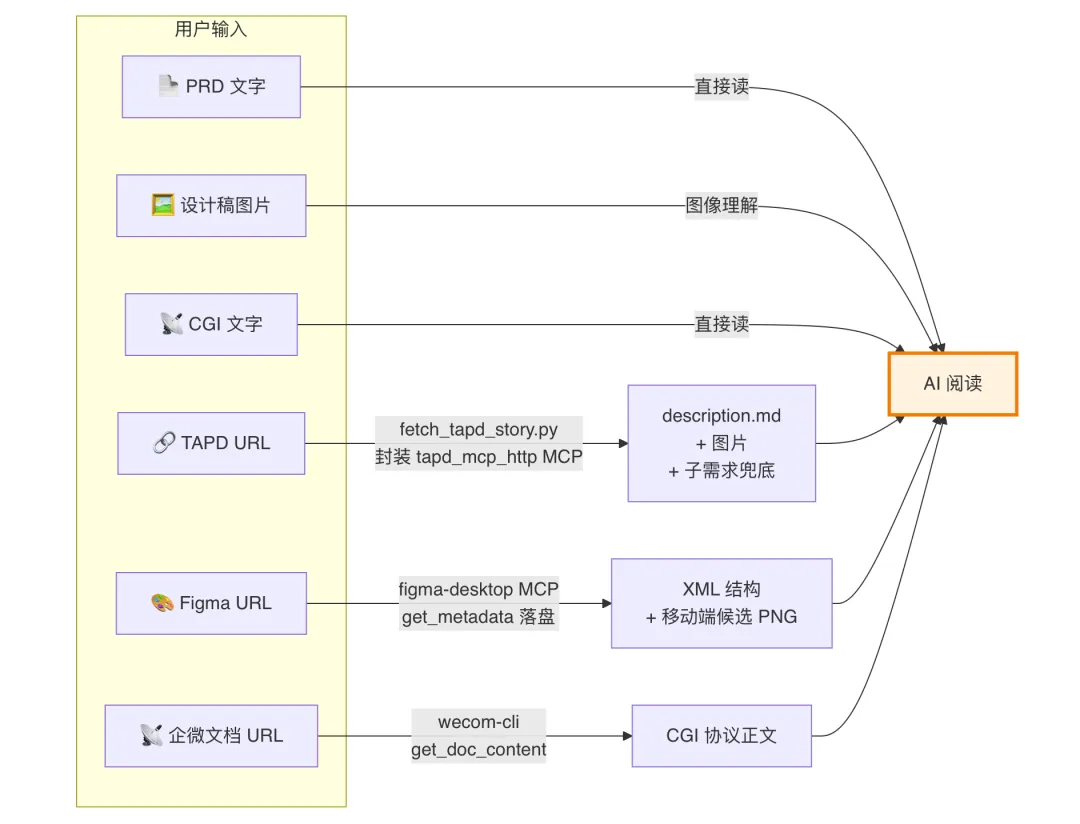
Why can't web_fetch be used? This is exactly one of the Skill's hardcoded Critical red lines:
⛔ RL-02:
doc.weixin.qq.commust go throughwecom-cli—web_fetch, after auth, only gets the HTML shell. ⛔ RL-03: TAPD URLs must go through thetapd_mcp_httpMCP —web_fetchcan't retrieve the markdown description.
7.2 Design Filtering: Scripted Histogram vs. LLM "Gut Feel"
A single Figma fileKey often contains dozens to hundreds of frames: posters, desktop, tablet, mobile, variants, annotated drafts... Letting an LLM pick out the mobile ones by "looks mobile-ish" is a disaster.
The Skill's approach:

⛔ RL-17: LLM manual bucketing is strictly forbidden — scan_figma_frames.py must run first to produce a histogram (data sourced from tools/iphone_sizes.json, an iPhone-size allowlist); the LLM can only supplement judgment on UNCERTAIN items already bucketed, and can't decide from impression alone.
This red line sweeps away, at the root, the randomness of "AI eyeballs the images and picks."
7.3 "Success Judged by What Landed on Disk" — the Engineering Elegance of RL-32
A long git commit message getting treated as a background task by the terminal, stdout getting truncated, piped commands turning asynchronous — these are all common "signal loss" traps between scripts and the LLM.
The Skill introduces a simple but genuinely elegant design: a sentinel file is the sole criterion for success.
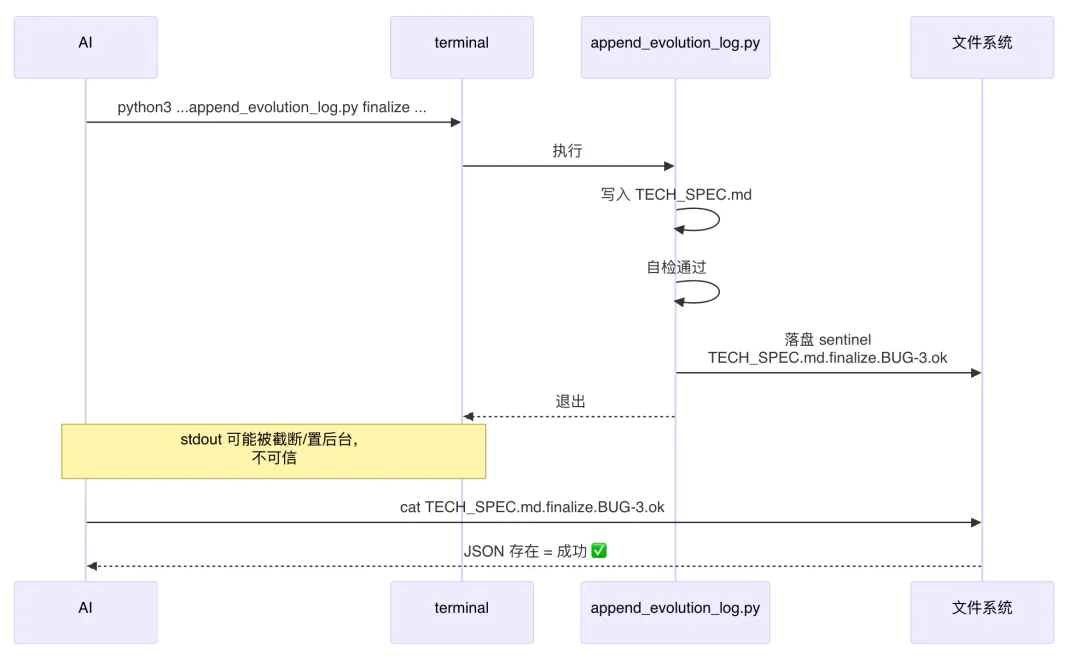
The same idea is used for git commit too (RL-31: the sole criterion is an updated git log -1 hash). No long-running command ever reports success via stdout — it's always disk-persisted files — an engineering lesson distilled from countless past failures.
VIII. Axiom III: The Red-Line Mechanism — Turning "Failure Modes" Into Hard Checkpoints Up Front
The biggest engineering risk with an LLM is that it "will say anything, will do anything." The Skill puts a red-line system on it as a restraint.
8.1 Red-Line Architecture: A Single YAML Source of Truth + Layered Loading
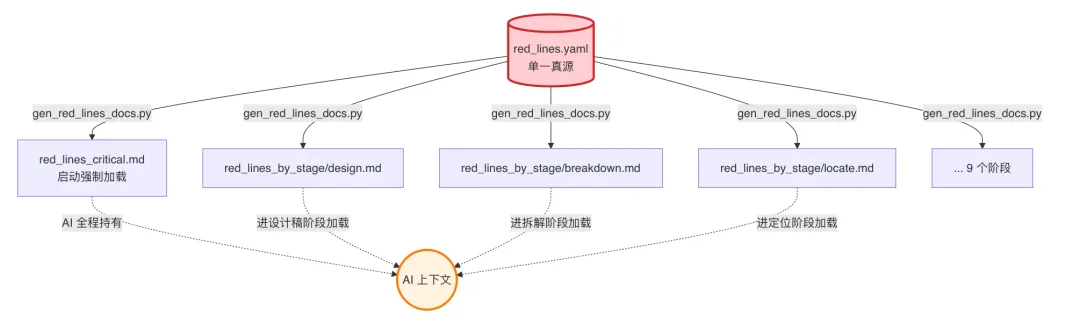
Red lines split into two tiers:
- 🔴 Critical (6 rules): mandatory across the entire pipeline, loaded at startup — violating them directly causes production incidents or serious rework
- 🟡 Standard (30+ rules): loaded per stage — violating them pollutes engineering standards
8.2 Stop on Trigger + Templated Reporting
Whenever any red line is triggered, the AI must stop and report using a fixed template:
⛔ Red line triggered, RL-XX: <title>
Current situation: <specifics>
Suggested handling: <which step to roll back to / what needs user confirmation>
This turns "AI secretly did something it shouldn't have" into "AI proactively tells you it hit a red line" — observability matters far more than cleverness.
8.3 A Few "Hard-Won" Critical Red Lines
| Red line | Origin | Design thinking |
|---|---|---|
| RL-15 Build must pass | "AI said it was done, but it didn't even compile" | Exit code 0 is the sole criterion; hard cap of 3 self-repair rounds |
| RL-16 Stages not followed in order | "One-sentence user instruction → AI skips decomposition and edits code directly → overreach" | The next stage's input must be the previous stage's output |
| RL-13/14 Read before writing, mimic what exists | "AI invents a new pattern → the only one of its kind in the project" | Fully read through the existing method first + search for similar branches |
| RL-31 Commit executed synchronously | "A long commit message gets backgrounded by the terminal → AI misjudges it as failed and resubmits" | An updated git log -1 hash is the only proof of success |
Red lines just pull the "failure point" up to a hard checkpoint — but there's a more fundamental question left: how does AI prove the code it wrote is actually correct? Compiling ≠ running correctly; running ≠ looking correct. The next section covers how the Skill engineers and automates "code quality verification" too.
IX. Runtime Verification: Letting AI Run It Itself
AI's biggest integrity problem is "self-reported completion" — saying "it's done" when it doesn't even compile; saying "the feature works" when a screenshot reveals the UI is misaligned. The Skill splits "verification" into two gates: build verification (code layer) + simulator verification (runtime + visual) — both must pass before entering the persistence stage.
9.1 Gate One: Build Verification — Exit Code 0 Is the Sole Criterion
After changing code, the AI isn't allowed to say "implementation complete" — it must first get bazel build to pass.
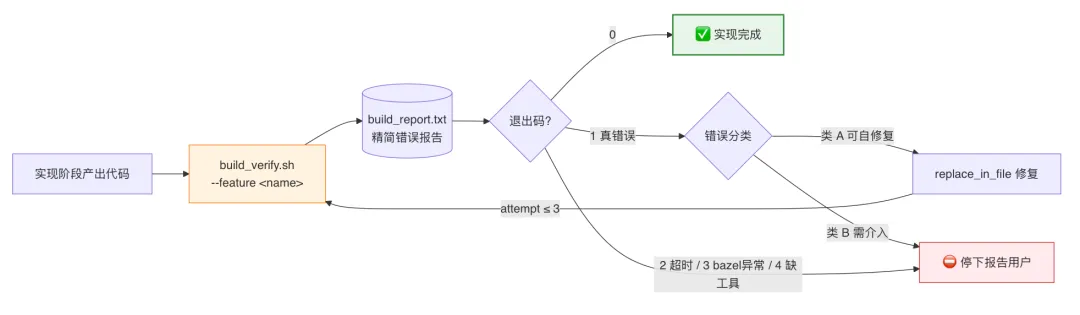
The essence of the A/B classification design:
| Category | Typical scenario | Can AI self-handle it? |
|---|---|---|
| A, self-repairable | Missing semicolon / undeclared identifier / type mismatch / missing enum case / #import not found | ✅ Fix directly via replace_in_file, rerun the build |
| B, needs human intervention | BUILD.bazel misconfigured / link error / error inside a third-party framework / error file outside this change set | ⛔ Stop immediately, never force it |
⛔ RL-15 + a hard cap of 3 self-repair rounds: still failing to build after 3 rounds → forced stop, report to the user, no further attempts allowed. This rule locks down the "AI makes an increasing mess trying to fix it" death spiral.
The report carries the surrounding code lines directly — so AI can fix it without having to go back and read the source. A small but clever bit of script design:
App/Mailbox/mailcore/mailbox_protocol.cpp:1822:25:
  error: use of undeclared identifier 'undefined_xxx'
 1822 | void __test_error__() { undefined_xxx(); }
      |                         ^^^^^^^^^^^^^
9.2 Gate Two: Simulator Verification — Actually Run It Once + Check the Screenshots
Compiling ≠ functioning correctly. The Skill uses an automated UI verification flow to have the AI install the build, tap through it, take screenshots, and check the expectations itself.
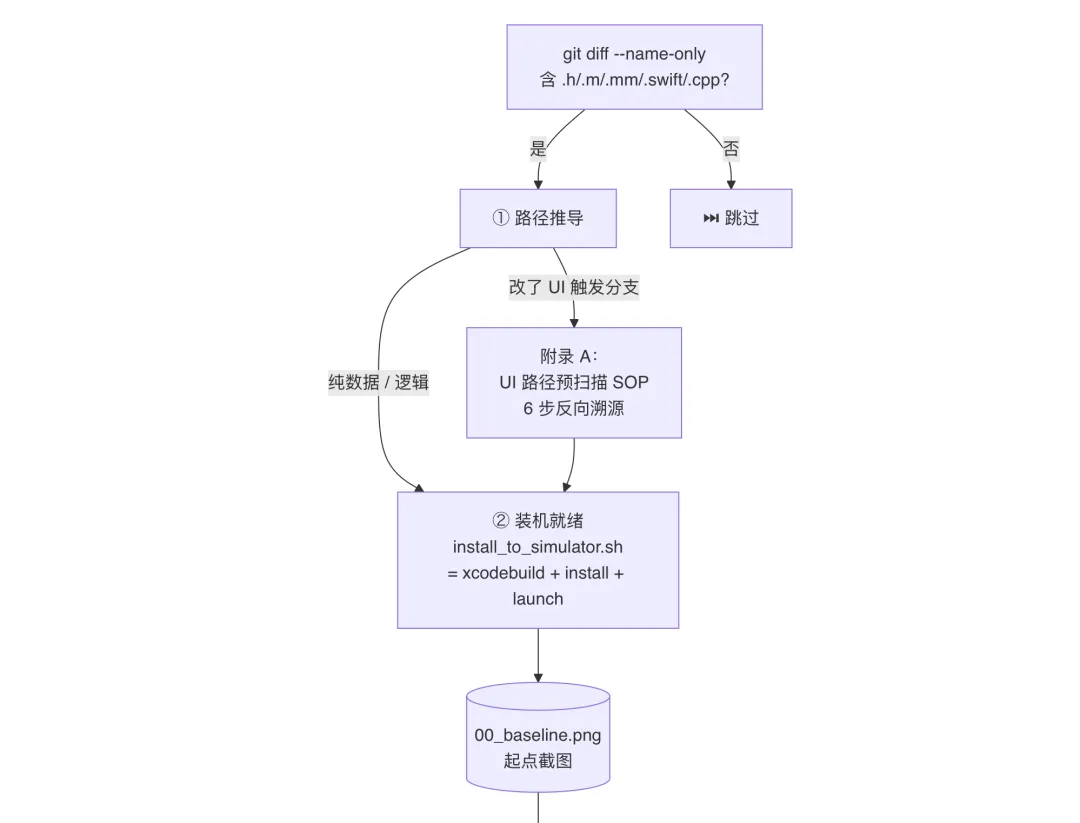
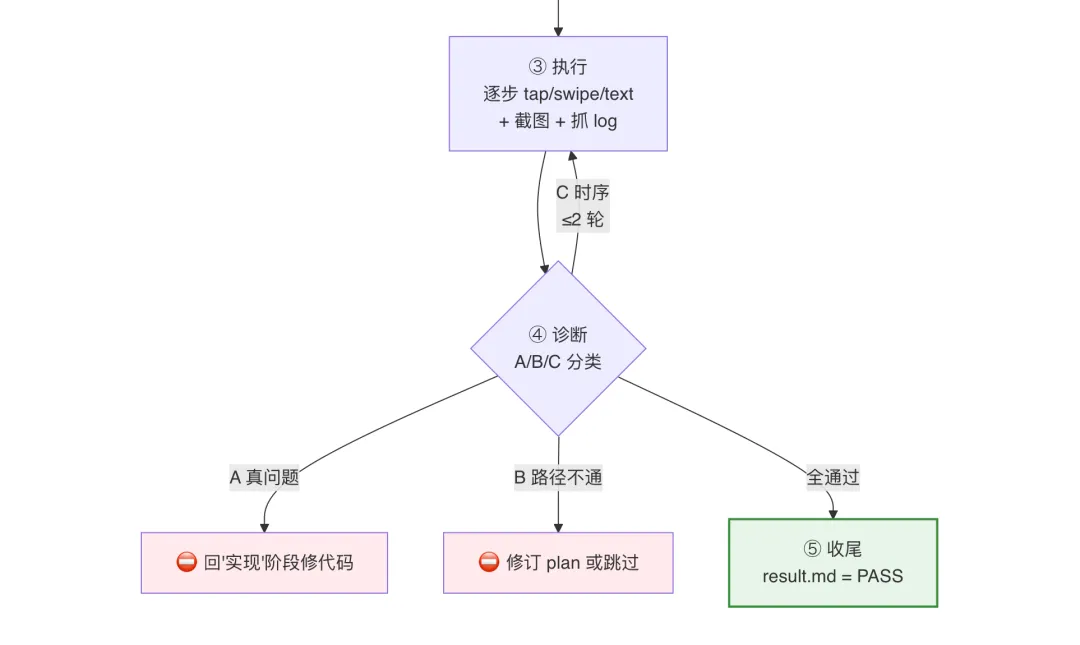
Step ①: Path Derivation — Working Backward From git diff to a UI Path
The AI doesn't "tap wherever it feels like" — it works backward from the git diff changes + TECH_SPEC §3 "Related Code Locations" + the design's final-state mockup, to derive a specific UI verification path:
| Change type | Verification endpoint |
|---|---|
| UI change (View/Controller) | The real visible state of that UI (visible in a screenshot) |
| Data/parsing change | A page where that data shows up in the UI + logs pulled to confirm the data flow |
| Pure logic change (no direct UI manifestation) | Hit on the XYZLOG_WARN log keyword |
The standard skeleton of verify_plan.md:
# Simulator verification plan: <feature-name>

## Steps
1. launch App                                  → 01_launched.png
2. tap Mail tab                                 → 02_mail_tab.png
3. tap the first email                          → 03_detail.png
4. observe whether the top Tips text contains "xxx" → 04_tips.png
5. tap nav_back_arrow                          → 05_back.png

## Expected
- Step 4's screenshot: Tips text == "<expected copy>"
- runtime.log: `XYZLOG_WARN(@"mailbox xxx")` hit count ≥ 1
UI Path Pre-Scan: 6-Step Reverse Tracing (the Essence of Appendix A)
If a change involves "a button's enable condition / an intercept dialog / a newly added tap response," AI must first do a pre-scan — working backward from "the method name at the code layer" to "the clickable control at the UI layer" — to avoid tapping the wrong thing or tapping and getting no response:

📌 The bridge method — when a dependent variable is assigned across files, locate the source via 3 types of bridges: notifications (
postNotificationName:) / KVO (RACObserve() / delegates (<DelegateProtocol> =). This is the key to turning "AI can't find where a control's value comes from" — a chronic problem — into a rule.
Steps ③④: Execution + A/B/C Triage
Every step is a fixed set of 5 actions, reported in real time, never run silently in a batch:
🎬 Step N/M: <action>
- Command: idb ui tap --udid $UDID 200 420
- Screenshot: 03_detail.png
- Observation: nav bar title "Email Detail," Tips area visible
When an expected check fails, it's triaged into A/B/C categories:
| Category | Symptom | Handling |
|---|---|---|
| A, a real bug (a code defect) | Expected UI didn't appear / field value is wrong / assert|crash|Error hit | ⛔ Don't fix code at this stage — go back to "Implement" |
| B, path doesn't work (verification design is wrong) | Blocked by a login page / onboarding / current account has no data / only reproducible on a real device | ⛔ Revise verify_plan or skip |
| C, script/timing (self-repairable) | Tapped before an element rendered / miscalculated coordinates / wrong keyboard state | ✅ Retry within-stage, ≤2 rounds |
🎯 The essence of this design: A/B/C classification turns "should I retry" from a muddy question into a clear decision. AI isn't allowed to keep forcing retries on category A/B issues — more than 2 rounds of category-C retries without success escalates to a substantive-problem report to the user.
Step ⑤: Visual Alignment Check — RL-30's Hard Checkpoint
⛔ RL-30: if RL-29 (a UI change) is triggered but
ui_alignment_spec.mddoesn't exist / has ≥1 unaligned item → visual alignment is judged FAIL outright, no skipping allowed.
"Visible in a screenshot" isn't enough on its own — a UI change also needs item-by-item numeric verification:
## Visual alignment check (per ui_alignment_spec.md, RL-30)

- [x] XYZTopicEmptyFooter container.height = 280 ✅ (measured 280 in screenshot)
- [x] icon centered and sized 96×96 ✅
- [x] title font size 16 / Medium ✅
- [⚠] desc lineHeight slightly small by 1pt (known deviation, recorded in spec)
- [x] cta primary blue ✅

## Visual alignment conclusion
- Key discrepancies: 0 / accepted deviations: 1 / **unaligned: 0**
- Unaligned ≥1 → status auto-downgrades to ❌ FAIL
This fully surfaces the chronic UI-engineering problem of "the design drifted" — no longer relying on a QA person eyeballing a comparison; the AI checks a numeric checklist item by item itself.
9.3 A Few "Hard-Won" Runtime Gotchas
The simulator verification process hit plenty of pitfalls along the way. The Skill has distilled them into a blind-spot list inside simulator_toolbox.md — things the AI absolutely must know "not to do":
| Blind spot | Why it doesn't work | Alternative |
|---|---|---|
| Edge-swipe-back | UIScreenEdgePanGestureRecognizer requires a genuine touchDown→hold→move sequence; idb ui swipe is a synthesized event — the simulator can never recognize it | Find nav_back_arrow's AX identifier and tap it instead |
| 3D Touch / force long-press | The simulator doesn't support pressure sensing | Use a menu button / open a debug backdoor |
| Physical pixels ↔ logical pixels | Screenshots are physical pixels, idb ui tap takes logical pixels — hardcoded coordinates are always wrong | Dynamically compute scale = logical_w / physical_w |
| Lost login state | simctl uninstall wipes the sandbox and loses login | simctl install with the same bundle id leaves the sandbox untouched, login state preserved |
Python f-string !r inside a shell heredoc | zsh treats !r as history expansion → the command gets scrambled | Use repr(x) instead, or a standalone .py file |
None of these pitfalls came from "the model not being smart enough" — they're all genuine engineering-layer traps. Once distilled into a handbook, every new session's AI can route around them directly.
9.4 The Verification Loop: From Code Change to "Daring to Say It's Done"
Put the two gates together, and AI's journey from "finished changing the code" to "daring to say it's done" passes through 5 checkpoints:

Every checkpoint has a machine-verifiable artifact: build_report.txt's exit code, <NN>_xxx.png screenshots, runtime.log hits, result.md's status field. Everything is proven by files, never self-reported by AI.
💡 The core idea: shifting "quality assurance" from "a QA person catches the bug" to "AI writes the code, verifies it, and hands it in itself." That's the key that lets AI graduate from "assistant" to "lead." When what AI hands over isn't just code, but screenshots, logs, and a visual-alignment report too, the developer only needs to do one final review — not manually re-run the verification.
X. Axiom IV: Cross-Session Knowledge Transfer — TECH_SPEC.md Is the Soul
If the first three axioms solve "efficiency within a single session," this axiom solves what actually makes AI work like a team member — able to do the work, remember it, and hand off cleanly.
10.1 Three Files, Each Carrying a Different Scale of "Memory"
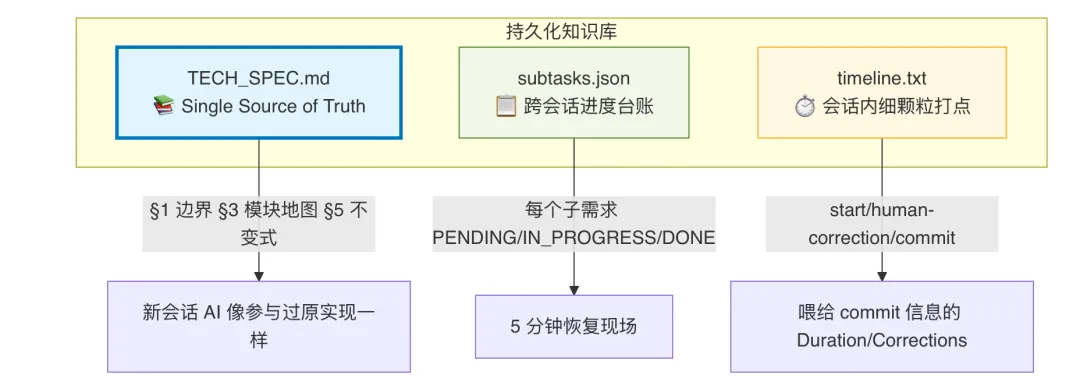
| File | Time scale | Content |
|---|---|---|
TECH_SPEC.md | Permanent | Feature boundaries, module map, invariants, bug/iteration evolution history |
subtasks.json | Cross-session | Each sub-requirement's status, current stage, related commits |
timeline.txt | Within-session | A stream of start / human-correction / commit events |
10.2 TECH_SPEC.md's Section Structure (the Essentials)
§0  AI self-check list        ← the "entry scan" for the next session's AI
§1  Feature boundaries          ← what's in scope, what isn't (prevents overreach)
§3  Module map          ← files + key methods + call chains
§5  Invariants            ← names/file lists/intercept boundaries that must not change
§7  Evolution events          ← BUG-N / ITER-N / REV-N entries, in timeline order
§8  Artifact list            ← what each commit changed
§9  Version number            ← v1.0 → v1.1 → ... → v2.0 (baseline merge)
A new session's AI just reads §0 → §1 → §3 → §5 → §7 in order, and it can "pick up seamlessly."
10.3 Four Entry Types: Auto-Routed by the Situation on the Ground
This relay mechanism, paired with 4 kinds of entry points, covers the "feature development" lifecycle end to end:
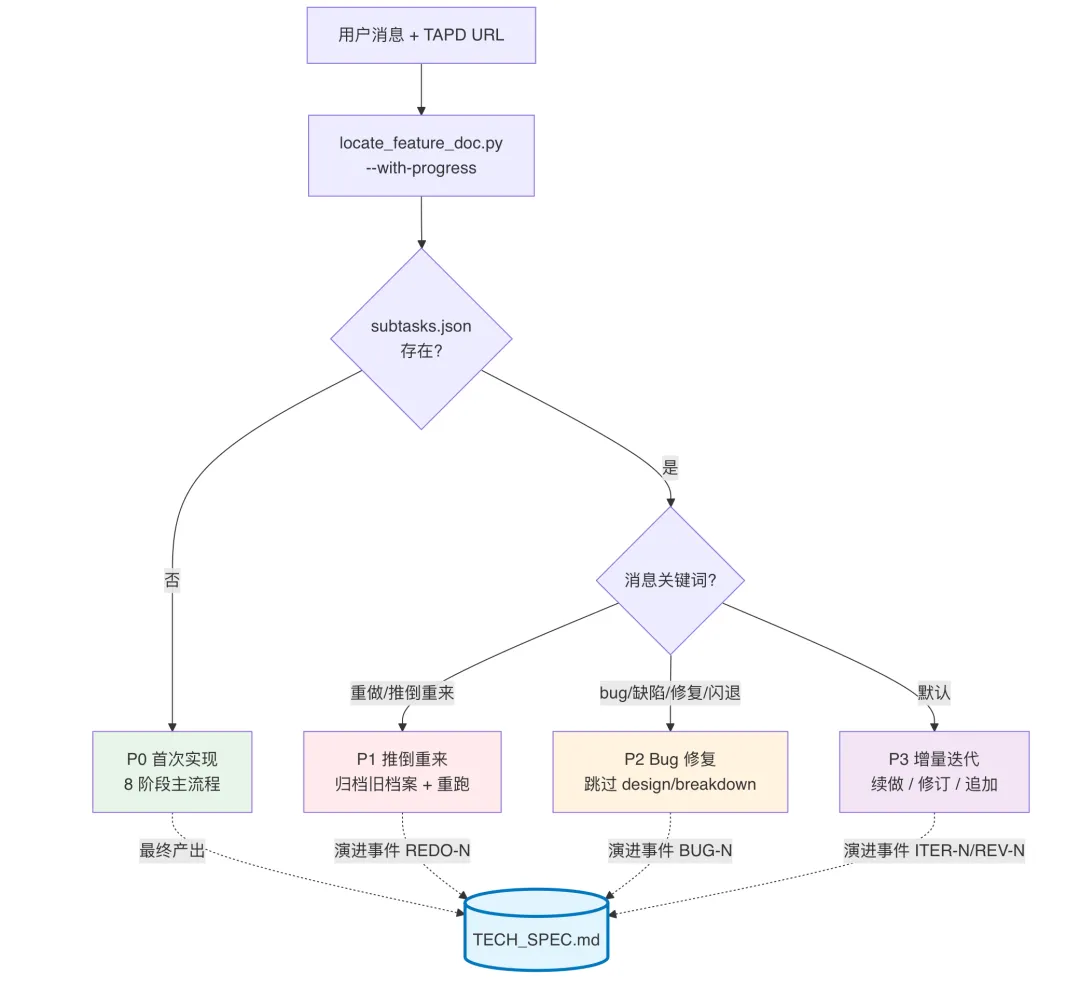
The entire lifecycle of a single TAPD requirement — from first implementation, through N rounds of iteration, M bug fixes, and the occasional rebuild-from-scratch — is all strung together by this one
TECH_SPEC.md.
10.4 Hard Checkpoints (HK): Trust, But Don't Give Free Rein
Every workflow has several human-machine hard checkpoints (Hard Checkpoints) embedded, mandating user confirmation:
| Checkpoint | When it triggers | What the user replies |
|---|---|---|
| HK-0 Situation briefing | Immediately upon entering via a relay entry point | Confirm progress / change N |
| HK-1 PENDING items | Once §7's translation is complete | "Confirm / change xxx" |
| HK-2 Persistence OK | Before TECH_SPEC is written to disk | "Persistence OK / approved" |
| HK-3 Commit message | Before git commit | "Submit / go" |
This system of "hard checkpoints" is one of the Skill's engineering essentials — the balance point between automation and controllability: AI runs at full speed, but any irreversible action waits for a human nod first.
XI. Efficiency Gains: How Much Faster, Really?
Data comes from roughly six months of actual runs on this project (not a rigorous benchmark) — for reference only.
| Stage | Traditional way | The Skill's way | Where the gain comes from |
|---|---|---|---|
| Requirement decomposition | 1-2 hours (reading TAPD/Figma + organizing) | 5-10 minutes | One-stop multi-source script pulls + automatic destination validation |
| Code localization | 30 min-2 hours (grep trial and error) | 5-15 minutes | Five-step localization + project_wiki index |
| Implementation | Depends on complexity | -30% to -50% | "Read before writing + mimic what exists" reduces rework |
| Build self-check | Manual back-and-forth | Automatic, 3 rounds | build_verify.sh + self-repair |
| UI verification | Manual install + tap + eyeball comparison | Automatic install + screenshots + visual alignment | install_to_simulator.sh + A/B/C diagnosis + RL-30 numeric check |
| Bug-fix handoff | 1+ hour re-reading code | 5 minutes to restore context | TECH_SPEC.md + subtasks.json |
| Commit conventions | Hand-written three-part commit | Auto-rendered + human confirmation | Timeline + template |
The biggest hidden gain: new hires and AI alike can pick up an existing requirement's iteration directly, no longer dependent on "asking the original author." That's the compounding return TECH_SPEC.md delivers.
XII. Key Takeaways: If You Want to Build a Skill Like This Too
The pitfalls we hit converge into 5 principles, general enough to reuse in your own project:

| Principle | One-line summary |
|---|---|
| Pipeline it | Break "feature development" into 8 semantic stages, each with a machine-checkable input/output/exit criterion |
| Scripts as the backstop | LLM handles "reading and judging"; precise numbers/idempotent execution/batch operations all sink down to Python/Shell scripts |
| Red lines up front | Write "what AI absolutely must not do" as YAML + layered loading; stop on trigger, templated reporting |
| Judge by what's on disk | Any long-running command's proof of success is "the file exists," never dependent on stdout (terminals truncate/background it) |
| Close the persistence loop | Every requirement produces a git-tracked TECH_SPEC.md, putting "knowledge" on equal footing with "code" |
XIII. Appendix: A Quick Look at the Skill's Directory
The whole Skill is made of 6 major components, organized by the perspective of "AI entering the pipeline":
skills/mailplugin-feature-dev/
│
├── ① External entry points (loaded when the LLM starts)
│   ├── SKILL.md                          # Overall flow diagram + 4-entry-type routing + hard constraints
│   ├── README.md                         # Human-facing usage guide
│   └── CHANGELOG.md                      # Version changelog
│
├── ② Setup and configuration
│   └── setup/
│       ├── install.sh                    # One-click install (incl. MCP registration, dependency detection)
│       ├── uninstall.sh                  # One-click uninstall
│       └── mcp.tapd.json                 # TAPD MCP server config
│
├── ③ Automation scripts ("judgment to the LLM, data to scripts")
│   └── tools/
│       │  —— Ingestion (Axiom II: bypassing context truncation) ——
│       ├── fetch_tapd_story.py           # One-stop TAPD ingestion: ticket+attachments+comments
│       ├── fetch_tapd_images.py          # Batch TAPD image download
│       ├── fetch_figma_mcp.py            # Persist Figma MCP data to disk
│       ├── scan_figma_frames.py          # Design histogram filtering (RL-17)
│       │
│       │  —— Doc generation and maintenance ——
│       ├── locate_feature_doc.py         # Locate the TECH_SPEC.md path
│       ├── render_tech_spec.py           # First-time TECH_SPEC.md rendering
│       ├── append_evolution_log.py       # Incremental §7/§8/§9 maintenance + sentinel
│       ├── append_bug_fix.py             # Append a bug-fix record
│       ├── breakdown_subtasks.py         # Sub-task ledger (cross-session relay)
│       ├── gen_red_lines_docs.py         # Red-line yaml → derived md
│       │
│       │  —— Build and verification (Axiom I: judge by what's on disk) ——
│       ├── build_verify.sh               # bazel build + report
│       ├── check_implement_done.sh       # Implementation completeness self-check
│       ├── check_intermediate_artifacts.py # Stage-artifact completeness check
│       ├── check_project_wiki_stale.py   # Knowledge-base staleness scan
│       ├── check_ui_token_usage.sh       # UI Token compliance check
│       │
│       │  —— Simulator and commit ——
│       ├── install_to_simulator.sh       # Install the build to the simulator
│       ├── iphone_sizes.json             # Device size database
│       ├── finalize_commit.sh            # Commit wrap-up
│       ├── render_commit_msg.py          # Commit message template rendering
│       ├── timeline_to_commit_lines.py   # Timeline → commit lines
│       └── md_to_pdf.py                  # Doc export
│
├── ④ Knowledge base and mapping ("code-side map + semantic bridge")
│   └── references/
│       ├── project_wiki/                 # Per-module knowledge base (organized by business domain + infra)
│       │   ├── overview.md               # Overview index (< 5KB, the L1 entry point)
│       │   └── *.md                      # Per-module L2 details (loaded on demand)
│       │
│       ├── figma_token_mapping.md        # L3 semantic bridge: Figma → engineering code
│       ├── figma_device_sizes.md         # Design-to-device-size mapping
│       └── ui_components_wiki.md         # Unified UI component docs
│
├── ⑤ Process specifics (loaded on demand, doesn't pollute context)
│   └── references/
│       │  —— Full execution specifics for all 8 stages ——
│       ├── stage_locate.md               # Stage 1: intent disambiguation + localization
│       ├── stage_design.md               # Stage 2: design doc ingestion
│       ├── stage_breakdown.md            # Stage 3: requirement decomposition + sub-task ledger
│       ├── stage_implement.md            # Stage 4: coding implementation
│       ├── stage_verify.md               # Stage 5: build verification
│       ├── stage_simulator_verify.md     # Stage 6: simulator verification
│       ├── stage_commit.md               # Stage 7: commit wrap-up
│       ├── stage_archive.md              # Stage 8: archival and persistence
│       │
│       │  —— 4 entry-type sub-workflows ——
│       ├── bug_fix_workflow.md           # Entry ②: bug fixing
│       ├── incremental_workflow.md       # Entry ③: incremental iteration
│       ├── redo_workflow.md              # Entry ④: rebuild from scratch
│       │
│       │  —— Toolbox ——
│       ├── simulator_toolbox.md          # Simulator debugging toolbox
│       └── tech_spec_template.md         # TECH_SPEC.md template
│
└── ⑥ Red-line mechanism (Axiom III: hard checkpoints)
    └── references/
        ├── red_lines.yaml                # Single source of truth for red lines (DSL)
        ├── red_lines_critical.md         # Loaded globally, mandatory (in effect at startup)
        └── red_lines_by_stage/           # Loaded per stage, on demand
            ├── global.md                 # Cross-stage general red lines
            ├── locate.md                 # Stage 1 red lines
            ├── design.md                 # Stage 2 red lines
            ├── breakdown.md              # Stage 3 red lines
            ├── implement.md              # Stage 4 red lines (the thickest one)
            ├── verify.md                 # Stage 5 red lines
            ├── simulator_verify.md       # Stage 6 red lines
            ├── commit.md                 # Stage 7 red lines
            └── archive.md                # Stage 8 red lines
One intuitive takeaway:
references/is bigger thantools/— the plainest possible evidence that "AI's efficiency gain lives in engineering, not in the model." The vast majority of the capability comes from explicitly written rules, knowledge, and templates — not from "counting on the model being clever."
Closing Thoughts
We initially set out to "get AI to help me write code." By the time we finished, we realized — what's actually valuable is making "feature development" itself explicitly modeled, observable, and handoff-able.
The Skill just translates these engineering standards "into a format an LLM can digest." And the TECH_SPEC.md and project_wiki left behind are equally valuable assets for humans — even if the AI gets swapped out someday.
The ceiling on AI's efficiency gains lies both in the model, and in the engineering.
Skill Resources
If you want to write your own Skill, or just want existing references to study, these repos and docs are worth bookmarking:
- anthropics/skills — Anthropic's official Skill repository, first-party examples
- Agent Skills official docs — the authoritative spec for frontmatter format, folder structure, and progressive-disclosure loading
- ComposioHQ/awesome-claude-skills — a curated community list of Skills, organized by category
- travisvn/awesome-claude-skills — a curated list leaning toward Claude Code use cases
- BehiSecc/awesome-claude-skills — another community-maintained Skill list